Oracle now ships monthly Critical Security Patch Updates (CSPU)
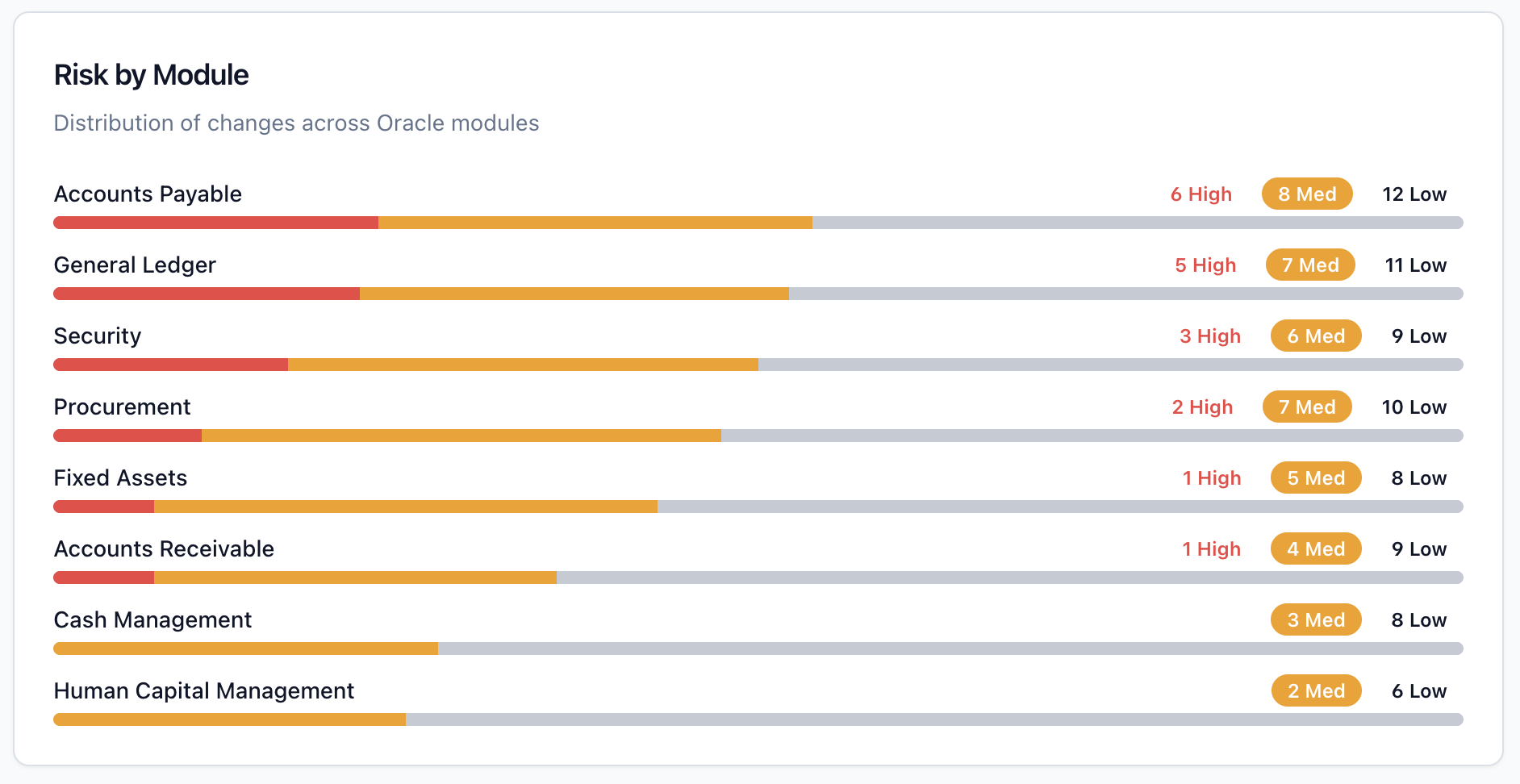
January 2026 was the last quarterly-only Oracle CPU. From May 28, 2026, Oracle ships a monthly CSPU on top of the existing quarterly CPU schedule. Module-level impact analysis and regression risk for Oracle Fusion Cloud — for US, UK and EU Oracle teams:
Oracle's January 2026 Critical Patch Update (CPU) is the largest single-cycle security release in recent memory: 337 new security patches across the Oracle product family. For most enterprise teams, a number that large triggers paralysis rather than action. Where do you even start?
Why This CPU Is Different
Of the 51 patches specifically for Oracle Fusion Middleware, 47 address vulnerabilities that are remotely exploitable without authentication. That means an attacker on the internet does not need a username or password — they just need network access to the exposed port.
This CPU also takes on added urgency following Oracle's out-of-band emergency alert in March 2026 for CVE-2026-21992 (CVSS 9.8, Oracle Identity Manager RCE). If you have not applied January's patches, your exposure to the March vulnerability is compounded.
Tier 1: Apply Within 72 Hours
Oracle Identity Manager and Oracle Web Services Manager: Combined with the March out-of-band alert, these patches are your absolute highest priority. Any CVE in OIM or OWSM with CVSS above 9.0 should be treated as a P1 incident.
Oracle WebLogic Server: WebLogic remains one of the most actively targeted Oracle components. Any internet-accessible WebLogic instance must be patched immediately. GCC organisations running Oracle E-Business Suite with WebLogic front-ends in DMZ configurations are particularly exposed.
Oracle HTTP Server and SOA Suite: If your Fusion Middleware topology includes OHS or SOA Suite components exposed to external networks, prioritise these patches alongside WebLogic.
Tier 2: Apply Within 30 Days
Oracle Database: Particularly for Database Vault and Label Security components used heavily in financial services and government deployments in the UK and GCC.
Oracle E-Business Suite: EBS patches address multiple CVEs in the eBusiness Suite Framework, HR, and Financials modules.
Oracle Analytics Server and OBIEE: The January CPU addresses authentication bypass and data exposure vulnerabilities that affect any organisation using Oracle BI for management reporting.
How to Build Your Patching Priority Matrix in 4 Steps
Step 1 — Download the CPU advisory CSV from Oracle's Security Alerts page. Filter by CVSS score descending. Focus first on all CVEs with CVSS 9.0 or above.
Step 2 — Cross-reference your product inventory. Map the filtered CVE list against the Oracle products actually deployed in your environment.
Step 3 — Assess network exposure. Internet-facing components with CVSS 7.5+ become Tier 1 regardless of the default score.
Step 4 — Schedule and communicate. Create a patching schedule with named owners, agreed maintenance windows, and rollback procedures. Document in your GRC tool as evidence for ISO 27001, SOC 2, and NCA ECC (Saudi Arabia) compliance audits.
Regional Compliance Context
USA: Check CISA's Known Exploited Vulnerabilities (KEV) catalogue — any CVE from the January CPU on the KEV list carries a binding operational directive for federal agencies.
UK: Cross-reference your January CPU patch status against any NCSC Early Warning Service alerts received since January 2026.
GCC / Saudi Arabia: NCA ECC Clause 2.5 requires organisations to apply critical security patches within defined SLAs. Document your patching timeline as audit evidence.