Salesforce Release Intelligence for Safer Seasonal Updates
Salesforce release testing is the discipline of understanding what each seasonal release changes, mapping those changes to your own org, and validating the parts that matter before they reach production. SyntraFlow is designed to help you know what changed, what is affected, and what must be tested before each Salesforce release goes live.
Built for Salesforce teams that want to move from broad, manual release checking to focused, impact-driven regression testing.
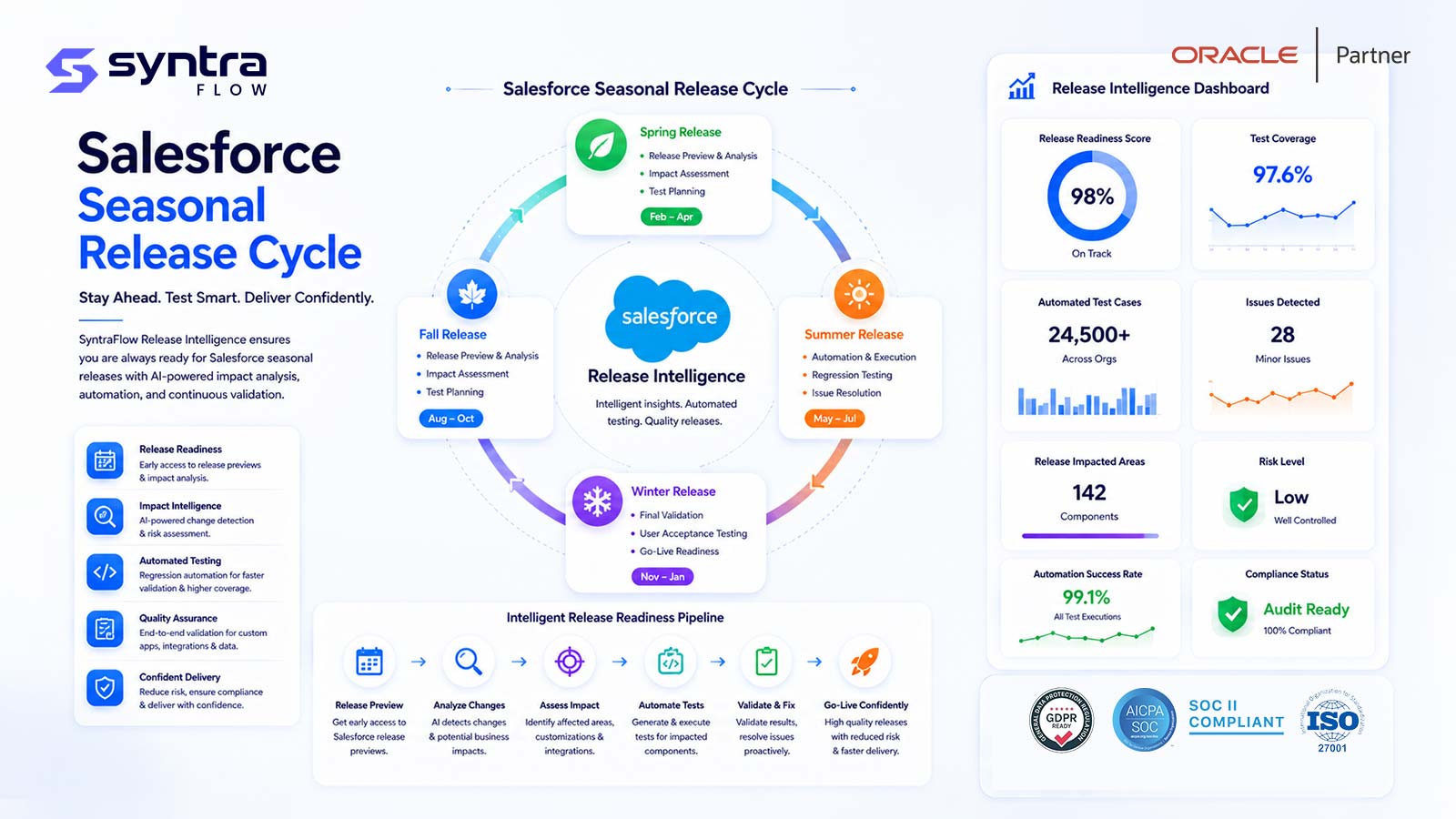
The Salesforce release model
Salesforce delivers three major seasonal releases each year: Spring, Summer, and Winter. Every org on the platform receives these updates on a published schedule, which means new behavior arrives whether or not your team has planned for it. Understanding this rhythm is the foundation of any credible Salesforce release testing program.
Three seasonal releases per year
Salesforce ships a Spring release, a Summer release, and a Winter release each year. Each one bundles new features, platform enhancements, and behavioral changes across Sales Cloud, Service Cloud, Platform, and adjacent products. These are seasonal Salesforce releases, not vendor quarterly patches, and they follow their own cadence and naming.
Sandbox preview period ahead of production
Before each seasonal release reaches production, Salesforce upgrades a subset of preview sandboxes so customers can evaluate the new version early. This preview window is the primary opportunity to run impact analysis and focused regression on the upcoming release against your own configuration before general availability.
Production release windows
Production orgs are upgraded during scheduled release windows tied to the instance each org runs on. Salesforce publishes these dates in advance, which lets teams plan testing, communications, and readiness activities around a known go-live date rather than reacting after the fact.
Release notes
Each seasonal release is accompanied by extensive release notes describing new, changed, and deprecated behavior. The notes are comprehensive, but they describe the platform in general terms and do not tell you which items intersect with your specific objects, Flows, Apex, or integrations.
Release Updates and enforced changes
Salesforce uses Release Updates to phase in changes that can affect existing behavior. Many are optional for a period and then become enforced or mandatory on a defined date. Tracking which mandatory changes apply to your org, and testing them ahead of enforcement, is a core part of release readiness.
The need to test before production
Because seasonal releases arrive automatically, the safest posture is to validate the upcoming version during the preview period. That means confirming that critical business processes still work, that customizations behave as expected, and that any mandatory changes have been accounted for before the release reaches live users.
Salesforce release testing sits alongside two related disciplines on this site: the metadata intelligence that maps your org's components, and the test automation that executes the checks. This page focuses specifically on the impact of each seasonal release. For the wider program, see the Salesforce testing overview.
Why release testing is hard
The challenge is rarely a shortage of information. It is the difficulty of connecting a large, general release to the specific way a single org has been built and integrated.
Large release notes
Seasonal release notes run to hundreds of entries spanning many clouds and features. Reading them end to end is time-consuming, and most items will never touch a given org, so relevant changes are easily lost in the volume.
Mapping changes to your org
Release notes describe the platform, not your implementation. Determining whether a change affects your objects, page layouts, or automations requires cross-referencing each item against how your org is actually configured.
Custom metadata
Custom objects, fields, validation rules, and settings accumulate over years. A subtle platform change can interact with a long-standing customization in ways that are hard to anticipate without an inventory of what exists.
Apex and Flow dependencies
Apex classes, triggers, and Flows depend on platform behavior and on each other. A change to an underlying API, a governor limit, or a Flow runtime can ripple through automation chains that are not obvious from the release notes alone.
Managed packages
Installed managed packages carry their own compatibility considerations. A seasonal release can affect how a package behaves, and package vendors may issue updates that need to be tested alongside the platform change.
Permission changes
Adjustments to profiles, permission sets, and sharing behavior can quietly alter what users can see and do. Permission-related changes are among the easiest to overlook and among the most disruptive when missed.
Lightning changes
Updates to Lightning Experience, Lightning Web Components, and the underlying component framework can shift page rendering, styling, and interactions in ways that affect the day-to-day user experience.
API version changes
Seasonal releases introduce new API versions and can retire older ones. Integrations pinned to a specific version, or relying on deprecated behavior, may need attention before the change lands in production.
Agentforce changes
As Agentforce capabilities evolve across releases, agent actions, topics, and grounding behavior can change. This is an emerging area, and release-over-release differences here deserve deliberate review.
Integrations
Orgs rarely stand alone. Inbound and outbound integrations to ERP, middleware, and downstream systems can be sensitive to platform changes, and a break may only surface when data flows across the boundary.
Limited preview windows
The preview period before general availability is finite. Teams must analyze impact, select tests, and execute them within a compressed window, which makes broad manual testing impractical.
Manual test selection
Deciding what to retest is often a judgment call made from memory. Without a systematic link between release changes and affected components, teams either over-test everything or risk missing the area that actually changed.
The SyntraFlow Release Intelligence process
SyntraFlow is designed to turn a general seasonal release into a focused, org-specific test plan through a repeatable nine-step lifecycle. Each step narrows a broad release down to the components and processes that actually warrant attention.
Ingest Salesforce release information
SyntraFlow is designed to take in the structured details of an upcoming seasonal release, including release notes, Release Updates, and mandatory-change schedules, as the raw material for analysis.
Connect to the org and build a metadata inventory
SyntraFlow can be configured to connect to a preview sandbox or org and assemble an inventory of implemented components. This builds on the same foundation described in metadata intelligence.
Compare release changes against implemented components
The release contents are cross-referenced against the org inventory so that platform changes are matched to the objects, Flows, Apex, permissions, and integrations that are actually present in your implementation.
Identify affected metadata and business processes
SyntraFlow is designed to surface the specific metadata components and, through their relationships, the business processes that a release change is likely to touch, rather than presenting an undifferentiated list of platform updates.
Score impact and risk
Affected areas are scored so that high-impact, business-critical processes are separated from low-risk cosmetic changes. This prioritization is intended to help teams spend limited preview time where it matters most.
Recommend regression tests
Based on the scored impact, SyntraFlow is designed to recommend the regression tests that correspond to the affected components and processes, so the test scope follows the release rather than the whole org.
Execute selected tests
The recommended tests are run, with execution handled through SyntraFlow's test automation as the execution mechanism against the preview sandbox.
Track readiness
Results are consolidated into a readiness view that shows which impacted areas have been validated, which are still outstanding, and where issues have been found ahead of the production window.
Produce evidence and release sign-off
SyntraFlow is designed to compile the analysis, test results, and readiness status into evidence that supports a documented release sign-off before the seasonal release reaches production.
Release Intelligence capabilities
These capabilities are designed to support impact-driven release testing. As SyntraFlow expands its Salesforce coverage, many are available for demonstration and proof-of-concept validation.
Release notes intelligence
Designed to parse seasonal release notes and Release Updates into structured, filterable change items so a large document becomes a workable list rather than a wall of text.
Customer-specific impact mapping
Designed to map each relevant change to the components present in your org, so the output reflects your implementation rather than the platform in general.
Metadata impact analysis
Designed to trace a release change through affected objects, fields, Flows, Apex, and permission sets, building on the org's metadata inventory to show what is touched.
Business-process impact analysis
Designed to roll component-level impact up to the business processes those components support, so stakeholders can see release risk in terms they recognize.
Risk scoring
Designed to rank affected areas by likely impact and business criticality, helping teams focus scarce preview-window time on the changes that carry the most risk.
Test-case recommendation
Designed to suggest the regression tests that correspond to affected components and processes, so test selection is tied to the release rather than guesswork.
Automated test selection
Designed to assemble a focused regression set from the recommendations, then hand execution to test automation as the run mechanism.
Sandbox preview testing
Designed to run impact analysis and focused regression against a preview sandbox during the window before general availability, when the upcoming version can be evaluated safely.
Readiness dashboard
Designed to show, at a glance, which impacted areas are validated, in progress, or blocked, so release readiness can be tracked against the go-live date.
Defect tracking
Designed to capture issues found during release testing and associate them with the release, the affected component, and the process, so remediation is traceable.
Release sign-off
Designed to compile analysis, results, and readiness into evidence that supports a documented decision to accept the release into production.
Historical release comparison
Designed to compare impact and outcomes across successive seasonal releases, so teams can see how a given area has behaved release over release.
Mandatory-change tracking
Designed to track which Release Updates apply to your org and when they become enforced, so mandatory changes are tested ahead of their activation date.
API-version change awareness
Designed to flag new and retiring API versions relevant to your integrations, so version-sensitive connections can be reviewed before the release lands.
Release impact categories
A seasonal release can touch many areas of an org. The table below outlines common categories, what can change in each, and what typically needs to be retested during the preview window.
| Area | What can change | What to retest |
|---|---|---|
| User interface | Lightning Experience updates, page rendering, navigation, and component styling. | Key record pages, list views, and high-traffic user journeys for layout and interaction issues. |
| Flow | Flow runtime behavior, element handling, and automation execution order. | Business-critical Flows end to end, including error paths and downstream automations. |
| Apex | Runtime behavior, deprecated methods, and interactions with platform changes. | Apex classes and triggers supporting core processes, plus their test coverage. |
| API | New API versions, retiring versions, and changes to request or response behavior. | Integrations pinned to specific versions and any calls relying on older behavior. |
| Security | Sharing behavior, session settings, and security-related enforced changes. | Record visibility and access for representative roles. See security. |
| Permissions | Profile and permission-set behavior, and default access adjustments. | What each user type can see and do across critical objects and actions. |
| Data model | Standard object behavior, field handling, and validation interactions. | Record create, update, and delete paths on key objects, including validation rules. |
| Reports | Report and dashboard rendering, filters, and formula behavior. | Operational and executive reports that feed decisions, for accuracy and rendering. |
| Integrations | Inbound and outbound connections to middleware, ERP, and downstream systems. | End-to-end data flows across system boundaries, including error handling. |
| Agentforce | Agent actions, topics, and grounding behavior in this emerging area. | Agent responses and actions for critical use cases. See Agentforce testing. |
| Data Cloud | Data model, mapping, and activation behavior in this evolving product area. | Ingestion, unification, and activation paths relevant to your configuration (roadmap area). |
| Managed packages | Package compatibility with the new release and vendor-issued updates. | Core flows within each critical package after any package or platform update. |
Test in the preview window
The preview period before general availability is the most valuable moment in the seasonal release cycle. During this window, Salesforce upgrades preview sandboxes to the upcoming version, giving teams a safe environment to see how the release behaves against their own configuration before any live user is affected.
Refresh or identify a preview sandbox
Ensure you have a preview sandbox that reflects your production configuration and that has been upgraded to the upcoming release. This becomes the environment where impact analysis and regression run before general availability.
Run impact analysis early
Use the opening of the preview window to compare the release against your metadata inventory and produce a scored list of affected components and processes, so the rest of the window is spent testing rather than investigating.
Focus regression on what changed
Rather than re-running everything, concentrate on the high-impact areas the analysis surfaced. Focused regression fits the compressed preview window and keeps attention on genuine release risk.
Validate mandatory changes ahead of enforcement
Confirm that Release Updates due to become enforced are accounted for and tested before their activation date, so nothing becomes mandatory in production without having been checked first.
Record readiness before general availability
Capture results and readiness status while still in preview, so the team reaches the production window with evidence in hand and a clear view of any outstanding risk.
Because the preview window is finite, impact-driven test selection is what makes thorough validation feasible within it. This is where SyntraFlow's Release Intelligence process is designed to add the most value.
Release impact does not stop at the org boundary
A Salesforce seasonal release can change behavior that reaches beyond Salesforce itself. When an API version shifts, a field behaves differently, or an integration pattern is affected, the break may not appear inside Salesforce at all. It can appear downstream, in the ERP or middleware that depends on the data Salesforce sends.
SyntraFlow's origin is enterprise ERP testing, and that heritage is the differentiator here. Rather than validating Salesforce in isolation, SyntraFlow is designed to re-test the cross-system flow after each release, following a business process from Salesforce through the integration layer and into the connected system so that a seasonal release does not silently break an order, an invoice, or a customer record on the other side.
The same release-impact thinking applies to enterprise resource planning platforms, which run their own update cadences. SyntraFlow's Oracle ERP testing tool anchors that side, and Oracle release intelligence is the sister discipline that reasons about Oracle updates the way this page reasons about Salesforce seasonal releases. Testing both endpoints and the flow between them is what keeps a connected landscape stable through change.
One release, two systems, one validated flow
When a Salesforce release and an Oracle update land close together, cross-system regression is the only way to know the end-to-end process still works. SyntraFlow is designed to validate the Salesforce side, the ERP side, and the integration between them as a single flow rather than as disconnected tests.
Seasonal release resources
Release Intelligence spans each seasonal release and the practices around it. The following resources go deeper into individual releases and specific release-testing activities. These pages are being published as the vertical expands.
By seasonal release
By release-testing activity
Outcomes of impact-driven release testing
Release Intelligence is designed to change how teams experience each seasonal release, moving them from broad, reactive checking to focused, evidence-based readiness.
More predictable releases
Knowing in advance what a seasonal release touches turns each update from a source of uncertainty into a planned event with a clear scope of work.
Focused regression
Testing follows the release. Effort concentrates on the components and processes that actually changed, which fits the preview window and reduces wasted runs.
Earlier detection of release risk
Analyzing and testing during the preview period surfaces issues before general availability, when there is still time to react rather than after users are affected.
Better release sign-off evidence
Consolidated analysis, test results, and readiness status give release owners documented evidence to support an accountable go-live decision.
Salesforce release testing FAQs
How often does Salesforce release updates?
Salesforce delivers three major seasonal releases each year: Spring, Summer, and Winter. Each bundles new features and behavioral changes and is rolled out to orgs on a published schedule, with a preview period in sandboxes ahead of the production release windows.
What is a Salesforce preview sandbox?
A preview sandbox is a sandbox that Salesforce upgrades to the upcoming seasonal release before it reaches production. It lets teams evaluate the new version against their own configuration, run impact analysis, and complete focused regression before general availability.
When should Salesforce release testing begin?
Release testing should begin as soon as the preview window opens and a preview sandbox is available on the upcoming version. Starting early leaves time to analyze impact, select tests, execute focused regression, and record readiness before the production release date.
How do I know which release changes affect my org?
The reliable way is to cross-reference the release notes and Release Updates against an inventory of your org's components. SyntraFlow is designed to map release changes to your specific metadata and business processes so you see only what intersects with your implementation.
What should be included in Salesforce release regression testing?
Focus on the areas a release can affect: user interface, Flow, Apex, API and integrations, security and permissions, the data model, reports, managed packages, and emerging areas such as Agentforce. Impact analysis narrows this to the components and processes that actually changed.
Can release impact analysis be automated?
The comparison of release contents against an org's metadata can be automated, which is what makes impact analysis practical within a short preview window. SyntraFlow is designed to automate this mapping and to recommend the regression tests it implies.
How are mandatory Salesforce changes tested?
Mandatory changes usually arrive as Release Updates that become enforced on a defined date. The approach is to identify which apply to your org, test them in a preview sandbox before enforcement, and track their status so nothing becomes mandatory in production untested.
Can SyntraFlow select tests based on release impact?
Yes. SyntraFlow is designed to recommend and assemble a focused regression set from the components and processes that a release affects, then hand execution to its test automation as the run mechanism, so test scope follows the release.
How should Agentforce changes be included in release testing?
Agentforce is an emerging area, and agent actions, topics, and grounding can change across releases. Include representative agent use cases in release regression, and note that Salesforce provides native tooling such as Agentforce Testing Center and the Testing API, which SyntraFlow complements rather than replaces.
How is release-readiness evidence maintained?
Readiness evidence comes from consolidating impact analysis, test results, defect status, and validation coverage against the release. SyntraFlow is designed to compile this into a readiness view and sign-off record that supports an accountable go-live decision.
Be ready before the next Salesforce release
See how SyntraFlow is designed to analyze each seasonal release, map its impact to your org, and focus regression on what actually changed, before it reaches production.