Salesforce Metadata Intelligence and Org Comparison
SyntraFlow brings Salesforce metadata comparison to your release process so you can understand every meaningful difference across Salesforce environments — and know which processes and tests each change affects. Instead of guessing what shifted between a sandbox and production, you see the exact components that were added, modified or removed, and the regression tests that should follow.
Metadata intelligence for Salesforce teams that need to release with confidence — available today for demonstration and proof-of-concept validation.
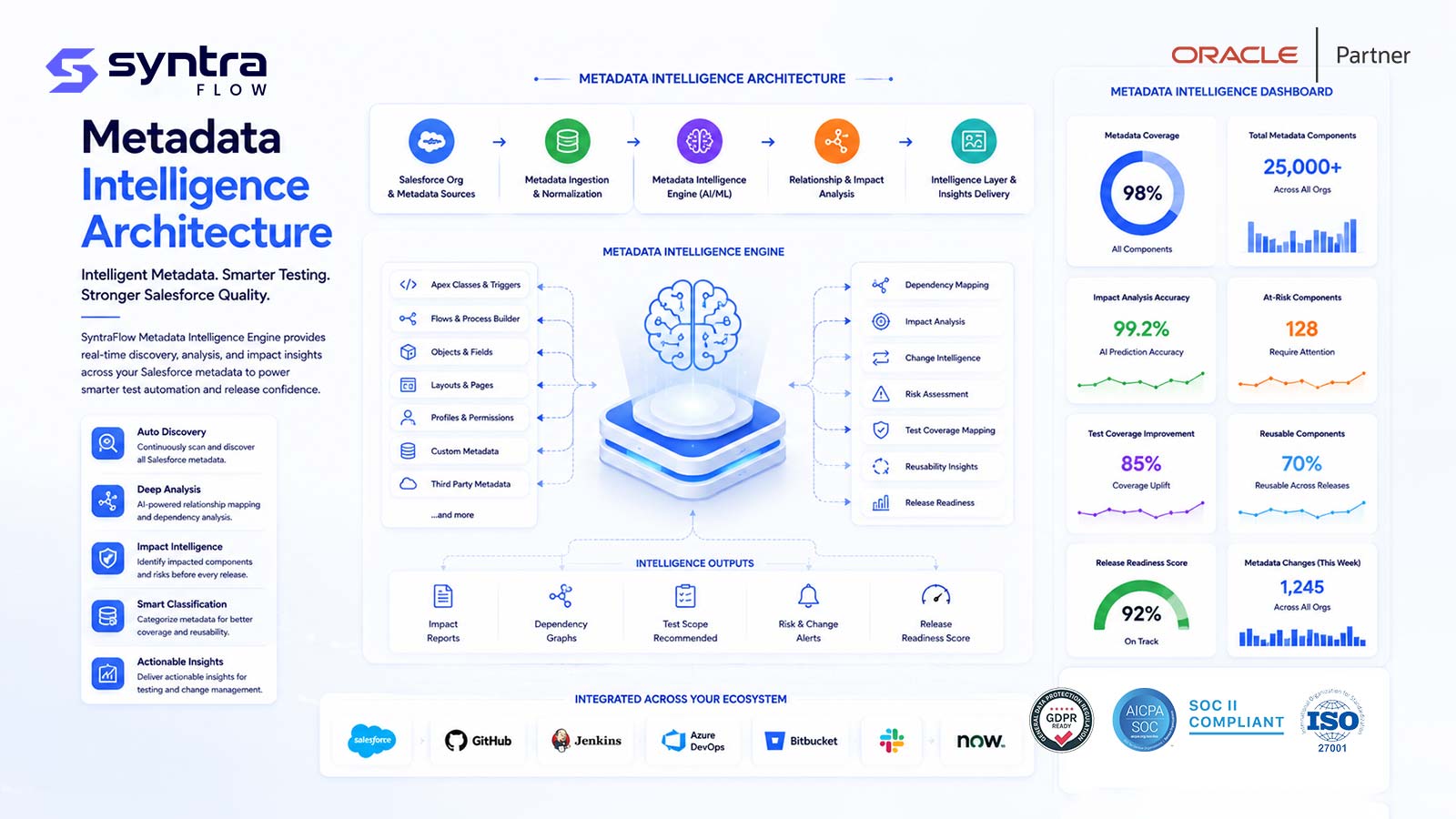
What counts as Salesforce metadata
Salesforce metadata is the configuration and components that define how your org behaves — the objects, automation, code and security that shape every screen and process. Metadata is not the same thing as your data. It is the blueprint, not the business records that flow through it.
Metadata is configuration, not data records
This distinction matters throughout this page. Metadata describes how the org is built: a custom field definition, a Flow version, a validation rule, an Apex class, a permission set assignment. It does not include the Accounts, Opportunities, Cases or Contacts that live inside those structures. Those business records are your Salesforce data, and they follow a completely different lifecycle of extraction, masking, seeding and refresh.
When you need to build, mask or provision the actual records a test runs against, that is a data problem rather than a metadata problem — see Salesforce test data management. Metadata Intelligence, described here, is concerned with the components and configuration that define behavior, and with linking each configuration change to the tests it affects.
The business problem
A mature Salesforce org accumulates thousands of interdependent components across a chain of sandboxes and production. Change comes from many directions at once — admins, developers, managed packages and seasonal platform releases — and most of it is invisible until something breaks. The result is a persistent gap between what teams believe is deployed and what is actually running.
Sandbox and production divergence
Every sandbox drifts from production the moment work begins in it. Over weeks of parallel change, environments that were meant to mirror each other quietly stop matching, and no one can say exactly where.
Untracked manual changes
A field edited in setup, a picklist value added, a validation rule toggled off during troubleshooting — manual changes rarely make it into a changelog, yet they alter behavior all the same.
Deployment uncertainty
Before a release, teams struggle to state precisely which components a change set or package will move, and which existing components it will overwrite. Uncertainty turns every deployment into a gamble.
Missing dependencies
A field referenced by a Flow, an Apex class called by a trigger, a permission set that unlocks a page — deployments fail or misbehave when a dependency is left behind because no one mapped the relationships first.
Flow version differences
Flows carry versions, and the active version in one environment is often not the active version in another. A UAT Flow can behave nothing like the production Flow that shares its name.
Permission differences
Profiles and permission sets are among the easiest metadata to change and the hardest to audit. A single field-level security difference can hide data from users or expose it in the wrong environment.
Package changes
Managed and unlocked packages upgrade on their own schedule and can add, alter or remove components you did not author. Their impact on your customizations is easy to overlook until testing.
Linking metadata to business impact
Even when a difference is spotted, translating "this Apex class changed" into "quote-to-cash is at risk" requires knowledge that usually lives in a few people's heads rather than in a system.
Selecting regression tests
Without a reliable map from components to test cases, teams either re-run everything at great cost or guess at a subset and risk shipping an untested change. Neither is a good option under release pressure.
The Metadata Intelligence lifecycle
Metadata Intelligence is a repeatable sequence that turns a raw pile of components into a clear, testable picture of change. Each step is designed to build on the last, so that by the end you are not just looking at a metadata diff — you are looking at a prioritized list of tests and a defensible record of what changed and why.
Discover metadata
SyntraFlow reads the components of a connected org — objects, fields, Flows, Apex, layouts, permissions and more — to build a complete inventory of what actually exists, rather than what documentation claims.
Establish an environment baseline
A point-in-time baseline captures the known-good state of an environment. Everything that follows is measured against this reference, so drift and change always have a clear origin.
Compare orgs or snapshots
Two orgs, or two snapshots of the same org taken at different times, are compared component by component. This is the core of Salesforce metadata comparison: a precise, side-by-side view of two configurations.
Identify added, modified and removed components
Differences are classified so you can see at a glance what is new, what changed and what disappeared — down to the individual field, Flow element or Apex method.
Analyse dependencies
For each changed component, SyntraFlow is designed to trace what references it and what it references, so the blast radius of a change is visible before it reaches an environment.
Map components to business processes
Technical components are linked to the business processes they support — an Opportunity field to quote-to-cash, an approval process to onboarding — so change is expressed in terms the business understands.
Map processes to test cases
Each business process is associated with the test cases that verify it, creating a traceable line from a single metadata change through the process it touches to the tests that cover it.
Recommend impacted tests
The lifecycle produces a focused, prioritized set of tests worth running for this specific change — the heart of risk-based regression selection, and a direct input to Salesforce test automation.
Approve or investigate changes
Reviewers can approve expected differences and flag the unexpected ones for investigation, turning a metadata diff into a decision point rather than a static report.
Preserve audit evidence
Every comparison, decision and impacted-test recommendation is retained, giving you durable evidence of what changed, who reviewed it and how the change was validated.
Metadata Intelligence capabilities
These are the capabilities SyntraFlow is designed to provide for Salesforce metadata comparison and org intelligence. They are available today for demonstration and proof-of-concept validation as the Salesforce vertical matures alongside SyntraFlow's established Oracle foundation.
Metadata inventory
Designed to build a complete, searchable catalog of the components in an org — objects, fields, Flows, Apex, layouts and permissions — so you always have an accurate picture of what exists.
Org-to-org comparison
Designed to compare any two connected orgs component by component, surfacing every added, modified and removed item so two environments can be reconciled with confidence.
Sandbox-to-production comparison
Designed to answer the release-day question directly: how does this sandbox differ from production right now, and which of those differences are intentional?
Snapshot comparison
Designed to compare two point-in-time snapshots of the same environment, so you can see exactly what changed in an org over a sprint, a week or a maintenance window.
Drift detection
Designed to detect configuration drift — differences that appear against an established baseline — and highlight manual or unexpected changes that were never part of a planned release.
Dependency analysis
Designed to map how components reference one another, so the true reach of a changed field, class or Flow is understood before it moves between environments.
Flow comparison
Designed to compare Flows across environments, including which version is active, so behavioral differences hidden inside automation are made explicit.
Permission comparison
Designed to compare profiles and permission sets — object, field and feature access — so security-relevant differences between environments are never left to chance. See also SyntraFlow security.
Apex impact analysis
Designed to identify what a changed Apex class or trigger touches — the objects, fields and integrations that depend on it — so code changes can be tested where they matter.
Lightning impact analysis
Designed to trace changes to Lightning pages and Lightning Web Components through to the profiles and processes that rely on them, so UI changes are validated for the right users.
Deployment validation
Designed to review a planned deployment against the target environment ahead of time, so you can see what will be added, overwritten or removed before the change lands.
Test-impact mapping
Designed to connect metadata changes to the business processes and test cases they affect, producing a prioritized set of regression tests for each release.
Change audit trail
Designed to preserve a durable record of every comparison, difference and review decision, so change history is available for governance, compliance and post-incident review.
Environment health dashboard
Designed to summarize drift, open differences and impacted-test coverage across your environments, giving release managers a single view of configuration health.
Metadata comparison vs source control
A common question is how Metadata Intelligence relates to the source-control and deployment tools a team already uses. The short answer is that it complements them. SyntraFlow is not a version-control system, a CI/CD pipeline or a deployment engine, and it is not designed to replace one.
Source control and DevOps tooling answer questions about intent and delivery: what a developer committed, which branch it lives on, and how a package moves from one environment to the next. Tools such as Git, Salesforce DX, DevOps Center, Copado, Gearset and general CI/CD pipelines are the right home for that work, and SyntraFlow assumes they remain in place.
Metadata Intelligence answers a different, testing-oriented question: given the actual state of two live environments, or the actual changes in a release, which business processes and tests are affected? It reads what is genuinely running in an org — including manual changes that never passed through a pipeline — and translates configuration differences into a prioritized regression scope. That is a test-selection and change-assurance discipline, and it sits alongside your existing delivery tooling rather than competing with it.
In practice, a team can keep committing to Git and deploying through DevOps Center or Gearset exactly as before, and use SyntraFlow to verify what actually changed between environments and to decide what to test. The two layers reinforce each other: your pipeline governs how change is delivered, and Metadata Intelligence governs how change is understood and validated.
Metadata comparison scenarios
These are the everyday situations Metadata Intelligence is built for — cases where a small configuration difference carries real business risk, and where knowing which tests to run saves both time and incidents.
| Scenario | What Metadata Intelligence surfaces | Test impact |
|---|---|---|
| Flow changed in UAT but not production | The Flow differs between environments and the active version is not the same in both. | Recommends the process tests that exercise the Flow before it is promoted. |
| Permission set differs between sandboxes | Object, field or feature access is granted in one sandbox but not another. | Flags access and visibility tests for the affected profiles. |
| New field added without regression coverage | A custom field is present in the source but no test currently references it. | Highlights a coverage gap so a test can be added before release. |
| Apex class changed with dependent integrations | Dependency analysis shows the class is called by an outbound integration. | Recommends integration and end-to-end tests, not just unit tests. |
| Validation rule with a downstream failure | A new or altered validation rule blocks records a later process expects. | Points to the downstream process tests likely to fail. |
| Lightning page changed for one profile | A Lightning page assignment differs for a specific profile or app. | Scopes UI tests to the users who actually see the changed page. |
| CPQ metadata differs between environments | Price rules, product rules or CPQ configuration are not aligned across orgs. | Recommends quote and pricing tests for the affected product lines. |
| Managed package upgrade changes components | A package upgrade added, altered or removed components you did not author. | Identifies the customizations and tests touched by the upgrade. |
Metadata change is rarely contained to Salesforce
A Salesforce metadata change seldom stops at the edge of the org. A renamed or retyped field, or an altered Apex class that builds an outbound payload, can quietly break an Oracle or ERP integration that consumes that data. The Salesforce diff looks small; the downstream failure can be large, and it usually surfaces days later in a system no one was watching.
This is where SyntraFlow's heritage matters. Metadata Intelligence is designed to link a Salesforce component change to the cross-system tests it impacts — not only the Salesforce process tests, but the integration and end-to-end tests that span into connected back-office systems. When an Apex change touches an integration that feeds Oracle, SyntraFlow is designed to recommend the Oracle-side and boundary tests alongside the Salesforce ones.
That cross-application view is the same configuration-intelligence discipline SyntraFlow has long applied on the Oracle side, where understanding how a configuration change ripples through interconnected modules is essential to safe change. Metadata Intelligence brings that sister approach to Salesforce, so a single release can be assessed across both platforms rather than one at a time.
Explore the connected-system perspective on the Oracle ERP testing tool, which applies config-intelligence thinking to Oracle environments and pairs naturally with Salesforce Metadata Intelligence for organizations running both.
Recommended next steps
Metadata Intelligence spans several focused disciplines. The following areas go deeper into specific comparison and analysis workflows, and are being expanded as dedicated guides.
Org comparison
Compare two full Salesforce orgs and reconcile every configuration difference.
Metadata diff
Read a component-level diff of what was added, modified and removed.
Configuration drift
Detect drift against a baseline and catch untracked manual changes.
Sandbox-to-production comparison
See exactly how a sandbox differs from production before you release.
Dependency analysis
Map how components reference one another to understand a change's reach.
Deployment impact analysis
Assess what a planned deployment will change in the target environment.
Permission set comparison
Compare permission sets and profiles to keep access aligned across orgs.
Flow comparison
Compare Flows and active versions to expose hidden automation differences.
Outcomes
Metadata Intelligence is designed to change how a Salesforce team experiences release — from anxious guesswork to informed, evidence-backed decisions.
Safer deployments
Knowing exactly what a release will add, overwrite or remove — and what depends on it — removes much of the uncertainty that makes deployments risky.
Better change coverage
Mapping components to processes and tests reveals coverage gaps early, so new fields, Flows and classes do not ship untested.
Faster regression selection
A prioritized, change-driven test set means teams run the tests that matter for this release instead of re-running everything or guessing.
Audit evidence for change
A durable record of comparisons, decisions and validations gives governance, compliance and post-incident review a clear trail to follow.
Metadata Intelligence works closely with Salesforce release intelligence and the wider Salesforce testing practice to keep every seasonal release and every sprint under control.
Metadata Intelligence FAQs
What is Salesforce metadata?
Salesforce metadata is the configuration and components that define how an org behaves — custom objects and fields, page layouts, Lightning pages, Flows, validation rules, approval processes, Apex classes and triggers, Lightning Web Components, permission sets, profiles, sharing rules, custom metadata types, custom settings and more. It is the blueprint of the org, distinct from the business records that live inside it.
What is Salesforce metadata comparison?
Salesforce metadata comparison is the practice of comparing the components of two orgs, or two snapshots of one org, to identify every component that was added, modified or removed. SyntraFlow is designed to perform this comparison and then translate the differences into the business processes and tests they affect.
How do I compare two Salesforce orgs?
You connect both environments, establish a baseline for each, and run an org-to-org comparison. SyntraFlow is designed to read the components of both orgs, classify the differences, analyse dependencies, and recommend the tests worth running for the changes it finds — so a comparison ends in an action plan, not just a list.
What is Salesforce configuration drift?
Configuration drift is the gradual divergence of an environment from its known-good baseline, usually caused by manual changes and untracked edits that never passed through a formal release. Drift detection compares the current state against the baseline to surface these unplanned differences before they cause problems.
Can metadata changes identify which tests should run?
Yes — that is the core of Metadata Intelligence. By mapping changed components to the business processes they support and those processes to test cases, SyntraFlow is designed to recommend a focused, prioritized regression set for each change, which feeds directly into automated execution.
What is the difference between metadata and Salesforce data?
Metadata is configuration — the structures, automation, code and security that define behavior. Data is the business records that flow through those structures, such as Accounts, Opportunities and Cases. Metadata Intelligence deals with configuration; provisioning and masking the actual records for a test is covered by Salesforce test data management.
Can SyntraFlow compare sandbox and production?
Yes. Sandbox-to-production comparison is a primary use case. SyntraFlow is designed to show how a sandbox differs from production before a release, so teams can confirm that intended changes are present and that no unexpected differences are about to ship.
How does metadata dependency analysis work?
Dependency analysis traces the relationships between components — which fields a Flow uses, which classes a trigger calls, which permission sets unlock a page. For each changed component, SyntraFlow is designed to map what references it and what it references, so the full reach of a change is visible before it is deployed.
Does metadata intelligence replace Git or DevOps Center?
No. Metadata Intelligence complements source-control and deployment tools such as Git, Salesforce DX, DevOps Center, Copado, Gearset and CI/CD pipelines. Those tools govern how change is committed and delivered; SyntraFlow reads the actual state of live environments and determines which processes and tests each change affects. The two layers work together.
Can permission and security changes be compared?
Yes. Permission comparison is designed to compare profiles and permission sets across environments — object, field and feature access — so security-relevant differences are caught early. Because access changes carry real risk, they are treated as first-class differences worth reviewing and testing.
See exactly what changed across your orgs
Bring Metadata Intelligence to your next Salesforce release. Compare environments, understand every meaningful difference, and know which tests to run — all in one view.