Oracle Lockbox Testing
Oracle Lockbox is the bank-file path into Receivables cash application: a bank captures customer remittances, transmits a file to Oracle, and Lockbox Import applies automatic matching against open invoices before handing unresolved items to an exception workbench. When file parsing, matching rules, or tolerances misbehave, cash gets misapplied, exceptions pile up unresolved, or a valid file is rejected outright — and none of that shows up until reconciliation or the customer calls.
This page is a practical guide to testing the lockbox process itself — file import, automatic matching, tolerances, and exception handling. It sits under the Oracle Accounts Receivable (AR) Testing Tool hub and covers only receipts that arrive via a bank lockbox file.
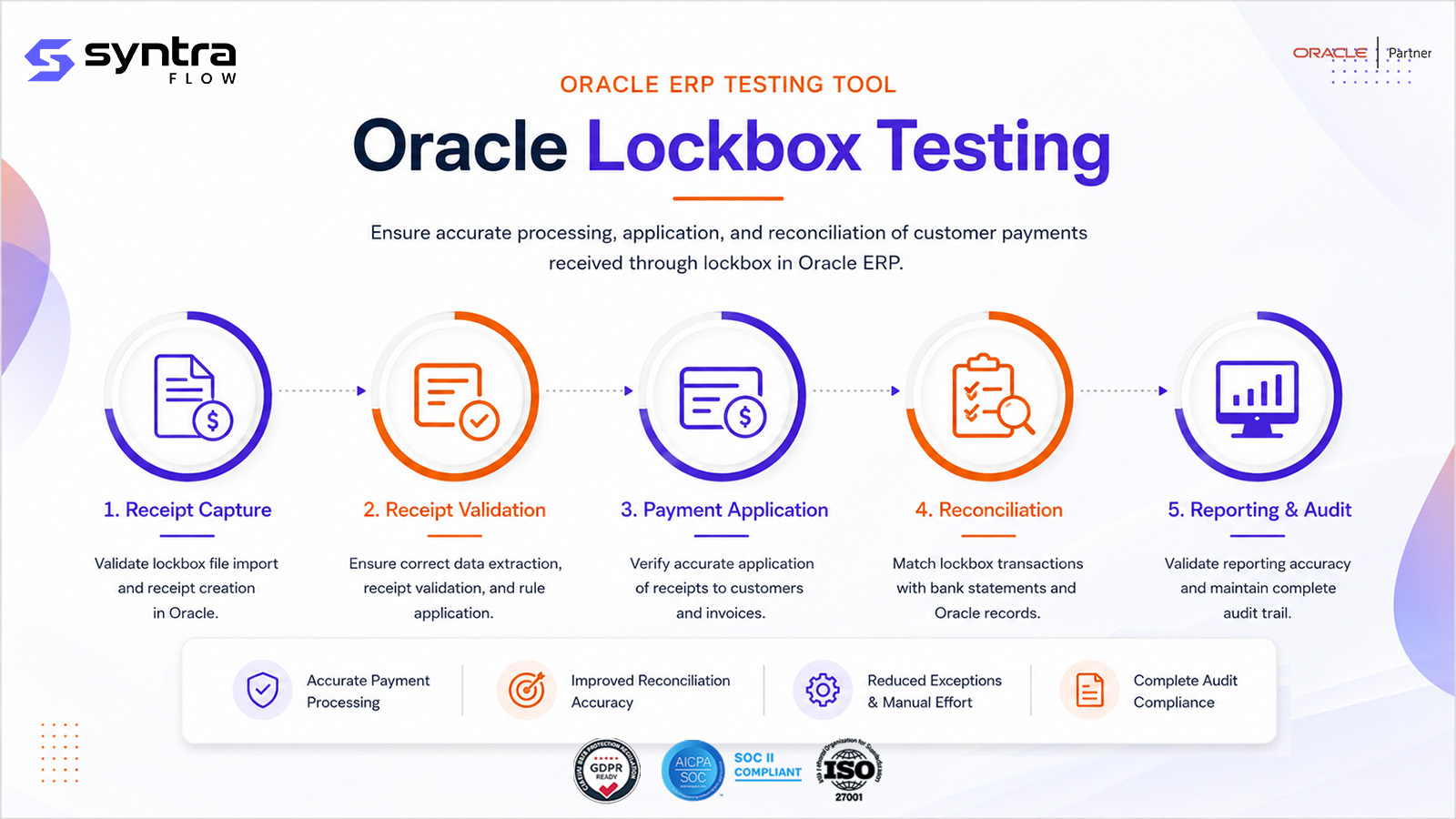
What Is Oracle Lockbox Processing in Receivables?
A bank lockbox is a remittance-processing service: customers send payments to a bank-managed address or account, the bank scans and captures the remittance detail, and transmits a data file — typically BAI2 or a bank-specific proprietary format — to Oracle on a scheduled or triggered basis. The Lockbox Import program reads that file, validates its structure and control totals, and creates a lockbox batch of individual remittance items.
For each item, Oracle applies automatic matching — using customer identifiers, invoice numbers, and remittance amounts against configured matching rules and tolerances — to decide which open invoice or invoices the payment settles. Items that match cleanly become receipts automatically, applied and closed against the matched invoices. Items that don't match, match ambiguously, or fall outside tolerance are routed to an exception workbench, where a user manually matches the item, creates an on-account receipt, or records it as unidentified pending research.
The teams that depend on lockbox behaving correctly are cash application analysts working the exception queue, AR supervisors who tune matching tolerances, and finance teams who rely on lockbox as the highest-volume, least-touched receipt channel. Its upstream dependency is the bank transmission and the customer/bank account cross-reference setup; its downstream dependency is everything that follows a receipt — application, collections, and cash reconciliation.
Scope note. This page covers only receipts arriving via a bank lockbox file — the import, automatic matching, and exception workbench specific to that channel. General receipt creation and manual entry, by any method, is covered on Oracle Receipt Testing. The mechanics of applying a receipt to invoices — open item application, discounts, write-offs, unapplication — regardless of how the receipt arrived, is covered on Oracle Receipt Application Testing. This page focuses on what's unique to the bank-file path.
Lockbox vs Receipt Entry vs Receipt Application
Three related but distinct testing scopes inside Receivables cash processing.
| Dimension | Oracle Lockbox Testing (this page) | Oracle Receipt Testing | Oracle Receipt Application Testing |
|---|---|---|---|
| Entry point | Bank lockbox file (BAI2 / bank format) | Manual, UI, or API receipt entry | Any receipt, regardless of source |
| Primary object tested | File import & automatic matching | Receipt creation & recording | Application of a receipt to invoice(s) |
| Matching logic | Automated match rules & tolerances from remittance data | Not applicable at entry | Manual and automatic application rules generally |
| Typical defects | Bad file format, batch out of balance, wrong auto-match | Wrong receipt method, currency, or bank account | Wrong invoice applied, discount miscalculated |
| Exception handling | Lockbox exception workbench | Receipt correction / reversal | Unapplication, write-off, on-account transfer |
| Owning page | This page | Receipt Testing | Receipt Application Testing |
Why Testing Oracle Lockbox Matters
Lockbox is usually the highest-volume, lowest-touch receipt channel — which means a defect here scales fast and stays hidden until reconciliation. The risks specific to lockbox:
| Risk | Example | Potential impact | Testing response |
|---|---|---|---|
| Auto-match to wrong invoice | Ambiguous remittance matched on amount alone | Cash misapplied; customer dispute | Assert the exact invoice matched per rule |
| Tolerance misconfiguration | Variance beyond policy still auto-applies | Under- or over-application of cash | Boundary tests at and beyond tolerance |
| Batch accepted out of balance | Control totals not enforced on import | Incomplete or incorrect batch enters the ledger | Negative test: out-of-balance batch rejected |
| Exception backlog | Unmatched items not routed or visible | Cash sits unapplied; DSO overstated | Assert exception routing and workbench visibility |
| Duplicate processing | Same remittance imported twice | Customer overstated as paid | Duplicate-detection negative test |
| Unauthorised exception correction | Broad workbench access granted by role | Segregation-of-duties weakness in cash application | Role-based access test |
| Foreign-currency misapplication | Wrong or missing conversion rate used | Receipt amount posted incorrectly | FX lockbox test against a known rate |
| File format drift | Bank changes file layout without notice | Import fails or misreads the whole file | Format-validation regression test |
| Performance at volume | High-item-count batch slows or stalls | Delayed cash application at month-end | Volume / performance test |
| Silent release-driven change | Quarterly update alters matching behaviour | Undetected control drift | Release-aware lockbox regression |
The Oracle Lockbox Process Flow
Lockbox runs on a scheduled or triggered basis once a bank transmits a file. Each step is a distinct point of failure and a distinct testing target.
Lockbox sequence
- Trigger: a bank transmits a lockbox file — scheduled, on-demand, or via an API-based bank integration.
- Key validations: record structure, header/detail/trailer integrity, batch control totals, customer and invoice reference resolution, match tolerances.
- Decision point: each item either matches cleanly and becomes a receipt, or fails one or more checks and is routed to the exception workbench.
- Exceptions: unmatched, ambiguously matched, or out-of-tolerance items require manual match, on-account creation, or unidentified-receipt recording.
- Expected output: a fully reconciled batch — every item either applied to an invoice or logged as an explicit, visible exception.
- Downstream impact: matched items feed receipt application, collections aging, and cash reconciliation immediately after the batch closes.
Suggested visual: a swimlane diagram of the lockbox sequence with the exception branch, for the web team to produce.
Testing Scope & Coverage Matrix
The dimensions a complete lockbox test suite must cover, with automation suitability and priority.
| Test area | What must be validated | Example scenario | Automation | Priority |
|---|---|---|---|---|
| Functional (pass) | Clean file imports and fully auto-matches | Well-formed file, all items match | High | High |
| Negative (format) | Malformed file rejected cleanly | Corrupt record structure | High | High |
| Boundary (tolerance) | Behaviour at exact tolerance limits | Variance = tolerance vs +0.01 | High | High |
| Exception workbench | Manual match, on-account, unidentified paths | Exception resolved by correct role | Medium | High |
| Role-based | Only privileged roles correct exceptions | Non-privileged role denied | Medium | High |
| Configuration | Matching rules and tolerances drive outcome | Rule change alters match rate | Medium | Medium |
| Batch control | Control totals enforced at import | Out-of-balance batch rejected | High | High |
| Multi-bank | Multiple banks / formats processed correctly | Two banks in the same run cycle | Medium | Medium |
| Integration / API | API-delivered remittance behaves as file import | API path matches file path | High | Medium |
| Data validation (currency) | Foreign-currency remittances handled correctly | FX remittance with a known rate | High | Medium |
| Regression / release | Behaviour unchanged after an update | Re-run pack after a quarterly update | High | High |
| Evidence capture | Result and match reason captured for audit | Batch log and screenshot retained | High | Medium |
| Performance | High-volume batch completes in window | Peak-volume file processed | Medium | Medium |
Oracle Lockbox Test Scenarios
A representative set of 31 Oracle Fusion lockbox scenarios — happy path, file and matching failures, exception handling, batch controls, currency, integration, and regression. Test IDs use the AR-LBX prefix.
| ID | Scenario | Preconditions | Expected result | Pri | Auto |
|---|---|---|---|---|---|
| AR-LBX-001 | Valid lockbox file imports successfully | Well-formed BAI2 file received | File imported without error; batch created | H | Y |
| AR-LBX-002 | Invalid file format rejected | Malformed / non-standard record structure | Import rejected with a format error; no partial load | H | Y |
| AR-LBX-003 | Lockbox transmission record validated | File contains header, detail, and trailer records | Each record type parsed and validated per spec | H | Y |
| AR-LBX-004 | Automatic match by invoice number | Remittance references a valid open invoice number | Receipt auto-created and applied to that invoice | H | Y |
| AR-LBX-005 | Automatic match by customer number | Remittance carries a valid customer cross-reference | Receipt matched to the correct customer account | H | Y |
| AR-LBX-006 | Automatic match by remittance amount | Amount equals a single open invoice balance | Match confirmed on amount plus invoice reference | H | Y |
| AR-LBX-007 | Match within tolerance | Remittance amount within configured tolerance | Invoice matched and closed; variance within tolerance | H | Y |
| AR-LBX-008 | Match outside tolerance routed to exception | Remittance amount beyond configured tolerance | Item routed to exception workbench, not auto-applied | H | Y |
| AR-LBX-009 | Partial payment matched to invoice | Remittance amount less than invoice balance | Receipt applied partially; invoice remains open | H | Y |
| AR-LBX-010 | Overpayment in lockbox file | Remittance amount exceeds invoice balance | Invoice closed; overpayment posted per configured rule | M | Y |
| AR-LBX-011 | Unidentified remittance, no match found | No matching customer or invoice reference | Item routed to workbench as unidentified | H | Y |
| AR-LBX-012 | Duplicate lockbox record detected | Same reference and amount appears twice in file | Duplicate flagged; only one receipt created | H | Y |
| AR-LBX-013 | Lockbox record for closed customer | Remittance references an inactive customer | Item exceptioned; no receipt applied to closed account | M | Y |
| AR-LBX-014 | Lockbox record for invalid bank account | Remittance bank account not set up in Receivables | Item exceptioned with an invalid-account reason | M | Y |
| AR-LBX-015 | Multiple invoices paid by one lockbox item | Single remittance amount covers several invoices | All referenced invoices matched and closed from one item | H | Y |
| AR-LBX-016 | One invoice paid by multiple lockbox items | Invoice balance split across several remittances | Invoice closes once cumulative applications equal balance | M | Y |
| AR-LBX-017 | Exception workbench — manual match | Exception item with identifiable customer, no auto-match | User manually matches item to invoice(s) in workbench | H | Y |
| AR-LBX-018 | Exception workbench — create on-account receipt | Exception item identifies customer, no specific invoice | User creates an on-account receipt from the workbench | M | Y |
| AR-LBX-019 | Exception workbench — create unidentified receipt | Exception item has no identifiable customer | User creates an unidentified receipt for research | M | Y |
| AR-LBX-020 | Lockbox batch control total validation | Batch trailer states expected item count and amount | Import validates actual totals against control totals | H | Y |
| AR-LBX-021 | Lockbox batch out-of-balance rejected | Batch trailer totals don't match detail records | Batch rejected or flagged; no receipts created from it | H | Y |
| AR-LBX-022 | Lockbox file with foreign currency | Remittance in a non-ledger currency, rate present | Receipt created and matched using correct conversion | M | Y |
| AR-LBX-023 | Lockbox reprocessing after correction | Prior exception corrected (customer or invoice fixed) | Reprocessed item matches and clears the exception | H | Y |
| AR-LBX-024 | Lockbox file transmission failure and retry | Bank transmission interrupted or incomplete | Failure detected; retry produces a complete, valid import | M | P |
| AR-LBX-025 | Lockbox files from multiple banks | Files received from more than one lockbox bank | Each processed against its own bank/account setup | M | Y |
| AR-LBX-026 | Lockbox scheduled / automated run | Import scheduled via a recurring program | Job runs on schedule; batch created without manual trigger | M | Y |
| AR-LBX-027 | Lockbox via API-based bank integration | Bank delivers remittance data through an integration channel | Data imported and matched consistently with the file path | M | Y |
| AR-LBX-028 | Lockbox reporting and audit trail | Batch processed with mixed matched / exception items | Reports show batch summary, match results, exception detail | M | Y |
| AR-LBX-029 | Role-based lockbox exception access | Non-privileged role attempts exception correction | Access denied; only authorised roles correct exceptions | H | P |
| AR-LBX-030 | Lockbox performance at high volume | Large file with a high item count submitted | Import and matching complete within the expected window | M | P |
| AR-LBX-031 | Quarterly-release regression pack | Post-update tenant, prior lockbox pack re-run | All prior match and exception results reproduce | H | Y |
Pri = priority (H/M/L). Auto = automation candidate (Y suitable · P partly, needs bank/role setup). Steps summarised; full step detail ships in the downloadable test pack.
Common Lockbox Exceptions & Defects
| Exception / defect | Likely cause | Business impact | Recommended test |
|---|---|---|---|
| Auto-match misfire | Matching rule weighted incorrectly | Payment misapplied; customer statement wrong | AR-LBX-004 to 006 |
| Tolerance too wide | Match tolerance configured beyond policy | Variances silently absorbed into cash | AR-LBX-007, AR-LBX-008 |
| Batch out-of-balance accepted | Control-total check not enforced | Bad data enters cash application | AR-LBX-020, AR-LBX-021 |
| Duplicate item processed twice | Duplicate-detection logic gap | Customer overstated as paid; reconciliation break | AR-LBX-012 |
| Exception item stuck unresolved | Workbench routing or notification failure | Cash sits unapplied; DSO impact | AR-LBX-011, AR-LBX-017 to 019 |
| Foreign-currency mismatch | Wrong or missing conversion rate | Incorrect receipt amount posted | AR-LBX-022 |
| Malformed file partially loaded | Import doesn't reject bad records cleanly | Incomplete or corrupt batch | AR-LBX-002 |
| Closed customer / invalid account not exceptioned | Validation gap on customer or bank status | Receipt posted to the wrong or blocked account | AR-LBX-013, AR-LBX-014 |
| Unauthorised exception correction | Role or privilege setup too broad | SOD control weakness in cash application | AR-LBX-029 |
| Batch / API path divergence | API integration bypasses file-based validation | Inconsistent controls between channels | AR-LBX-027 |
| Performance degradation at volume | Import / matching not tuned for high item counts | Delayed cash application, exception backlog | AR-LBX-030 |
How SyntraFlow Automates Lockbox Testing
SyntraFlow drives lockbox file processing and the exception workbench together, then asserts the exact match outcome — not just that the batch loaded.
AI test generation
Generates lockbox variants — file formats, matching conditions, tolerance boundaries, exception types — from your configuration.
Self-healing execution
Playwright-based runs that re-anchor when Oracle changes the exception workbench or Redwood pages, so matching assertions keep working.
Dynamic test data
The Oracle Data Vault provisions bank-file structures and customer data that produce the specific match or exception each test needs.
Regression suite
A reusable lockbox pack that re-runs match and exception outcomes on demand, not a one-off script built for a single cycle.
Release intelligence
Runs the lockbox subset a given release actually affects, instead of the whole pack every quarter.
Configuration intelligence
Ties each test to the matching rules and tolerances that drive it, so a configuration change re-points the right tests.
UI + file-processing execution
Exercises both the file-import path and the exception-workbench UI, closing the gap a UI-only tool would miss.
Evidence capture
Timestamped batch logs, match results, and screenshots retained as audit-grade evidence for every run.
Quarterly-update testing
Re-validates lockbox behaviour against each Oracle update before it reaches production cash application.
A note on capability. AI-assisted generation, self-healing execution, UI plus file-processing coverage, and evidence capture are current platform capabilities. Coverage scoped to your specific banks, matching rules, and roles is configurable during onboarding. Any tenant-specific extension is confirmed at assessment rather than assumed here.
For teams building out a lockbox suite, the Oracle Lockbox Test Pack lays out file scenarios, matching conditions, expected exceptions, and the evidence and sign-off format used to close a test cycle. Request it through a demo to see it scoped to your bank formats and matching setup.
When to Re-Test Oracle Lockbox
Lockbox depends on bank formats, matching configuration, and customer master data, so any change to these is a regression trigger. Retest when these events occur:
| Change event | Risk to lockbox | Recommended regression scope |
|---|---|---|
| Oracle quarterly update | Import or exception-workbench logic changes | Full lockbox pack, release-scoped |
| Redwood rollout | Exception workbench UI redesign breaks automation | Workbench UI + manual-match cases |
| Matching rule / tolerance change | Auto-match rate and variance threshold shift | Boundary + auto-match cases |
| Bank transmission format change | File parsing breaks or misreads records | Format validation + import cases |
| New bank onboarded | New file format or account not yet validated | Multi-bank + format cases |
| Customer master data change | Cross-reference / customer mapping drifts | Customer-match cases |
| Receipt method / bank account setup change | Receipts post to the wrong account | Bank-account validation cases |
| Currency / exchange-rate setup change | Foreign-currency remittances misconvert | Foreign-currency lockbox case |
| Security-role change | Exception-workbench access shifts | Role-based access cases |
| Production defect fix | Fix may regress adjacent matching logic | Targeted + smoke lockbox pack |
Lockbox Testing & Oracle Quarterly Releases
Oracle's quarterly updates can change lockbox behaviour without any action on your part — through feature opt-ins, Redwood redesigns of the exception workbench, new or altered matching logic, or deprecated file-processing behaviour. Because lockbox is the entry point for the majority of incoming cash, a silent change here is one of the highest-leverage things to catch before production.
Rather than re-testing every lockbox scenario on every release, SyntraFlow Release Intelligence narrows the work to what actually changed in your tenant:
- 1.Analyses the Oracle release notes for changes touching Receivables lockbox and cash application.
- 2.Maps those changes to your configuration — matching rules, tolerances, and bank setup.
- 3.Identifies the customers, banks, and receipt volumes affected.
- 4.Recommends the specific lockbox test cases to run.
- 5.Prioritises regression execution by risk to cash application.
- 6.Tracks lockbox testing evidence for audit and sign-off.
See how the impact map is built on the Release Impact Analysis page.
Configurations That Drive Lockbox Results
A lockbox test is only trustworthy if the configuration behind it is known and stable. These setups determine whether a remittance auto-matches, exceptions out, or gets rejected — and when they drift between environments, tests pass against the wrong reality.
| Configuration area | Testing impact | Example failure | Recommended validation |
|---|---|---|---|
| Lockbox transmission format setup | Determines how file records are parsed | Wrong format definition rejects a valid file | Format validation cases (AR-LBX-001 to 003) |
| Matching rules & tolerances | Sets which fields drive auto-match and variance limits | Tolerance widened beyond policy | Boundary match cases (AR-LBX-007, 008) |
| Customer number cross-reference | Maps bank-supplied customer IDs to Receivables customers | Cross-reference missing or mis-mapped | Customer-match cases (AR-LBX-005, 011) |
| Remittance bank account / receipt method | Ties an incoming file to the correct bank account | Wrong bank account applied to receipts | Bank-account cases (AR-LBX-014, 025) |
| Currency & exchange rate setup | Drives conversion for foreign-currency remittances | Rate missing or stale | Foreign-currency case (AR-LBX-022) |
| Application rule sets | Determines application order across lines and charges | Wrong order changes the amounts applied | Application-outcome verification cases |
| Exception workbench role setup | Determines who can correct or approve exceptions | Over-broad access granted | Role-based access case (AR-LBX-029) |
| Batch control-total settings | Determines whether out-of-balance batches are rejected | Control disabled or too permissive | Batch balance cases (AR-LBX-020, 021) |
SyntraFlow's Configuration Intelligence compares these setups across environments and flags drift before it corrupts a lockbox test result — so a passing test means the configuration was correct, not just present.
Lockbox Testing Best Practices
Assert the exact invoice(s) matched, not just that a receipt was created.
Test every tolerance at, below, and above its limit — boundaries are where mismatches hide.
Cover every exception path: manual match, on-account, and unidentified.
Separate positive (auto-match) and negative (format/duplicate rejection) packs.
Validate batch control totals independently from item-level matching.
Test exception-workbench role permissions to protect segregation of duties.
Use production-like file formats and bank setups, not simplified test files.
Include foreign-currency and multi-bank cases in every cycle.
Re-run the lockbox pack on every quarterly update, scoped by release impact.
Capture match reason and evidence automatically for audit and sign-off.
Test both the file path and any API-based bank integration for parity.
Re-validate coverage after any matching-rule or tolerance change.
Related Oracle Receivables Pages
Lockbox is one channel into cash application. Go deeper on adjacent topics:
Frequently Asked Questions
What is Oracle Lockbox processing in Receivables?
▼
Lockbox is the bank-file path into Receivables cash application. A bank captures customer remittances and transmits a file — typically BAI2 or a bank-specific format — that Oracle imports, validates, and matches automatically against open invoices using customer, invoice, and amount data. Unmatched items go to an exception workbench for manual resolution.
How is this different from Oracle Receipt Testing?
▼
Receipt Testing covers how a receipt is created and recorded, by any method — manual entry, UI, or API. Lockbox testing covers one specific channel: receipts that arrive as a bank file, including file format validation, batch control totals, automatic matching, and the exception workbench unique to that path. See Oracle Receipt Testing for the general receipt-creation scope.
How is lockbox testing different from Receipt Application Testing?
▼
Receipt Application Testing covers how any receipt is applied to invoices — open item application, discounts, write-offs, unapplication — regardless of source. Lockbox testing covers what happens before that: whether the bank file imports correctly and whether automatic matching picks the right invoice. See Oracle Receipt Application Testing for application mechanics.
What file formats does Oracle Lockbox support?
▼
Banks commonly transmit lockbox files in the BAI2 standard or a bank-specific proprietary layout. Whichever format is configured, testing must confirm the import correctly parses header, detail, and trailer records and rejects any file that doesn't match the expected structure.
How does automatic matching work in Lockbox?
▼
Oracle evaluates each remittance item against configured matching rules, using customer identifiers, invoice numbers, and remittance amounts within set tolerances. A clean match creates and applies a receipt automatically; anything ambiguous, unmatched, or out of tolerance is routed to the exception workbench instead.
What happens when a lockbox item doesn't match?
▼
It's routed to the exception workbench, where a user can manually match it to the correct invoice, create an on-account receipt against an identified customer, or record it as unidentified for later research. Testing should cover all three resolution paths, not just the manual-match case.
How do match tolerances affect lockbox testing?
▼
Tolerances set the variance a remittance amount can differ from an invoice balance and still auto-match. They must be tested at the boundary — a variance exactly at the limit should match, one cent beyond should exception — since tolerances differ across environments and change over time.
What is the lockbox exception workbench?
▼
It's the screen where items the automatic matching couldn't resolve are worked manually. A complete test suite covers manual matching, on-account receipt creation, unidentified-receipt recording, and the role restrictions on who can perform each action.
How do you test lockbox batch control totals?
▼
Build files where the trailer's stated item count and amount match the detail records, and files where they deliberately don't. The import should accept the balanced file and reject or flag the out-of-balance one — this prevents bad data from entering cash application undetected.
Can lockbox be tested through an API integration?
▼
Yes, where a bank delivers remittance data through an API-based integration rather than a flat file. Testing should confirm the API path produces the same matching outcomes as the file-based path, since any divergence between the two is a control gap.
How often should lockbox be regression tested?
▼
On every Oracle quarterly update, and after any change to matching rules, tolerances, bank formats, customer master data, or exception-workbench security roles. Because lockbox handles the majority of incoming cash for most Receivables teams, silent drift here has outsized impact.
Does Redwood affect lockbox testing?
▼
Redwood can redesign the exception workbench pages, which breaks selector-based automation even when the underlying matching logic is unchanged. SyntraFlow understands Redwood pages semantically and self-heals, so exception and matching assertions keep running through UI redesigns.
What test data does lockbox testing need?
▼
Each test needs a file engineered to produce a specific outcome — a clean match, a boundary-tolerance case, a duplicate record, an invalid bank account. SyntraFlow's Oracle Data Vault provisions valid customers, invoices, and bank-file structures so tests produce the intended result reliably instead of relying on hand-built fixtures.
How do you test lockbox exception role permissions?
▼
Run the same exception item under different roles and assert who can and cannot correct it. This protects segregation of duties in cash application — access to create on-account or unidentified receipts should be limited to roles with that authority, and role changes should trigger a retest.
Strengthen Your Oracle Receivables Test Coverage
Identify gaps in your lockbox test suite, automate high-risk matching and exception scenarios, and prepare for Oracle quarterly updates with SyntraFlow. See it run against lockbox cases like yours.