Oracle AutoInvoice Testing
AutoInvoice is the Oracle Fusion Receivables import engine that turns billing data from external and upstream systems into AR invoices. It loads records into the RA_INTERFACE_LINES_ALL interface tables, applies grouping and validation rules, then either creates invoices or raises exceptions. Because so much revenue arrives this way — project billing, subscription charges, EDI, custom integrations — a defect in AutoInvoice doesn't just break a test case. It stalls revenue recognition or lets bad data reach a customer invoice.
This page is a practical guide to testing the AutoInvoice import process itself — interface loading, grouping, validation, exceptions, and resubmission — under the Oracle Accounts Receivable (AR) Testing Tool hub.
What Is Oracle AutoInvoice?
AutoInvoice is the Oracle Fusion Receivables program that imports transaction data staged by another system into AR as completed invoices, debit memos, or credit memos. A source system — project billing, a service or subscription platform, an EDI gateway, or a custom integration — writes rows to the AutoInvoice interface tables, principally RA_INTERFACE_LINES_ALL, with related distribution and sales-credit rows in RA_INTERFACE_DISTRIBUTIONS_ALL and RA_INTERFACE_SALESCREDITS_ALL. The AutoInvoice program then reads those staged records, applies configured grouping rules to decide how lines combine into invoices, runs validation rules against each line, and either creates the transaction or writes it to RA_INTERFACE_ERRORS_ALL as an exception.
Grouping rules determine whether multiple interface lines become one invoice or several — grouped by customer, by order or project reference, by currency, or by other configured attributes. Validation rules check that each line carries the data Oracle needs to create a transaction: a valid customer and bill-to site, a defined transaction type, an open GL date, a valid tax code, and a recognised unit of measure. Lines that fail validation don't stop the batch; they're rejected as exceptions that a user reviews, corrects at the source or in the interface, and resubmits through AutoInvoice.
The teams that depend on AutoInvoice behaving correctly are AR processors who work the exceptions queue, integration teams who own the upstream extract, and the finance and audit functions who rely on complete, accurate revenue reaching the ledger. Its upstream dependencies are the source system's extract logic and the interface table structure; its downstream dependencies are the invoice transaction object, customer and tax setup, and ultimately GL revenue recognition.
Scope note. This page covers invoices arriving via the AutoInvoice import process — from project billing, service billing, subscription systems, EDI, and custom integrations. It does not cover manually entered invoices or the invoice transaction object itself, which are addressed on Oracle Invoice Testing, and it does not cover the billing-run engines that generate the source charges, which are addressed on Oracle Billing Testing. Here we focus only on what happens once data reaches the AutoInvoice interface tables.
AutoInvoice vs Manual Invoice vs Billing-Run Generation
Three distinct processes create Receivables transactions. Each needs its own test coverage.
| Dimension | AutoInvoice import (this page) | Manual invoice entry | Billing-run generation |
|---|---|---|---|
| Entry point | Interface tables + AutoInvoice program | Manage Transactions UI | Billing engine run (usage, milestones, recurring) |
| Source of data | External/upstream systems and integrations | AR user keying header and lines | Billing rules engine inside the source module |
| Core object tested | Interface record → invoice mapping, grouping, validation | The invoice transaction object itself | Billing event → invoice line generation |
| Key Oracle process | AutoInvoice Import Program | Create/Manage Transactions | Generate/transfer to Receivables |
| Typical defects | Interface rejects, grouping mis-splits, tax mismatch | Missing required fields, wrong transaction type | Wrong billing amount, missed billing event, duplicate transfer |
| Covering page | This page | Oracle Invoice Testing | Oracle Billing Testing |
Why Testing AutoInvoice Matters
AutoInvoice sits between an upstream system and revenue in the ledger, so a defect here rarely stays contained. It either lets bad data become a customer-facing invoice or holds good revenue out of AR indefinitely. The risks specific to AutoInvoice:
| Risk | Example | Potential impact | Testing response |
|---|---|---|---|
| Interface data malformed | Source extract omits a required column | Whole batch rejects or partially loads | Interface-population test per source |
| Grouping rule misconfigured | Rule groups unrelated charges together | Billing dispute; hard-to-trace invoice | Grouping-rule cases by customer, order, currency |
| Validation rule too loose | Bad tax code or GL date passes through | Invalid invoice reaches the customer | Negative test per validation condition |
| Exception backlog grows | Rejected lines never corrected/resubmitted | Revenue held out of AR and GL | Correction and resubmission test |
| Duplicate interface records | Source resends an already-loaded document | Customer overbilled | Duplicate-detection negative test |
| Tax handled inconsistently | Source-supplied tax vs Oracle-calculated tax diverge | Tax under/over-statement | Both tax-supplied and tax-calculated cases |
| Batch performance failure | Large volume batch times out or drops rows | Billing-cycle backlog | Volume/performance test at realistic scale |
| Partial batch failure | One bad line blocks an entire batch | Valid invoices needlessly delayed | Mixed valid/invalid batch test |
| Exception access too broad | Any user can edit and resubmit interface data | Control / segregation-of-duties weakness | Role-based access test on exceptions |
| Silent behaviour change | Quarterly update alters a grouping or validation rule | Undetected control drift | Release-aware regression on AutoInvoice |
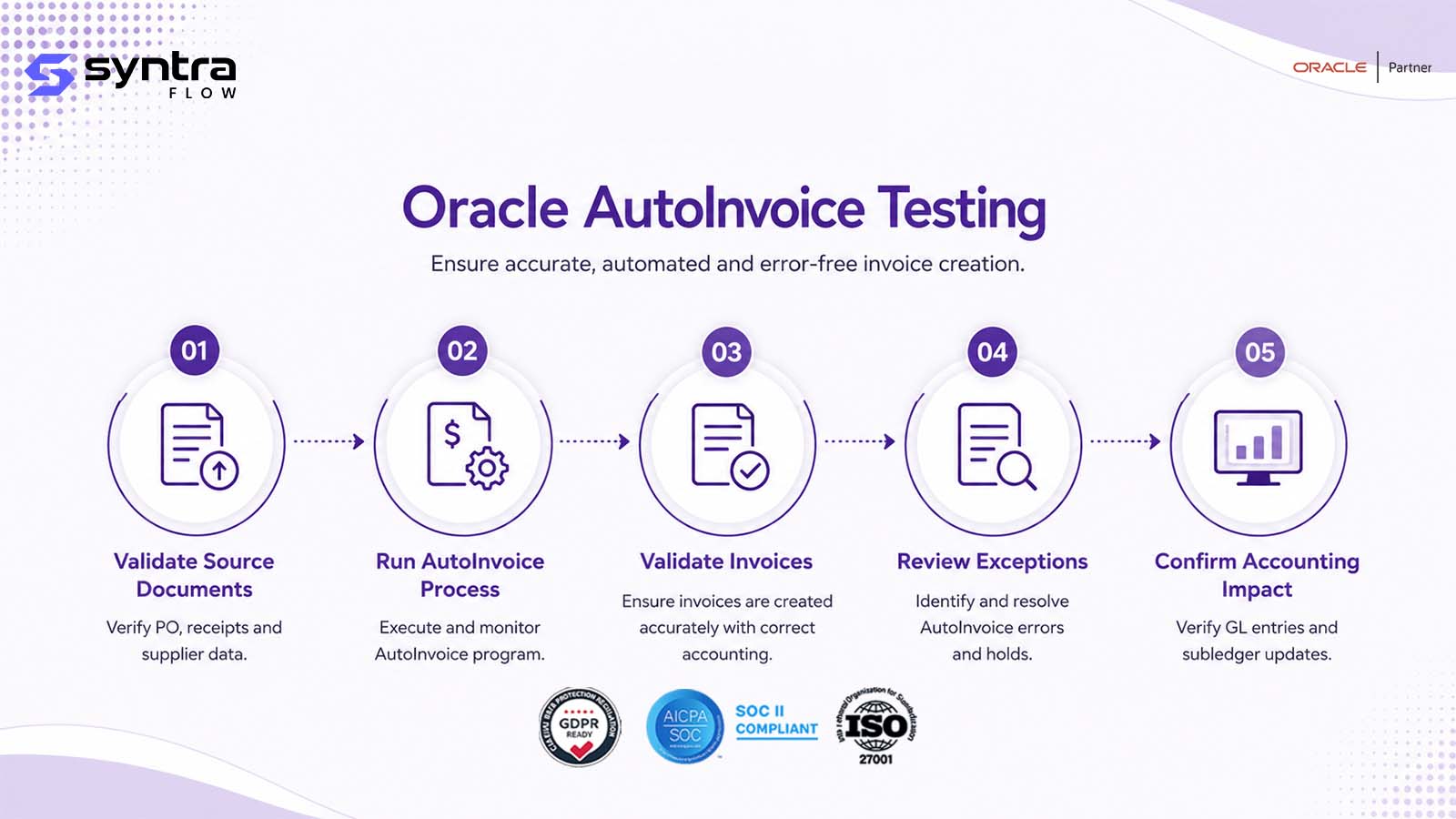
The Oracle AutoInvoice Process Flow
AutoInvoice runs on a schedule or on demand once a source system has staged data. Each run moves records through grouping, validation, and either invoice creation or exception handling.
AutoInvoice sequence
- Trigger: source system writes to the interface tables, then the AutoInvoice program runs on schedule, on demand, or via API.
- Grouping: configured rules decide whether lines combine by customer, order/project reference, currency, or other attributes into one invoice or several.
- Validation: each line is checked for a valid customer, bill-to site, transaction type, GL date, tax code, and unit of measure.
- Decision point: valid lines create the invoice, debit memo, or credit memo; invalid lines are written to the exceptions table with a reason.
- Exception handling: a user reviews the exception, corrects the data at source or in the interface, and resubmits the line through AutoInvoice.
- Expected output: a completed transaction for every valid line, and a clear, correctable exception for every rejected one — with no record silently lost.
Suggested visual: a swimlane diagram of the AutoInvoice sequence with the exception/resubmission loop, for the web team to produce.
Testing Scope & Coverage Matrix
The dimensions a complete AutoInvoice test suite must cover, with automation suitability and priority.
| Test area | What must be validated | Example scenario | Automation | Priority |
|---|---|---|---|---|
| Functional (pass) | Clean interface line creates an invoice | Valid record processes with no exception | High | High |
| Negative / validation | Bad data raises the correct exception | Missing bill-to site → exception | High | High |
| Grouping rules | Lines combine or split as configured | Group by customer vs by project | High | High |
| Exception handling | Rejected lines correctable and resubmittable | Corrected line reprocesses cleanly | High | High |
| Duplicate detection | Repeat source records don't double-invoice | Same order sent twice | High | High |
| Tax handling | Supplied and calculated tax both correct | Interface line with no tax amount | High | High |
| Role-based | Only privileged roles correct/resubmit exceptions | Read-only role denied resubmission | Medium | Medium |
| Multi-source integration | Each source system's data imports correctly | Projects, subscription, EDI, custom feed | High | High |
| Volume / performance | Large batches complete within SLA | Thousands of interface lines in one run | High | Medium |
| Integration / API | FBDI, REST, and scheduled loads behave consistently | Same data via FBDI vs REST | High | Medium |
| Regression / release | Behaviour unchanged after an update | Re-run pack after quarterly update | High | High |
| Evidence capture | Result and exception reason captured for audit | Exception log retained per batch | High | Medium |
Oracle AutoInvoice Test Scenarios
A representative set of 32 Oracle Fusion AutoInvoice scenarios — interface loading, grouping, validation, exceptions, source-system variety, and regression. Test IDs use the AR-AI prefix.
| ID | Scenario | Preconditions | Expected result | Pri | Auto |
|---|---|---|---|---|---|
| AR-AI-001 | Interface table populated correctly | Source system writes valid rows to RA_INTERFACE_LINES_ALL | Required columns populated per spec | H | Y |
| AR-AI-002 | AutoInvoice program submission | Interface records staged and ready | Program completes and processes records | H | Y |
| AR-AI-003 | Grouping rule by customer | Multiple lines, same customer, same rule | Single invoice created per customer | H | Y |
| AR-AI-004 | Grouping rule by order/project | Lines share the same order/project reference | Lines grouped into one invoice | H | Y |
| AR-AI-005 | Grouping rule by currency | Lines in different transaction currencies | Separate invoices per currency | H | Y |
| AR-AI-006 | Validation: missing customer | Interface line has no bill-to customer | Line rejected; exception logged | H | Y |
| AR-AI-007 | Validation: invalid transaction type | Line references an undefined transaction type | Line rejected with exception | H | Y |
| AR-AI-008 | Validation: invalid GL date | GL date falls in a closed period | Line rejected; period exception | H | Y |
| AR-AI-009 | Validation: invalid tax code | Line references a non-existent tax code | Line rejected; tax exception | H | Y |
| AR-AI-010 | Validation: missing bill-to site | Customer has no valid bill-to site | Line rejected; site exception | H | Y |
| AR-AI-011 | Validation: invalid unit of measure | Line UOM not defined for the item/UOM class | Line rejected; UOM exception | M | Y |
| AR-AI-012 | Successful invoice creation from interface | Clean, fully valid interface line | Invoice created; interface record marked processed | H | Y |
| AR-AI-013 | Multiple lines grouped into one invoice | Lines share all grouping attributes | Single multi-line invoice created | H | Y |
| AR-AI-014 | Multiple lines split into multiple invoices | Lines differ on a grouping attribute | Separate invoices created per rule | H | Y |
| AR-AI-015 | AutoInvoice exception report | Batch includes rejected records | Report lists each rejection with its reason | H | Y |
| AR-AI-016 | Exception correction and resubmission | Rejected line corrected in the interface | Line reprocesses and creates an invoice | H | Y |
| AR-AI-017 | Duplicate interface record | Same source document loaded twice | Duplicate rejected or flagged, not invoiced twice | H | Y |
| AR-AI-018 | Interface record with credit amount | Negative-amount interface line | Credit memo created, not a standard invoice | M | Y |
| AR-AI-019 | Interface record with freight | Line includes a freight amount/type | Freight charged correctly on the invoice | M | Y |
| AR-AI-020 | Interface record with tax already calculated | Line carries source-calculated tax amount | Oracle preserves the supplied tax amount | M | Y |
| AR-AI-021 | Interface record without tax | Taxable line, no tax amount supplied | Oracle calculates tax on the line | M | Y |
| AR-AI-022 | AutoInvoice from Projects billing | Interface populated by project billing extract | Invoice created with project references intact | H | Y |
| AR-AI-023 | AutoInvoice from subscription billing | Recurring billing extract loads the interface | Invoice created for the billing period | M | Y |
| AR-AI-024 | AutoInvoice from custom integration | Custom middleware populates the interface | Invoice created per the custom mapping | M | Y |
| AR-AI-025 | AutoInvoice from B2B/EDI | EDI-derived interface records | Invoice matches the EDI source data | M | Y |
| AR-AI-026 | Large-volume interface batch (performance) | High-volume batch, thousands of lines | Batch completes within SLA; no data loss | H | Y |
| AR-AI-027 | Partial batch failure | Batch mixes valid and invalid lines | Valid lines process; invalid lines exception only | H | Y |
| AR-AI-028 | AutoInvoice line rounding | Line amounts with fractional currency units | Rounding rule applied consistently | M | Y |
| AR-AI-029 | AutoInvoice run duplication prevention | Program re-run on an already-processed batch | No duplicate invoices created | H | Y |
| AR-AI-030 | Role-based access to exceptions | Non-privileged role opens the Exceptions Workbench | Access restricted per role | M | P |
| AR-AI-031 | Quarterly-release regression | Post-update tenant | Prior grouping/validation results reproduce | H | Y |
| AR-AI-032 | FBDI vs REST import parity | Same source data loaded via FBDI and REST | Same invoices and exceptions result | M | Y |
Pri = priority (H/M/L). Auto = automation candidate (Y suitable · P partly, needs role/data setup). Steps summarised; full step detail ships in the downloadable test pack.
Common AutoInvoice Exceptions & Defects
| Exception / defect | Likely cause | Business impact | Recommended test |
|---|---|---|---|
| Missing bill-to customer exception | Interface line lacks a customer reference | Line stuck in the exceptions queue | AR-AI-006 |
| Invalid transaction type exception | Source mapping doesn't match AR transaction-source setup | Invoice creation blocked | AR-AI-007 |
| Closed-period GL date exception | Source system posts to a closed period | Batch fails to interface; close delay | AR-AI-008 |
| Invalid tax code exception | Tax code deprecated, retired, or misspelled | Revenue misclassified or blocked | AR-AI-009 |
| Grouping rule mis-splits invoices | Grouping attribute mismatch across related lines | Customer receives too many invoices | AR-AI-004, AR-AI-014 |
| Grouping rule over-consolidates | Rule configured too broadly | Billing dispute; hard to trace source charges | AR-AI-003, AR-AI-013 |
| Duplicate invoice from re-run | Program re-processes already-loaded rows | Customer overbilled | AR-AI-017, AR-AI-029 |
| Tax recalculated incorrectly | Source-supplied tax flag misconfigured | Tax over- or under-stated | AR-AI-020, AR-AI-021 |
| Exceptions never resubmitted | Corrected records not resubmitted through AutoInvoice | Revenue held out of AR indefinitely | AR-AI-016 |
| Batch performance degradation | Interface volume exceeds the tuned batch size | Backlog delays the billing cycle | AR-AI-026 |
| Partial batch failure blocks all | Program treats one bad line as a whole-batch failure | Valid invoices delayed unnecessarily | AR-AI-027 |
| Rounding discrepancy | Currency precision rule mismatch between systems | GL/AR reconciliation break | AR-AI-028 |
How SyntraFlow Automates AutoInvoice Testing
SyntraFlow provisions interface data engineered to trigger a specific grouping, validation, or exception outcome, runs AutoInvoice, and asserts the exact result — not just that the program completed.
AI-assisted test generation
Generates AutoInvoice variants — grouping combinations, validation failures, exception types — from your interface and grouping-rule configuration.
Self-healing execution
Playwright-based runs against the Exceptions Workbench and Manage Transactions pages that re-anchor when Oracle changes them.
Dynamic interface & customer data
The Oracle Data Vault provisions interface records, customers, bill-to sites, and tax codes that produce the specific outcome each test needs.
Regression suite
Re-runs the full AR-AI pack after any grouping-rule, validation-rule, or tax change, not only on a fixed schedule.
Release intelligence
Release Intelligence narrows execution to the AutoInvoice cases an Oracle quarterly update actually touches.
Configuration intelligence
Configuration Intelligence compares grouping rules, validation rules, and account derivation across environments.
UI, API & batch execution
Runs AutoInvoice through the standard UI, REST, and FBDI/batch paths and confirms they agree on the same data.
Evidence capture
Timestamped screenshots, exception logs, and interface-to-invoice traces retained as audit-grade evidence for every run.
Quarterly-update testing
Re-validates grouping and validation behaviour against each Oracle Fusion Receivables update before it reaches production.
A note on capability. Pre-built AutoInvoice cases, self-healing execution, UI/API/batch validation, and evidence capture are current platform capabilities. Coverage scoped to your specific grouping rules, validation rules, and source systems is configurable during onboarding. Any tenant-specific extension is confirmed at assessment rather than assumed here — roadmap items are never presented as live.
Downloadable resource
Oracle AutoInvoice Test Pack
A structured starter pack covering the AutoInvoice import lifecycle: interface scenarios by source system, the validation conditions that produce each exception, expected results, evidence requirements, and a sign-off status column. Use it to benchmark your current coverage, then extend it to your own grouping rules, validation rules, and source integrations. Request it as part of a walkthrough and we will map it to your tenant.
Request the Test PackWhen to Re-Test AutoInvoice
AutoInvoice behaviour depends on configuration, source-system contracts, and master data, so any change to these is a regression trigger. Retest when these events occur:
| Change event | Risk to AutoInvoice | Recommended regression scope |
|---|---|---|
| Oracle quarterly update | Grouping or validation logic changes | Full AR-AI pack, release-scoped |
| Redwood / Exceptions Workbench redesign | Exception review UI changes | UI exception + resubmission cases |
| Grouping-rule configuration change | Invoice consolidation changes | Grouping-rule cases |
| AutoInvoice system-options change | Pass/reject behaviour shifts | Validation-rule cases |
| Tax rule / rate change | Tax calculation on interface lines shifts | Tax validation cases |
| New source system onboarded | New interface population pattern introduced | Source-specific import cases |
| Transaction-source setup change | Mapping to AR transaction types changes | Transaction-type validation cases |
| Chart-of-accounts / AutoAccounting change | Revenue account derivation changes | Account-derivation cases |
| Security-role change | Who can view/correct exceptions changes | Role-based exception cases |
| Interface volume / batch-size change | Performance profile shifts | Volume / performance cases |
| Production defect fix | Fix may regress adjacent grouping/validation | Targeted + smoke AR-AI pack |
AutoInvoice & Oracle Quarterly Releases
Oracle's quarterly updates can change AutoInvoice without any action on your part — through feature opt-ins, Redwood redesigns of the Exceptions Workbench, new or altered validation rules, or deprecated grouping behaviour. Because AutoInvoice is the on-ramp for most of your Receivables revenue, a silent change here is exactly the kind you must catch before it reaches production.
Rather than re-testing every AutoInvoice scenario on every release, SyntraFlow Release Intelligence narrows the work to what actually changed in your tenant:
- 1.Analyses the Oracle release notes for changes touching Receivables AutoInvoice.
- 2.Maps those changes to your configuration — grouping rules, validation rules, tax setup.
- 3.Identifies the source systems and transaction types affected.
- 4.Recommends the specific AR-AI test cases to run.
- 5.Prioritises regression execution by risk.
- 6.Tracks AutoInvoice evidence for audit and sign-off.
See how the impact map is built on the Release Impact Analysis page.
Configurations That Drive AutoInvoice
An AutoInvoice test is only trustworthy if the configuration behind it is known and stable. These setups determine whether an interface line becomes an invoice or an exception — and when they drift between environments, tests pass against the wrong reality.
| Configuration area | Testing impact | Example failure | Recommended validation |
|---|---|---|---|
| AutoInvoice grouping rules | Determine invoice consolidation | Rule change splits invoices unexpectedly | Grouping-rule cases |
| AutoInvoice validation/line-ordering rules | Determine which lines pass or reject | Rule loosened lets bad data through | Validation-rule cases |
| Transaction sources | Map interface data to AR transaction types | Source misconfigured for a new feed | Transaction-type cases |
| AutoAccounting rules | Derive revenue, tax, and freight accounts | Wrong account derived on import | Account-derivation cases |
| Tax rules & rates | Drive tax calculation on interface lines | Rate out of sync with source | Tax validation cases |
| Customer & bill-to site setup | Gates customer/site validation | Site inactive in test only | Customer/site validation cases |
| AR system options | Govern duplicate checking and rounding | Option toggled between environments | Duplicate / rounding cases |
| Period / calendar status | Gates GL-date validation | Period open in one environment only | Period/date cases |
SyntraFlow's Configuration Intelligence compares these setups across environments and flags drift before it corrupts an AutoInvoice test result — so a passing test means the configuration was correct, not just present.
Related Oracle Receivables Pages
AutoInvoice connects to the rest of the AR suite. Go deeper on adjacent topics:
Frequently Asked Questions
What is Oracle AutoInvoice and how does it work?
▼
AutoInvoice is the Oracle Fusion Receivables program that imports billing data staged in the interface tables — principally RA_INTERFACE_LINES_ALL — into completed invoices, debit memos, or credit memos. It applies grouping rules to decide how lines combine, validation rules to check each line, then creates transactions for valid lines and raises exceptions for invalid ones.
How is this different from Oracle Invoice Testing?
▼
This page covers the AutoInvoice import process — interface loading, grouping, validation, and exceptions — for invoices arriving from external and upstream systems. Oracle Invoice Testing covers manually entered invoices and the invoice transaction object itself, regardless of how the transaction reached AR. If your invoice starts in the interface tables, test it here; if it starts with a user typing it into Manage Transactions, test it there.
How is AutoInvoice testing different from Oracle Billing Testing?
▼
Billing-run generation happens upstream, inside a module like Projects or a subscription engine, and decides what to bill and how much. AutoInvoice testing starts once that billing data has been written to the interface tables and focuses on whether it correctly becomes an AR invoice. See Oracle Billing Testing for the billing-run side.
What interface tables does AutoInvoice testing need to cover?
▼
At minimum, RA_INTERFACE_LINES_ALL for line-level data, RA_INTERFACE_DISTRIBUTIONS_ALL for accounting distributions when supplied, RA_INTERFACE_SALESCREDITS_ALL for sales-credit allocations, and RA_INTERFACE_ERRORS_ALL for the exceptions AutoInvoice raises. A complete suite verifies that data lands correctly in each and that AutoInvoice reads it as expected.
What are AutoInvoice grouping rules and why do they need testing?
▼
Grouping rules decide whether multiple interface lines become one invoice or several, based on attributes like customer, order or project reference, and currency. A misconfigured rule either splits related charges into a confusing set of invoices or merges unrelated charges into one, so each grouping attribute needs its own explicit test.
What validation rules should AutoInvoice testing cover?
▼
At minimum: a valid customer and bill-to site, a defined transaction type, an open GL date, a valid tax code, and a recognised unit of measure. Each should be tested as a negative case that produces the correct exception, and as a positive case once the underlying data is corrected and resubmitted.
How do you test AutoInvoice exceptions and resubmission?
▼
Load data engineered to fail a specific validation, confirm the exception is raised with the correct reason in the Exceptions Workbench, correct the underlying data, resubmit through AutoInvoice, and confirm the line now creates the expected transaction. Both halves — the rejection and the successful resubmission — need coverage.
How do you prevent duplicate invoices from AutoInvoice?
▼
Test that loading the same source document twice, or re-running AutoInvoice over an already-processed batch, does not create a second invoice. This depends on source-system document references and Oracle's duplicate handling, so it should be tested per source system rather than assumed to work universally.
Does AutoInvoice testing cover credit memos?
▼
Yes. A negative-amount interface line should create a credit memo rather than a standard invoice, with the correct sign and accounting. This is a distinct test from a manually entered credit memo, since it depends on how AutoInvoice interprets the amount and transaction-type mapping on import.
How does AutoInvoice handle tax, and does testing need both scenarios?
▼
A source system can either supply a pre-calculated tax amount on the interface line or leave tax for Oracle to calculate. Both paths need explicit test coverage, because a misconfigured flag can cause Oracle to overwrite a correct supplied tax amount, or fail to calculate tax when none was supplied.
What source systems commonly feed AutoInvoice?
▼
Common sources include project billing, service and subscription billing platforms, B2B/EDI gateways, and custom point-to-point integrations. Each has its own extract logic and data patterns, so AutoInvoice testing should include at least one representative scenario per source your organisation actually uses.
How do you test AutoInvoice at volume?
▼
Load a batch sized to match a realistic peak — end-of-month billing runs, for example — and confirm the AutoInvoice program completes within its expected window, processes every valid line, and does not silently drop or duplicate records. Performance defects at this stage typically surface as a billing-cycle backlog rather than an outright error.
How often should AutoInvoice be regression tested?
▼
On every Oracle quarterly update, and after any change to grouping rules, validation rules, tax setup, AutoAccounting, or the security roles governing exception access. Because AutoInvoice is a high-volume revenue on-ramp, silent drift here tends to surface only when a billing cycle is already underway.
Who should have access to AutoInvoice exceptions?
▼
Access to correct and resubmit interface data should be limited to roles with the appropriate AR privilege, since exception correction can directly change what gets invoiced. Testing should confirm that a read-only or unrelated role cannot edit or resubmit interface records.
What test data does AutoInvoice testing need?
▼
Each test needs interface data engineered to produce a specific outcome — a missing bill-to site, a closed-period GL date, a duplicate document reference, a credit amount. SyntraFlow's Oracle Data Vault provisions valid customers, sites, and tax codes so tests produce the intended result reliably instead of relying on hand-built fixtures.
Strengthen Your Oracle Receivables Test Coverage
Identify gaps in your AutoInvoice test suite, automate high-risk grouping and validation scenarios, and prepare for Oracle quarterly updates with SyntraFlow. See it run against AutoInvoice cases like yours.