Syntra DataVault — Data Masking
Enterprise Data Masking for Non-Production Environments
Protect sensitive implementation and test data while preserving the structure and relationships required for meaningful enterprise testing. DataVault provides reusable masking policies across connected application and data environments.
Masking Flow
Production-Like Data Creates Non-Production Risk
Implementation, testing, UAT, training and development environments generally need data that behaves like real enterprise data — realistic volumes, realistic relationships and realistic edge cases. The fastest way to get that has traditionally been to copy production data as-is into non-production environments. That approach also copies every sensitive value along with it, creating exposure that has nothing to do with the testing objective.
Categories of data that commonly appear in non-production copies include:
DataVault is designed to help teams keep the structure and relationships that make test data useful, while reducing how much of this sensitive information is present in non-production copies in its original, readable form.
From Sensitive Data to Protected Test Data
A repeatable lifecycle turns a raw source copy into a usable, protected test data set.
1. Discovery
Scan source objects and fields to identify where sensitive data lives.
2. Classification
Assign a sensitivity category, such as PII, Financial or Confidential, to each field.
3. Masking Policy
Define how each classified field should be protected, once, for reuse.
4. Transformation
Apply the configured masking method to convert sensitive values into protected ones.
5. Validation
Independently confirm that the expected protection is actually present.
6. Protected Test Data
Data is ready for implementation, testing, UAT, training or development use.
Identify What Needs Protection
Sensitive Data Discovery scans configured Source Systems to help identify which objects and fields contain sensitive values, so masking policies can be targeted at what actually needs protection.
| Object | Field | Classification | Sensitive Records |
|---|---|---|---|
| Workers | national_id | PII | 4,220 |
| Supplier Bank Accounts | account_number | Financial | 2,510 |
| Customers | email_address | Contact | 14,630 |
| Suppliers | tax_registration_no | Confidential | 5,100 |
Illustrative example data shown for explanatory purposes only — not actual customer records.
Apply the Right Protection Method for Each Data Type
Different fields call for different treatment. A national ID and an email address are both sensitive, but they are not usefully protected the same way. DataVault supports several masking methods that can be assigned per Masking Policy.
Redaction
AB123456C → XXXXXXXX
Replaces the original value entirely with a fixed masking character.
Partial Masking
1234 5678 4417 → **** **** 4417
Obscures most of a value while leaving enough visible for recognition or testing.
Hashing
Sensitive Value → 8f3c1a...d92
Converts a value into a fixed-length representation that does not reveal the original.
Email Masking
jane.smith@company.com → j*****@masked.test
Preserves a recognizable email structure while removing the real address.
Shuffle / Substitution
Replaces a source value with another non-sensitive test value drawn from a configured substitution set, rather than deriving a new value from the original.
Synthetic Replacement
Jane Smith → Sarah Williams
Generates a realistic, fictitious replacement value, supported where configured.
Tokenization
RoadmapReversible token-based protection, where implemented, for cases requiring controlled re-identification.
Define Policies Once and Reuse Them
Rather than configuring masking screen by screen, DataVault Masking Policies map to a data concept — such as Personal Email or Bank Account — so the same policy can apply everywhere that concept appears across connected objects.
| Policy | Data Concept | Classification | Method | Scope |
|---|---|---|---|---|
| EMAIL_MASK | Personal Email | Contact-PII | Email Mask | Non-production |
| BANK_MASK | Bank Account | Financial | Partial | Test-UAT |
| NATIONAL_ID | National ID | PII | Redact | All non-prod |
| TAX_ID | Tax Registration | Confidential | Hash | Selected environments |
Because a policy is tied to the data concept rather than to a specific screen or report, adding a new object that contains a Personal Email or National ID field does not require writing a new rule from scratch — the existing policy can be applied to it.
Apply Different Policies by Environment
Masking Policy scope can differ by environment. Production is not modified by DataVault unless explicitly configured to do so — masking is applied when data is copied into non-production environments.
Implementation
Masking RequiredSIT
Masking RequiredUAT
Masking RequiredDevelopment
Masking RequiredProtect Data Without Breaking End-to-End Testing
A simple field-replacement utility that masks each value independently can leave test data internally inconsistent — the same person can end up with a different masked name in two different systems, breaking cross-system test scenarios. Where deterministic masking is supported, the same transformed identity can be used consistently across mapped systems.
Original Identity
Jane Smith
jane.smith@company.com
Protected Identity
Sarah Williams
sarah.williams@masked.test
This consistency matters most in scenarios that span multiple objects or systems — employee integrations, customer flows, supplier flows, financial reconciliation and other end-to-end testing where the same underlying person or entity is expected to appear the same way everywhere it is referenced.
Measure What Is Masked and What Remains Exposed
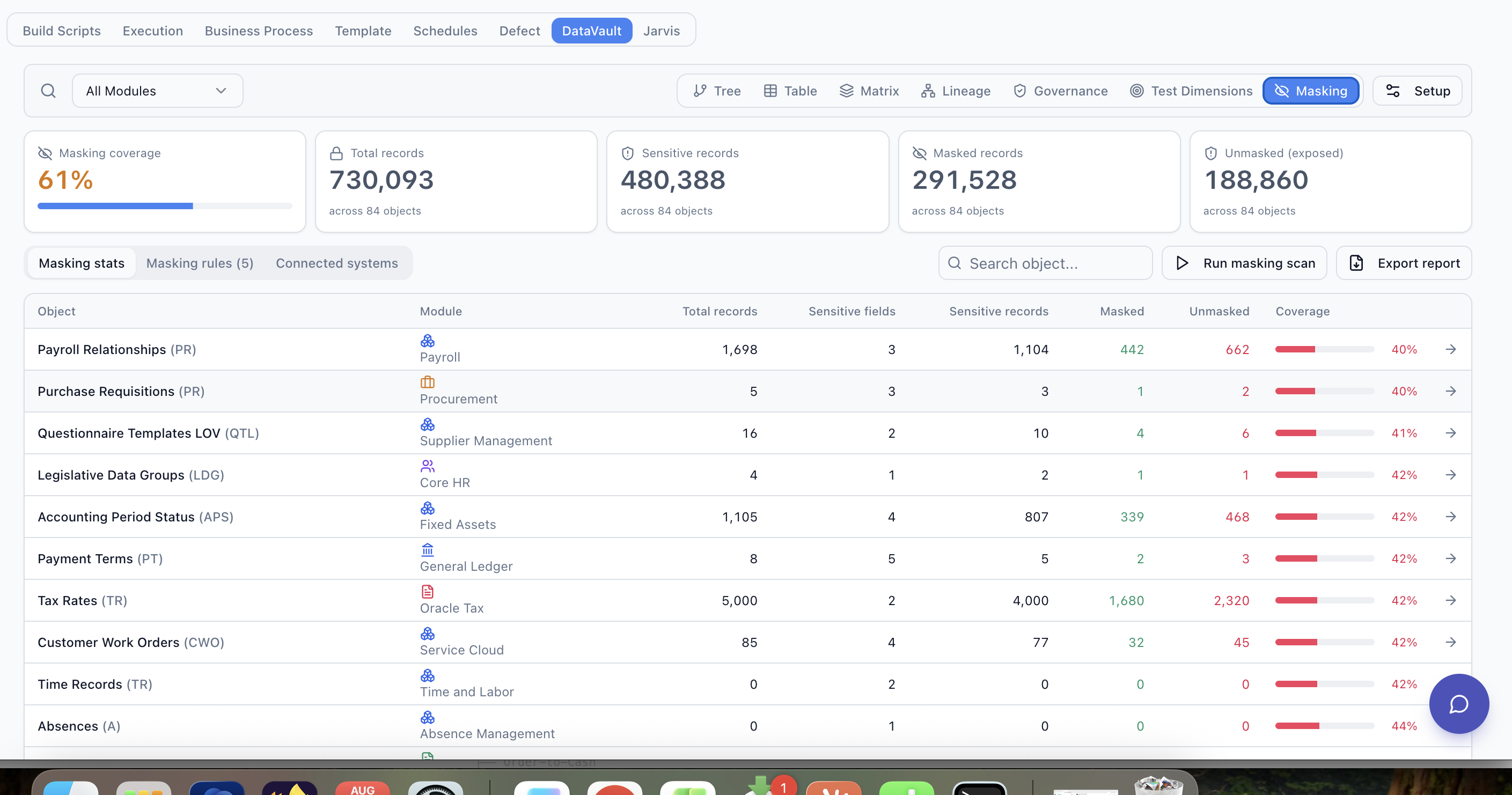
A masking exercise is only useful if you can measure it. DataVault can report on total records, sensitive records identified, records masked, and records that remain unmasked and exposed.
730,093
Total Records
480,388
Sensitive Records
291,528
Masked Records
188,860
Unmasked / Exposed
61%
Coverage
| Object | Sensitive Records | Masked | Coverage |
|---|---|---|---|
| Workers | 4,220 | 4,220 | 100% |
| Customers | 14,630 | 9,010 | 62% |
| Suppliers | 5,100 | 2,652 | 52% |
| Supplier Bank Accounts | 2,510 | 2,510 | 100% |
Illustrative example data shown for explanatory purposes only — not actual customer statistics.
Reapply Protection After Refreshes and Data Loads
Non-production environments are frequently refreshed from production, which can reintroduce unmasked sensitive data. Masking Drift describes a previously protected or expected-to-be-protected field or record that no longer satisfies the defined protection policy — a common outcome of an environment refresh. DataVault scans are designed to be run after a refresh to identify and remask affected data.
Extend Masking Policies Across the Enterprise Landscape
Sensitive data rarely stays in one place. It flows from Source Systems into Downstream Systems — the applications, integrations, databases, files and analytics systems that receive that data. DataVault uses a connector and mapping model to relate the same data concept across these systems, subject to authorized connectivity and applicable supported connectors, so a Masking Policy defined once can be traced to where that data lands downstream.
Explore Downstream Masking AssuranceMasking a source field is only part of the picture. Two related DataVault capabilities extend the same policies further: masked data still needs to be provisioned as coherent, right-sized data sets for testing, and both source and downstream copies benefit from being tracked over time.
DataVault Across Enterprise Applications
DataVault is built on a connector-based architecture. Platform-specific pages are published as connectors are validated.
Workday →
Worker and implementation data masking and downstream verification.
Oracle Fusion →
Object-level test data harvesting and masking for Oracle Fusion environments.
SAP
RoadmapConnector not yet validated.
Salesforce
RoadmapConnector not yet validated.
Frequently Asked Questions
What is enterprise data masking?
What types of information can DataVault mask?
Is masked data still usable for testing?
Can the same masked identity be maintained across systems?
Can masking be applied after environment refreshes?
Does DataVault make an organization GDPR compliant?
See DataVault Across Your Enterprise Landscape
Show us a representative application and downstream data flow. We'll demonstrate how DataVault can model sensitive data, masking policies, test-data relationships, lineage and downstream verification.