DataVault — Downstream Masking Assurance
Verify Sensitive Data Remains Masked Downstream
Follow sensitive data from its source application into connected systems, verify expected protection at each destination and identify masking drift before exposed values spread through non-production environments.
Masking at the source is only the beginning. DataVault verifies protection across the connected data journey.
Illustrative downstream flow
Data Moves Beyond the Application Where It Was Masked
A Masking Policy applied at the Source System protects data where the rule runs. It says nothing about what happens once that same data is extracted, transformed, replicated or synchronized into a Downstream System. Integrations, extract files, reporting layers and analytics platforms each represent a new opportunity for a sensitive value to arrive unprotected — even when the source was masked correctly.
Common reasons a Downstream System can end up with unmasked or partially masked data, even when the Source System is correctly protected:
- Transformation failures during extract, load or sync
- Unmapped fields not covered by the source Masking Policy
- Extract copies and file drops taken outside the managed pipeline
- Legacy interfaces that bypass current masking rules
- Independent refreshes of a downstream environment
- Configuration drift in connector or mapping settings
- New target fields added after the policy was defined
- Masking rules not propagated to a newly connected destination
Applied, Propagated and Verified Are Not the Same Thing
Most masking programs stop at the first of these three states and assume the rest follow. DataVault treats each state as something that has to be independently established.
Policy Applied
The Masking Policy exists and runs at the Source System or a staging layer.
Policy Propagated
Equivalent protection logic has been configured for a connected Downstream System, where supported.
Downstream Verified
DataVault has independently checked the destination against the expected Masking Policy — Masking Verification.
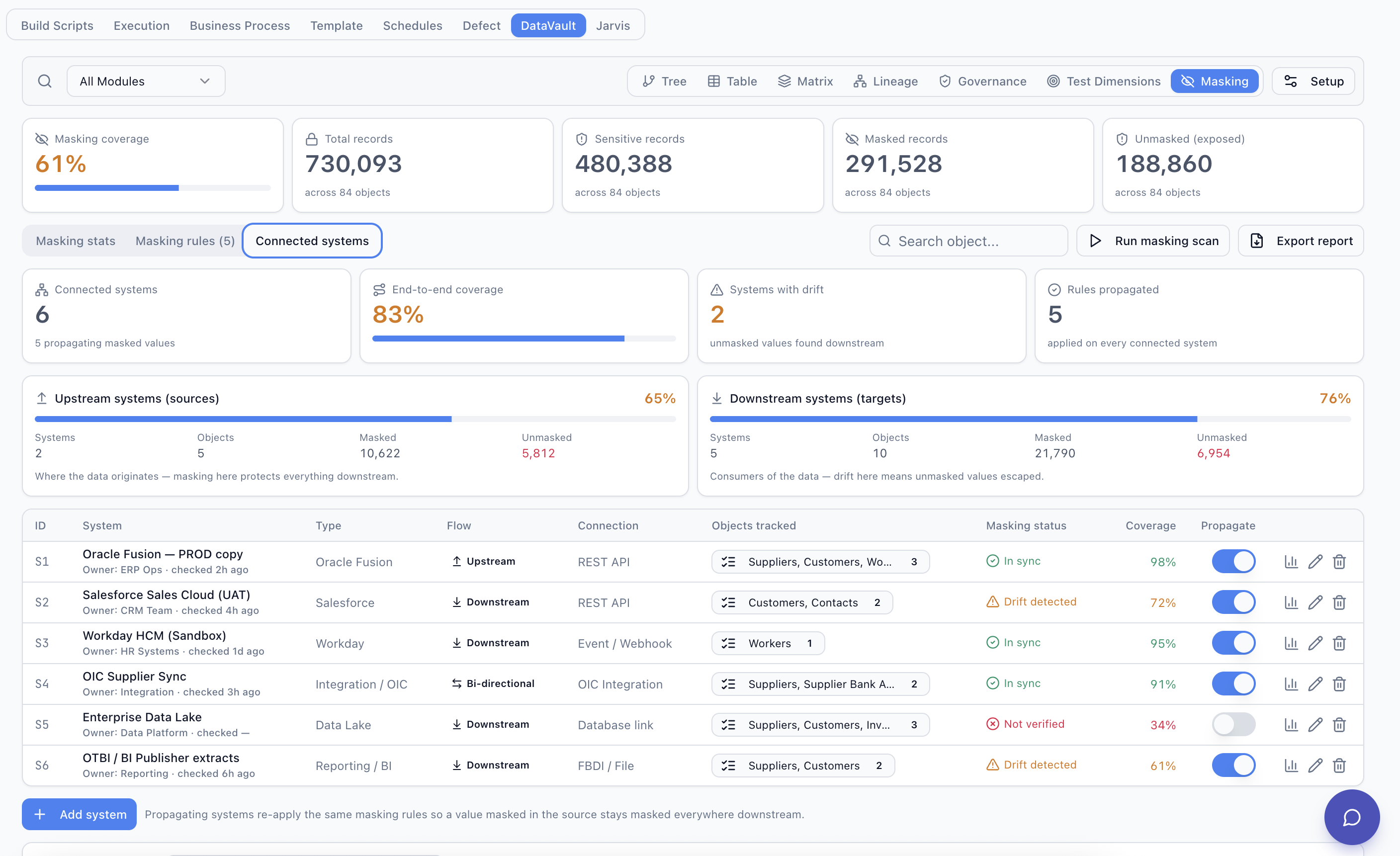
See Protection Status Across Connected Systems
A connected-systems view brings Source and Downstream Systems into one place, showing Masking Verification status and estimated coverage for each.
| System | Direction | Verification | Coverage |
|---|---|---|---|
| HCM Source | Upstream | Verified | 98% |
| CRM Test | Downstream | Drift detected | 72% |
| Payroll Test | Downstream | Verified | 95% |
| Data Lake | Downstream | Not verified | 34% |
| BI Extract | Downstream | Drift detected | 61% |
Illustrative example data for a representative environment. Not real customer statistics.
Measure End-to-End Masking Assurance
Source Masking Coverage measures how much sensitive data is protected at the point of origin. End-to-End Coverage measures how much of that same protection is still confirmed present once the data has moved through every connected Downstream System. The two numbers are rarely identical, and the gap between them is where undetected exposure tends to live.
98%
Source Masking
96%
CRM
100%
Payroll
74%
Data Lake
89%
Reporting
83%
End-to-End Assurance
Illustrative figures used to explain the concept, not real production metrics.
Follow One Sensitive Attribute Across the Data Flow
Masking Verification can operate at the level of a single classified field, tracing it from the Source System through the Integration Layer into every mapped destination.
Attribute drill-down
- Expected downstream value
- j*****@masked.test
- Found downstream
- Original-format sensitive value
- Status
- Drift Detected
Detect Masking Drift Before It Becomes Widespread Exposure
Masking Drift is a previously protected or expected-to-be-protected field or record that no longer satisfies the defined protection policy. Drift is rarely caused by a single dramatic failure — it usually accumulates from small changes that nobody flagged as a masking concern:
- A new integration field added to an existing flow
- A changed source mapping or extract definition
- A new downstream destination connected without review
- A masking rule disabled or misconfigured
- A target environment refresh from an unmasked source
- A transformation step bypassed or reordered
- A configuration change to a connector or job
- Target
- Enterprise Data Lake
- Object
- Worker Extract
- Field
- personal_email
- Expected policy
- EMAIL_MASK
- Affected records
- 62
- Status
- Exposed
Illustrative interface example.
Protect the Data Concept, Not Just One Application Field
The same sensitive business concept — an employee's personal email address, for example — is stored under a different object and field name in every application. Where connected, DataVault maps equivalent business concepts to a shared Masking Policy across systems, so verification checks for the same protection regardless of the local field name. The object and field names below are conceptual examples used to illustrate the mapping, not a validated schema for every customer environment.
| System | Object.Field (conceptual example) | Masking Policy |
|---|---|---|
| Workday | Worker.PersonalEmail | EMAIL_MASK |
| Salesforce | Contact.Email | EMAIL_MASK |
| SAP | Employee.ContactEmail | EMAIL_MASK |
| Data Lake | employee.personal_email | EMAIL_MASK |
Conceptual mapping example. Availability of a given connector, object or field is subject to authorized connectivity and applicable supported connectors.
Produce Evidence Across the Full Data Path
A downstream verification report ties a single sensitive attribute to every system it touches, and to the result of checking it there. Typical report contents include:
- Source system
- Source object and field
- Classification
- Masking Policy applied
- Connected downstream targets
- Expected result
- Target result
- Coverage
- Masking Drift, where detected
- Verification timestamp
- Exceptions
Where Downstream Masking Verification Applies
Conceptual examples of the kind of source-to-downstream flow DataVault is designed to help verify, where connected. These are illustrative patterns, not connector certifications.
Workday → Payroll / Data Lake
Worker data flowing from Workday into payroll processing and analytics platforms.
Oracle Fusion → CRM / Reporting
Customer and transaction data moving from Oracle Fusion into CRM and reporting layers.
Salesforce → Analytics
Contact and opportunity data replicated into downstream analytics environments.
SAP → Warehouse / Reporting
Employee and business partner data extracted into a data warehouse or reporting tool.
Source Application → Integration Middleware
Data passing through an integration or ESB layer before reaching any final destination.
Application Extracts / Files
Flat-file exports and ad hoc extracts taken outside a managed integration pipeline.
Downstream Masking works alongside the rest of the DataVault platform: source-side Data Masking, environment-level Test Data Management and Data Lineage that traces where a sensitive field originated and everywhere it has been copied.
DataVault Across Enterprise Applications
DataVault is built on a connector-based architecture. Platform-specific pages are published as connectors are validated.
Workday →
Worker and implementation data masking and downstream verification.
Oracle Fusion →
Object-level test data harvesting and masking for Oracle Fusion environments.
SAP
RoadmapConnector not yet validated.
Salesforce
RoadmapConnector not yet validated.
Frequently Asked Questions
What is downstream data masking?
How is downstream masking different from source masking?
Does DataVault automatically modify downstream systems?
What is masking drift?
Can DataVault verify data in a data lake?
Can the same policy be used across Workday, Oracle, SAP and Salesforce?
What happens if a downstream system cannot be accessed?
See DataVault Across Your Enterprise Landscape
Show us a representative application and downstream data flow. We'll demonstrate how DataVault can model sensitive data, masking policies, test-data relationships, lineage and downstream verification.