Oracle AI Agent Studio for Fusion Applications
Oracle AI Agent Studio is the configuration environment inside Oracle Fusion Applications where administrators and functional teams build, extend, and manage AI agents that act on Fusion data and processes. It brings agent templates, knowledge-source attachment, tool and API wiring, instruction management, and approval controls into one workspace, so agent development mostly happens through configuration rather than custom code.
This page covers how Agent Studio is put together — what you configure, connect, and must govern before an agent touches production data. For the broader concept of Oracle AI agents, see Oracle AI Agents. To validate an agent once built, see Oracle AI Testing.
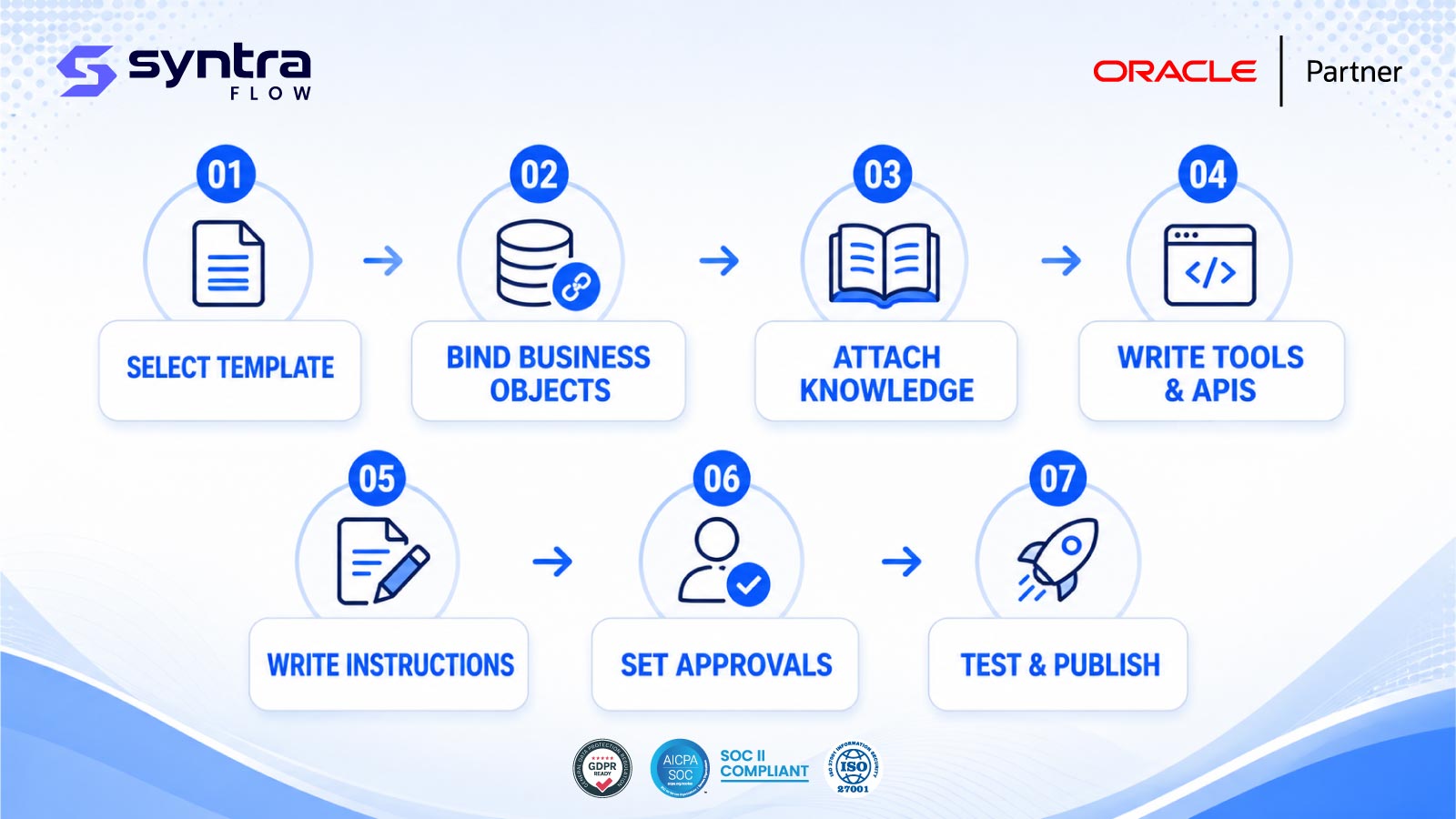
What Oracle AI Agent Studio Is
Agent Studio sits alongside Oracle's pre-built, Oracle-delivered AI agents as the place where customers configure their own. Rather than every agent shipping fixed and unchangeable, Agent Studio exposes the building blocks Oracle uses internally — templates, knowledge attachment, tool bindings, instructions, and approval gates — to functional administrators, so agents can be tailored to a tenant's own processes, terminology, and controls.
Most of that configuration is declarative: select a template, point it at business objects and knowledge sources, choose the tools it can call, set who approves its actions. That lowers the bar for building an agent compared to a fully custom integration, but it doesn't remove the need for testing, security review, and change control — a configured agent still reads and writes real Fusion data.
Scope note. This page focuses on Agent Studio's build and configuration mechanics. Governance responsibilities — approval policy, audit trails, and lifecycle ownership across an agent estate — are covered on Oracle AI Governance. Oracle continues to evolve Agent Studio each quarterly update; treat capability details below as observed categories rather than a fixed feature list.
Supported Agent-Building Capabilities
In direct answer: Agent Studio's core capability set spans templated agent creation, knowledge and data grounding, tool and API connections, instruction authoring, approval workflow design, and role-based access — the same categories that determine how much configuration work a given agent needs.
Template-based creation
Start from an Oracle-provided or prior custom agent template rather than an empty configuration.
Knowledge attachment
Ground responses in documents, help content, and Fusion data so the agent answers from your tenant.
Business object binding
Scope an agent to the objects and business processes it is allowed to read or act on.
Tool and API wiring
Connect agents to Fusion actions, REST services, and integration flows they can invoke.
Instruction authoring
Define the prompts, guardrails, and behavioural instructions that shape agent responses.
Approval workflow design
Insert human checkpoints before an agent commits a transaction or sensitive change.
Role-based access
Control which roles can build, publish, or invoke a given agent, consistent with Fusion security.
Orchestration across agents
Coordinate a primary agent with supporting agents for multi-step or cross-process work.
Lifecycle management
Version, publish, retire, and monitor agents as configuration and data change over time.
Agent Templates and Orchestration
In direct answer: most Agent Studio configurations begin from a template — either an Oracle-delivered pattern for a common Fusion process or a previously built custom agent cloned as a starting point — and orchestration lets a primary agent hand off sub-tasks to other agents rather than one agent trying to do everything itself.
Typical build sequence
Orchestration becomes relevant once a process spans more than one specialised agent — for example, a request-handling agent that gathers information and a second agent that executes an approved transaction. How agents coordinate, and where responsibility for a given step sits, is itself something to design and test deliberately rather than assume works correctly by default.
Knowledge Sources
In direct answer: knowledge sources are the documents, help content, policies, and structured data an agent draws on to ground its responses, and Agent Studio configuration determines which sources a given agent can see. An agent without well-scoped knowledge sources tends to answer generically or from stale training knowledge rather than from your tenant's actual policies and data.
Getting knowledge scope right matters for accuracy and for security: a knowledge source that is too broad can surface information a requesting user shouldn't see, while one that is too narrow produces incomplete or unhelpful answers. Knowledge configuration should be reviewed alongside the business objects an agent is bound to, since the two together define what the agent actually knows and can act on.
Testing implication. Knowledge grounding is one of the harder things to validate by inspection alone — it typically requires running representative questions against the configured sources and checking the answers, not just confirming the sources are attached. See Oracle AI Testing for how this fits into a broader test approach.
Business Objects and Application Context
In direct answer: business object binding is the configuration step that scopes an agent to specific Fusion records and processes — a Payables agent bound to invoices and suppliers, an HCM agent bound to worker and absence records — so the agent operates within a defined application context rather than an unbounded one.
This scoping determines both what the agent can retrieve and, where write actions are configured, what it can change. Because business object access in Agent Studio is layered on top of standard Fusion security, an agent's effective reach is the intersection of its own configuration and the security profile of whichever role invokes it — a detail worth confirming explicitly rather than assuming, since it directly affects segregation-of-duties exposure.
Tools, APIs and Integrations
In direct answer: tools are the actions an agent is permitted to call — Fusion business actions, REST APIs, and integration flows — configured explicitly rather than inferred, so an agent can only do what it has been wired to do. This is the mechanism that turns an agent from something that only answers questions into something that can also submit a request, update a record, or trigger a downstream process.
Each tool binding is a control point. Every API or action added to an agent's toolset should be reviewed for what it allows and whether an approval checkpoint sits in front of it — the same discipline as any integration that writes to production Fusion data, since an agent action and a user action against the same API aren't meaningfully different to the application.
Prompt and Instruction Management
In direct answer: instructions are the configured guidance — tone, scope, escalation behaviour, and explicit boundaries — that shapes how an agent interprets a request and decides whether to answer, ask a clarifying question, invoke a tool, or defer to a human. Agent Studio treats instructions as configuration, so they can be edited and versioned without redeploying the underlying agent template.
Instruction changes are still functional changes with real consequences: a loosened boundary can widen what an agent will attempt, and a tightened one can make it unhelpfully rigid. Treat instruction edits like any other change to a business process — worth a targeted re-test, not just a visual read-through.
Human Approval Controls
In direct answer: approval controls are configurable checkpoints that require a human to review and confirm an agent's proposed action before it commits — typically used for anything that writes data, initiates a transaction, or falls outside a low-risk, read-only pattern. Agent Studio lets these checkpoints be attached at the tool or action level, so a single agent can operate autonomously for some steps and require sign-off for others.
Where approval sits, and who is authorised to give it, is a governance decision as much as a technical one — it should mirror the segregation-of-duties model applied to the equivalent manual process, not stand in as a lightweight substitute. See Oracle AI Governance for how approval policy fits into a broader governance model.
Security and Access
In direct answer: Agent Studio access is layered — who can build and publish an agent, who can configure its knowledge and tools, and who can invoke it at runtime are three distinct permission questions, and each should be assigned deliberately rather than defaulted broadly. Because agents can read sensitive Fusion data and, where configured, take action on it, an agent's security profile deserves the same scrutiny as a new integration or a new privileged role.
Common risk areas include an agent inheriting broader data access than the requesting user should have, a build-time role that can also grant runtime access, and knowledge sources that leak information across role boundaries — failure modes worth testing explicitly, not just reviewing on paper. See Oracle AI Security for a deeper treatment of Oracle AI security risk categories.
Testing and Deployment
In direct answer: an Agent Studio configuration is ready to publish once its knowledge grounding, tool actions, instructions, and approval checkpoints have each been exercised against representative scenarios — not just configured and visually reviewed. Deployment itself is a configuration change like any other in Fusion and should move through the same non-production validation and promotion path.
Test design itself is covered on the dedicated Oracle AI Testing page, which addresses how to structure test cases for agent accuracy, tool behaviour, and approval-gate correctness. The build discipline that matters here: don't publish a change to a live agent without first running it through a defined test pass, the same as any other Fusion setup change.
Monitoring and Maintenance
In direct answer: agents built in Agent Studio need ongoing monitoring for usage, tool-call outcomes, and approval-gate activity, plus periodic re-validation whenever the knowledge sources, business objects, tools, or instructions behind them change. An agent that was accurate at launch can drift as underlying Fusion data, configuration, or an Oracle quarterly update shifts around it.
Treat an agent estate like any other set of configured Fusion processes: know what's published, know who owns each agent, and re-test after configuration edits, knowledge-source updates, and Oracle's own quarterly changes. The Oracle AI Release Intelligence page tracks how quarterly updates affect AI Agent Studio and related AI capabilities specifically.
Common Implementation Risks
Most Agent Studio implementation problems trace back to a small number of configuration gaps — overscoped access, unvalidated knowledge grounding, missing approval gates, untested tool actions. The table below summarises the ones worth checking first.
| Risk | How it shows up | Potential impact | Mitigation |
|---|---|---|---|
| Overscoped business object access | Agent bound to more records than the process needs | Data exposure beyond intended scope | Scope binding to the minimum required objects |
| Knowledge source drift | Attached documents go stale after a policy change | Agent gives outdated or incorrect answers | Owner assigned to refresh sources on a cadence |
| Missing approval checkpoint | Write-capable tool published without a human gate | Unreviewed transaction commits to Fusion | Require approval on every write-capable action |
| Untested tool behaviour | API/tool wired but never exercised end to end | Failure or wrong action discovered in production | Test each tool call against representative cases |
| Instruction ambiguity | Vague or conflicting guidance in agent instructions | Inconsistent or unpredictable agent responses | Review instructions for explicit boundaries |
| Role/runtime access mismatch | Build-time role also grants broad runtime invocation | Segregation-of-duties weakness | Separate build, configure, and invoke permissions |
| No owner after go-live | Agent published with no assigned maintenance owner | Drift goes unnoticed until a failure is reported | Assign an owner and a monitoring cadence |
| Quarterly update impact | Oracle changes Agent Studio behaviour or dependent pages | Silent behaviour change in production agents | Review release notes and re-test affected agents |
Frequently Asked Questions
What is Oracle AI Agent Studio?
▼
Oracle AI Agent Studio is the configuration environment inside Oracle Fusion Applications for building and managing custom AI agents. It provides templates, knowledge-source attachment, tool and API wiring, instruction authoring, and approval controls so agents can be tailored to a tenant's own processes without full custom development.
Do I need to write code to build an agent in Agent Studio?
▼
Most Agent Studio configuration work is declarative — selecting templates, binding business objects, attaching knowledge sources, wiring tools, and writing instructions — rather than custom coding. That said, the underlying tools and APIs an agent calls may themselves require development work, and complex orchestration across multiple agents can still involve technical configuration.
How is Agent Studio different from Oracle's pre-built AI agents?
▼
Oracle-delivered agents ship pre-configured for common Fusion processes. Agent Studio is the environment for building your own — either from scratch or by extending a template — when a pre-built agent doesn't match your process, terminology, or data scope. For the broader concept of Oracle AI agents generally, see Oracle AI Agents.
What are knowledge sources in Agent Studio?
▼
Knowledge sources are the documents, help content, policies, and structured data an agent can draw on to ground its answers in your tenant's actual information rather than generic responses. Scoping them correctly affects both answer accuracy and what information a given agent can expose.
How do approval controls work for custom agents?
▼
Agent Studio lets you attach a human approval checkpoint to specific tools or actions, typically anything that writes data or initiates a transaction. The agent proposes the action and a designated approver confirms it before it commits, mirroring the approval step in the equivalent manual process.
How should a custom agent be tested before publishing?
▼
Test knowledge grounding with representative questions, exercise every configured tool and API against realistic scenarios, and confirm approval gates trigger correctly on write actions — before the agent goes live and after any meaningful configuration change. See Oracle AI Testing for a fuller test approach.
What security risks are specific to Agent Studio configurations?
▼
The main risks are overscoped business object access, knowledge sources that leak information across role boundaries, and a mismatch between who can build an agent and who can invoke it at runtime. These should be reviewed with the same rigor as any new integration or privileged role. See Oracle AI Security.
Does Oracle change Agent Studio in quarterly updates?
▼
Oracle continues to develop Agent Studio and related AI Fusion capabilities across quarterly updates; Oracle's own 26A HCM release notes, for example, list AI Agent Studio among the pages affected by that update's changes. Reviewing each quarter's release notes for Agent Studio impact — and re-testing affected agents — is a reasonable standing practice rather than a one-time step.
Assess and Test Oracle AI Agents with SyntraFlow
Assess and test Oracle AI agents with SyntraFlow. SyntraFlow helps organizations assess Agent Studio configurations against real Fusion data and processes, and the SyntraFlow roadmap can support extending existing Oracle Fusion test coverage — including the Oracle ERP Testing Tool — to the agents built on top of it. Scope and specific capabilities are confirmed at assessment, not assumed in advance.