Oracle Benefits Testing
Oracle Fusion Cloud Benefits decides what every employee pays, what coverage they carry, and who qualifies as a dependent — across medical, dental, vision, life, disability, and FSA/HSA plans. When an eligibility profile, a rate calculation, or an enrollment window is mis-configured or silently changed by a quarterly update, employees get charged the wrong premium, coverage lapses go undetected, or a life-event enrollment lands in the wrong plan year.
This page is a practical guide to testing plan design, eligibility, open enrollment, life-event-driven enrollment, dependents, rates, and coverage in Oracle Fusion Benefits. It sits under the Oracle HCM Testing Tool hub. Compensation cycles — salary, bonus, merit, and stock — are covered separately on Oracle Compensation Testing.
What Is Oracle Benefits Testing?
Oracle Fusion Cloud Benefits is the module that administers voluntary and employer-sponsored benefit plans: plan design and rates, eligibility profiles, enrollment (both the annual open enrollment cycle and life-event-driven enrollment), dependent and beneficiary management, coverage calculation, and the confirmation statements and downstream feeds that carry elections to payroll and to third-party carriers. Every one of those pieces is configuration-driven, which means behavior can change without a single line of custom code — a plan year rollover, an eligibility profile edit, or a rate table update can all shift outcomes for thousands of employees at once.
Benefits testing verifies that this configuration produces the correct result for a given worker, a given event, and a given point in time: is this person eligible, what plans and tiers can they choose, what does each option cost them and the employer, which dependents qualify, and when does coverage start and stop. It spans the benefits administrator who builds plan configuration, the HR business partner who processes life events, the employee running self-service enrollment, and the payroll and finance teams who depend on accurate deduction and cost data downstream.
This page forms part of the complete Oracle Hire-to-Retire (H2R) lifecycle — see the Oracle HCM Testing Tool hub for how benefits connects to the rest of the worker journey.
Scope note. This page owns plan design, eligibility, enrollment, dependents, rates, and coverage testing. Compensation cycles — salary planning, bonus, merit, and equity — are a distinct process with their own calendar and approval chains, covered on Oracle Compensation Testing. Leave and time-off balances are covered on Oracle Absence Management Testing, and worker record and assignment testing lives on Oracle Worker Testing.
Why Benefits Testing Matters
Benefits errors are payroll errors and compliance errors at the same time. A miscalculated employee premium changes a paycheck; a missed eligibility change means a terminated worker's dependent stays covered on the employer's dime; a dependent who should have aged out but did not is a data-integrity gap an auditor will find. Because benefit elections drive recurring payroll deductions and carrier feeds, a defect introduced in one open enrollment cycle does not correct itself — it repeats every pay period until someone notices.
The stakes are highest at two predictable moments: open enrollment, when the entire employee population re-elects coverage in a compressed window, and a life event, when an individual change (marriage, birth, divorce, loss of other coverage) must be evaluated correctly and quickly against strict regulatory windows. Both moments are also when Oracle quarterly updates and configuration changes are most likely to be in flight, which is exactly when testing coverage tends to be thinnest.
Benefits also sits close to regulatory exposure — affordability and eligibility reporting, COBRA triggers, imputed income for non-tax-dependent coverage, and IRS contribution limits for FSA and HSA plans. Testing that only checks "did the enrollment page save" misses all of this; testing that must actually happen checks the eligibility, rate, and coverage outcome against the rule that produced it.
The Oracle Benefits Process Flow
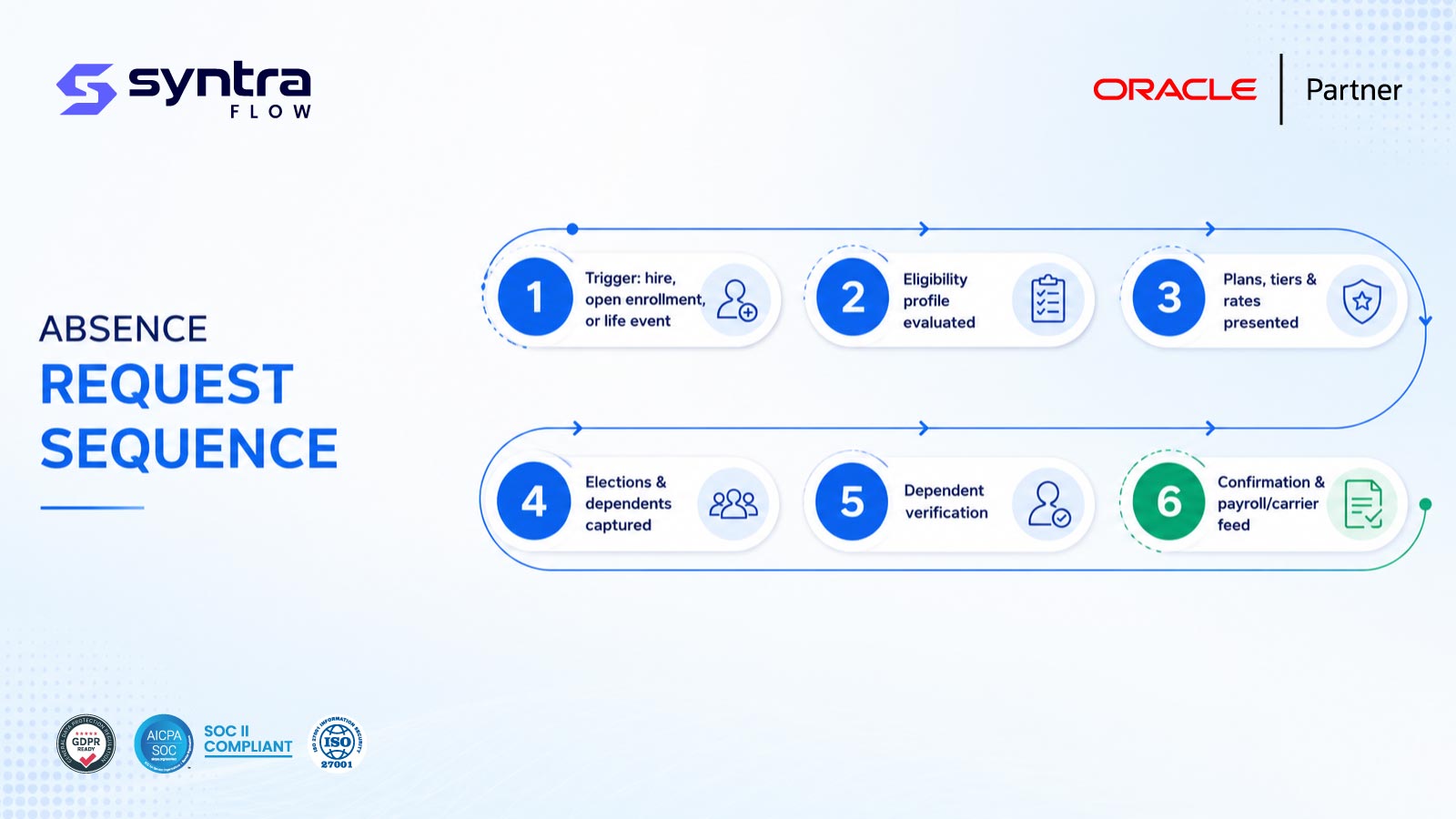
Every enrollment — whether triggered by a hire, an open enrollment period, or a life event — moves through the same evaluation sequence before an election becomes effective coverage.
Benefits enrollment sequence
- Trigger: a new-hire enrollment window, an open enrollment period, or a qualifying life event opens the enrollment opportunity.
- Eligibility: eligibility profiles evaluate worker attributes — employment status, hours, location, union, service date — against each plan's rules.
- Plan and rate presentation: the plans, coverage tiers, and calculated employee/employer costs a worker can choose are derived from plan design and rate configuration.
- Elections and dependents: the worker elects coverage, adds or updates dependents, and designates beneficiaries where applicable.
- Verification: dependent eligibility documentation may be required before an election is finalized, depending on configuration.
- Confirmation and downstream feed: a confirmation statement is generated and elections flow to payroll deductions and, where configured, to carrier EDI feeds.
[SyntraFlow — Benefits enrollment test execution view, illustrative]
Common Benefits Testing Challenges
Benefits testing is harder than most HCM testing because outcomes depend on the intersection of worker data, plan configuration, timing, and regulatory rules — and because a single defect can affect a large population at once.
Compressed open enrollment window
The entire population elects in days, leaving little room to catch defects before they affect thousands of workers.
Time-sensitive life events
Marriage, birth, and loss-of-coverage events run on strict regulatory windows that testing must respect precisely.
Eligibility profile complexity
Overlapping profiles by status, hours, location, and union can produce conflicting or unintended eligibility outcomes.
Rate calculation edge cases
Age-banded rates, tobacco surcharges, and imputed income for non-dependents each add calculation branches to verify.
Dependent data quality
Duplicate, unverified, or aged-out dependents are hard to detect without deliberately engineered test data.
Downstream data integrity
Elections must reconcile exactly with payroll deductions and carrier feeds, or the error compounds every pay period.
Benefits Testing Risks
| Risk | Example | Potential impact | Testing response |
|---|---|---|---|
| Eligibility mis-evaluation | Ineligible worker offered a plan | Coverage granted incorrectly; audit finding | Boundary tests per eligibility profile |
| Rate miscalculation | Age-band or tier rate applied incorrectly | Wrong payroll deduction, employee complaints | Rate cases across bands, tiers, surcharges |
| Life event window missed | Event processed outside regulatory period | Coverage denied or applied late; compliance risk | Boundary tests on event window dates |
| Dependent not removed | Ex-spouse or aged-out child stays covered | Unnecessary employer cost; audit exposure | Age-out and disqualification test cases |
| Duplicate dependent | Same dependent enrolled twice | Overcharged coverage; data integrity gap | Negative test on duplicate dependent entry |
| Coverage date error | Effective or end date miscalculated | Gap or overlap in coverage | Coverage date cases per event type |
| Imputed income omitted | Domestic partner coverage untaxed | Tax reporting error | Imputed income calculation test |
| Contribution limit breach | FSA/HSA election above configured limit accepted | Regulatory non-compliance | Boundary tests at and above limit |
| Payroll feed mismatch | Election not reflected in deduction | Payroll error; employee dispute | Reconcile election vs deduction per run |
| Silent configuration drift | Quarterly update alters an eligibility or rate rule | Undetected population-wide error | Release-aware regression on benefits |
What SyntraFlow Automates in Benefits Testing
SyntraFlow drives eligibility, enrollment, and rate scenarios end to end, then asserts the specific outcome — the plan offered, the rate charged, the dependent accepted — not just that a page loaded.
Pre-built benefits cases
A starter pack of eligibility, enrollment, dependent, and rate scenarios you extend to your plan design.
Life-event scenario generation
Generates marriage, birth, divorce, and status-change variants from your configured life-event definitions.
Self-healing execution
Playwright-based runs that re-anchor when Oracle changes enrollment or Redwood self-service pages.
Dynamic worker data
Provisions workers, dependents, and hire/event dates that reliably produce the eligibility or coverage outcome each test needs.
Outcome-level assertions
Verifies the specific plan, tier, rate, and dependent result — the difference between a real and a hollow test.
Payroll reconciliation
Confirms elections reconcile with the resulting payroll deduction, closing a gap manual testing usually skips.
Automation Benefits
| Benefit | Manual approach | With SyntraFlow |
|---|---|---|
| Open enrollment coverage | Sampled elections tested under deadline pressure | Full scenario pack run repeatedly before go-live |
| Life-event variants | A handful of scripted scenarios | Broad set of event, timing, and precedence combinations |
| Rate accuracy | Spot-checked against a spreadsheet | Every band, tier, and surcharge asserted per run |
| Test maintenance | Scripts break on every UI or Redwood change | Self-healing re-anchors to the current page |
| Evidence for audit | Manually captured, inconsistent | Timestamped evidence captured automatically per run |
Illustrative Test Execution Dashboard
480
Benefits scenarios executed
97%
Pass rate
14
Rate/eligibility defects found
65%
Regression time saved
Illustrative figures for a representative quarterly benefits regression cycle — not a specific customer result.
AI Testing Features for Benefits
AI helps generate the breadth of eligibility, life-event, and rate combinations that benefits testing needs, and helps analyze what a configuration change actually affects.
Manual vs AI-Driven Testing
| Dimension | Manual testing | AI-driven testing |
|---|---|---|
| Scenario coverage | Limited by tester time before enrollment go-live | Generates eligibility, event, and rate combinations at scale |
| Impact analysis | Relies on tribal knowledge of what a change affects | Maps a release or config change to affected plans and tests |
| Test data setup | Hand-built workers, dependents, and dates | Provisions data engineered for the specific outcome needed |
| Maintenance under Redwood | Scripts rewritten after every page redesign | Self-healing selectors adapt to the current page |
| Evidence & audit trail | Manually assembled, inconsistent | Captured automatically per execution |
AI Impact Analysis — Illustrative Regression Effort
Illustrative comparison for a typical quarterly benefits regression pack — actual effort depends on plan count and configuration complexity.
A note on capability. Pre-built benefits cases, self-healing execution, and evidence capture are current platform capabilities. Life-event scenario generation and release-impact mapping are AI-assisted and configurable to your plan design during onboarding. Deeper predictive impact modeling is on the roadmap and is not presented here as a live capability. Any tenant-specific extension is confirmed at assessment rather than assumed.
Oracle Benefits Test Scenarios
A representative set of 30 Oracle Fusion Benefits scenarios spanning eligibility, open enrollment, life events, dependents, rates, and coverage. Test IDs use the HC-BEN prefix.
| ID | Scenario | Preconditions | Expected result | Pri | Auto |
|---|---|---|---|---|---|
| HC-BEN-001 | Eligibility profile qualifies active full-time worker | Worker active, full-time, meets service date | Worker offered plan in enrollment | H | Y |
| HC-BEN-002 | Eligibility profile excludes worker below hours threshold | Part-time worker under configured hours | Worker not offered plan | H | Y |
| HC-BEN-003 | New-hire enrollment window opens on hire date | Newly hired eligible worker | Enrollment window opens per plan rule | H | Y |
| HC-BEN-004 | New hire misses enrollment deadline | No election made within window | Default or waive coverage applied | M | Y |
| HC-BEN-005 | Open enrollment period opens for plan year | Configured plan year start date reached | All eligible workers see enrollment | H | Y |
| HC-BEN-006 | Open enrollment locks elections after close date | Enrollment period end date passed | Elections locked; no further changes | H | Y |
| HC-BEN-007 | Waive coverage election recorded | Worker actively waives a plan | Waive status recorded; no premium charged | M | Y |
| HC-BEN-008 | Change coverage tier during open enrollment | Worker moves from employee-only to family | New tier and rate applied from effective date | H | Y |
| HC-BEN-009 | Switch plan option during open enrollment | Worker moves between plan options (e.g. HMO to PPO) | Prior plan ended, new plan effective on schedule | M | Y |
| HC-BEN-010 | Marriage life event opens spouse enrollment | Marriage event dated within reporting window | Spouse enrollment window opens | H | Y |
| HC-BEN-011 | Birth/adoption life event adds dependent | Birth event recorded for eligible worker | Dependent added; coverage tier updates | H | Y |
| HC-BEN-012 | Divorce life event removes spouse dependent | Divorce event recorded | Spouse removed; COBRA eligibility evaluated | H | Y |
| HC-BEN-013 | Dependent ages out at plan-defined limit | Child dependent reaches configured age limit | Dependent auto-disqualified on limit date | H | Y |
| HC-BEN-014 | Loss-of-other-coverage triggers special enrollment | Worker reports loss of spouse's plan | Special enrollment window opens | M | Y |
| HC-BEN-015 | Employment status change triggers eligibility loss | Worker moves full-time to part-time | Eligibility re-evaluated; coverage ends per rule | H | Y |
| HC-BEN-016 | Multiple concurrent life events processed by precedence | Two events dated within same window | Events applied in defined precedence order | M | P |
| HC-BEN-017 | Backdated life event applies retroactive coverage | Event entered after occurrence date | Coverage start date backdated correctly | M | Y |
| HC-BEN-018 | Domestic partner dependent enrolled with imputed income | Domestic partner added as dependent | Imputed income calculated and applied | M | Y |
| HC-BEN-019 | Dependent verification document required | Plan configured to require proof of dependency | Enrollment held pending document upload | M | P |
| HC-BEN-020 | Duplicate dependent record rejected | Same dependent added twice on one enrollment | Duplicate entry prevented/flagged | M | Y |
| HC-BEN-021 | Age-banded rate applied to supplemental life plan | Worker age falls in a configured rate band | Correct band rate charged | H | Y |
| HC-BEN-022 | Tobacco surcharge applied on self-attestation | Worker attests tobacco use | Surcharge added to premium | M | Y |
| HC-BEN-023 | Employer/employee cost split calculated | Plan configured with employer contribution rule | Split matches plan design exactly | H | Y |
| HC-BEN-024 | FSA/HSA election within configured limit | Election amount below annual limit | Election accepted | H | Y |
| HC-BEN-025 | FSA/HSA election above configured limit rejected | Election amount exceeds annual limit | Election blocked with validation message | H | Y |
| HC-BEN-026 | Coverage effective date matches enrollment rule | Election finalized within open enrollment | Coverage starts on configured plan-year date | H | Y |
| HC-BEN-027 | Coverage end date set on termination event | Worker termination recorded | Coverage end date matches termination rule | H | Y |
| HC-BEN-028 | Retroactive rate correction recalculates elections | Rate table corrected after enrollment closed | Affected elections recalculated correctly | M | P |
| HC-BEN-029 | Benefits confirmation statement reflects elections | Enrollment finalized | Statement matches final plans, tiers, dependents | M | Y |
| HC-BEN-030 | Enrollment election interfaces to payroll deduction | Elections finalized and confirmed | Payroll deduction amount matches election | H | Y |
Pri = priority (H/M/L). Auto = automation candidate (Y suitable · P partly, needs role/document/data setup). Steps summarised; full step detail ships in the downloadable test pack.
Regression Testing for Benefits
Because a single eligibility profile, rate table, or plan configuration change can affect an entire employee population, benefits is one of the highest-value places to run targeted, release-aware regression rather than re-testing everything from scratch. A regression pack should re-verify eligibility outcomes, rate calculations, dependent rules, and coverage dates after any plan design, configuration, or Oracle update.
The Oracle Regression Testing Tool scopes benefits regression to what actually changed — a specific eligibility profile, plan, or rate table — instead of running the full open enrollment suite on every change.
Benefits & Oracle Quarterly Releases
Oracle's quarterly updates can change benefits behavior without any action on your part — new eligibility rule options, Redwood redesigns of the enrollment pages, or adjusted default plan-year processing. Because open enrollment often follows shortly after a quarterly update, there is little margin to discover a regression late.
Rather than re-running every benefits scenario on every release, Oracle Release Intelligence analyzes the release notes for changes touching Benefits, maps them to your plan configuration, and recommends the specific eligibility, enrollment, and rate cases to re-run — so testing effort tracks actual risk instead of the full catalog.
Redwood UI Considerations for Benefits
Benefits self-service is one of the most visible Redwood surfaces — it is where employees enroll, add dependents, and review confirmation statements directly, often on a mobile device. A redesigned enrollment page can break selector-based automation even when the underlying eligibility and rate logic is unchanged, which is exactly the scenario that produces false confidence from a test that only checks the page loaded.
See Oracle Redwood UI Testing for how SyntraFlow understands Redwood pages semantically and self-heals enrollment and dependent-management flows through UI redesigns.
Benefits Testing Best Practices
Assert the specific plan, tier, rate, and dependent outcome — not just that enrollment saved.
Test every eligibility profile boundary — hours, status, service date — not only the obvious cases.
Cover every life-event type and its regulatory timing window, not just marriage and birth.
Test rate calculations at every band, tier, and surcharge boundary.
Reconcile elections against the resulting payroll deduction, not just the confirmation screen.
Include dependent age-out and disqualification cases in every regression cycle.
Run the full open enrollment pack before go-live, not sampled spot checks.
Re-test benefits after every quarterly update, scoped by release impact.
Capture confirmation statements and eligibility evidence automatically for audit.
Test concurrent and backdated life events, not only single, current-dated events.
SyntraFlow Advantages
Oracle-native
Built around Fusion Benefits objects — eligibility profiles, plans, rates — not generic web automation.
Self-healing
Enrollment and dependent flows keep running through Redwood redesigns.
Release-aware
Scopes regression to what a quarterly update or config change actually affects.
Audit-ready evidence
Timestamped results retained automatically for compliance sign-off.
Related Oracle HCM Testing Pages
Oracle HCM Testing Tool ⭐
The Hire-to-Retire testing hub.
Compensation Testing →
Salary, bonus, merit, and stock cycles.
Absence Management Testing →
Leave plans, accrual, and balances.
Worker Testing →
Worker records and assignment changes.
Oracle HCM Test Cases →
Broader HCM scenario catalog.
Oracle HCM UAT Checklist →
Sign-off checklist for HCM releases.
Oracle documentation references
- Oracle Fusion Cloud HCM: Administering Benefits
- Oracle Fusion Cloud HCM: Implementing Benefits
- Oracle Fusion Cloud HCM: Using Benefits
- Oracle Fusion Cloud HCM: Implementing Global Human Resources
Frequently Asked Questions
What does Oracle Benefits testing cover?
▼
Plan design and rates, eligibility profiles, open enrollment, life-event-driven enrollment, dependent management, coverage effective and end dates, and the downstream feeds that carry elections to payroll and carriers. It does not cover compensation cycles like salary, bonus, or stock, which have their own dedicated page.
How is benefits testing different from compensation testing?
▼
Benefits governs elective and employer-sponsored coverage — plans, eligibility, enrollment, dependents, and rates. Compensation governs pay decisions — salary changes, bonus, merit, and equity cycles. They run on different calendars and rules; see Oracle Compensation Testing for that process.
What life events should be tested?
▼
At minimum: marriage, divorce, birth or adoption, dependent age-out, loss of other coverage, and employment status changes that affect eligibility. Each should be tested for the correct enrollment window, the correct dependent action, and the correct coverage effective date.
How do you test open enrollment at scale?
▼
By running the full eligibility, plan, tier, and rate scenario pack before the enrollment window opens for real employees — not by sampling a handful of cases under deadline pressure. SyntraFlow runs the pack repeatedly against your configuration so defects surface before go-live rather than mid-enrollment.
How are dependent eligibility rules tested?
▼
By provisioning dependents at and around each rule boundary — the age-out limit, duplicate detection, verification requirements, and domestic-partner imputed income — and confirming the system applies the correct outcome on the correct date, not just at data entry.
How do you automate Oracle Benefits testing?
▼
SyntraFlow provisions workers, dependents, and event dates engineered to produce a specific eligibility, enrollment, or rate outcome, drives the enrollment flow through the UI, and asserts the exact plan, tier, rate, and dependent result. It self-heals when Oracle changes enrollment or Redwood pages, and captures evidence for every run.
How often should benefits testing be repeated?
▼
On every Oracle quarterly update, before every open enrollment cycle, and after any change to eligibility profiles, plan design, or rate tables. Because benefits errors compound every pay period, testing after these events is the highest-leverage moment to catch a defect.
Does Redwood change benefits self-service testing?
▼
Redwood redesigns the enrollment and dependent-management pages employees use directly, which breaks selector-based automation even when eligibility and rate logic is unchanged. SyntraFlow understands Redwood pages semantically and self-heals, so enrollment tests keep running through UI redesigns.
Can benefits testing confirm payroll deductions are correct?
▼
Yes. A complete benefits test reconciles the finalized election against the resulting payroll deduction rather than stopping at the confirmation screen, since a defect in that handoff repeats every pay period until it is caught.
What test data does benefits testing need?
▼
Workers and dependents positioned at specific eligibility, age, and rate boundaries, plus events dated to land inside or outside regulatory windows. SyntraFlow provisions this data so each test reliably produces the outcome it is designed to verify.
Strengthen Your Oracle Benefits Test Coverage
Identify gaps in eligibility, enrollment, and rate testing, automate high-risk life-event scenarios, and prepare for open enrollment and Oracle quarterly updates with SyntraFlow.