Oracle HCM Test Cases
A structured catalogue of Oracle Fusion Cloud HCM test cases, organised by process area — worker, employment, assignment and position through payroll, time and absence, benefits and compensation, recruiting, performance, learning and HCM security. Skim a category, review representative test cases, then follow the link to full detail.
This is a catalogue and starting point, not a deep single-topic guide. Each category below summarises what it covers, shows high-value cases, and links to the child page for full coverage. The hub for all of HCM testing is the Oracle HCM Testing Tool.
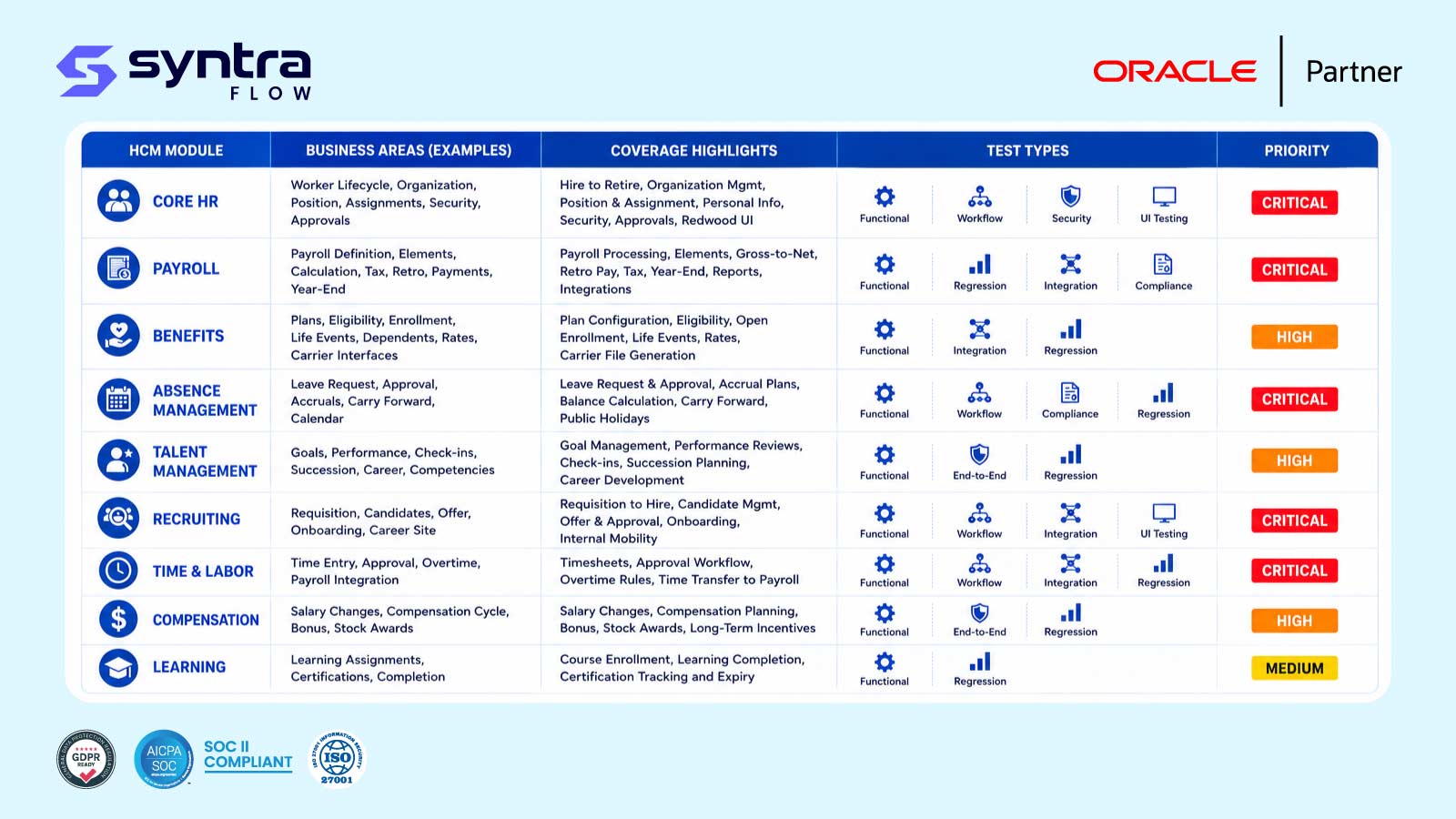
How to Use This Test-Case Catalogue
HCM in Oracle Fusion is a chain of dependent processes built around one person record: a worker is hired into an employment and assignment, may occupy a position, is paid through payroll on a schedule driven by time and absence, elects benefits and compensation, and is developed and evaluated through talent processes, scoped throughout by security. A library mirroring that chain is easier to maintain than a flat list of scripts.
Every category uses a consistent test-ID prefix (for example HC-WRK for worker cases or HC-PAY for payroll) so a defect traces back to a process. The cases shown are a subset; linked child pages carry the full scenario sets and step detail. Treat this page as the index to your HCM test suite.
Scope note. This catalogue summarises each area and points to its detailed page. For a structured sign-off checklist before go-live see the Oracle HCM UAT Checklist, for person and pay mechanics see Worker Testing and Payroll Testing, and for the broader HCM programme see the Oracle HCM Testing Tool hub.
How to Structure a Test Library
A durable HCM test library is organised by process area, not by tester or release. Group cases under the categories Oracle uses — worker, employment, assignment, position, payroll, payroll flow, time and labor, absence, benefits, compensation, recruiting, performance management, learning, and security — with a stable ID prefix each, keeping coverage visible and regression selection precise.
Organise by process area
One category per HCM process, each with its own ID prefix, so coverage gaps are obvious at a glance.
Stable, traceable IDs
Prefix + sequence (HC-PAY-004). IDs never change, so defect links stay valid across releases.
Layer positive and negative
Every process gets a clean pass case plus the failure cases that must raise the right validation.
Tag priority, cadence and automation
Mark each case with a priority, an execution tag (smoke, regression, quarterly update, Redwood) and an automation flag.
Parameterise test data
Keep workers, assignments and effective dates as data, not hard-coded, so cases reuse across environments.
Map cases to configuration
Link each case to the setup that drives it, so a config change re-points the right tests.
Positive vs Negative, Functional vs Integration
An HCM test library needs a deliberate mix of test types. Positive cases prove a process works on clean data; negative cases prove controls fire on bad data. Functional cases exercise one process in isolation; integration cases prove the hand-offs hold. A suite that is all positive-functional passes while real risks — a retro change that never recalculates, a life event that never opens an enrollment window — go untested.
| Test type | What it proves | HCM example | Why it matters |
|---|---|---|---|
| Positive (pass) | Clean data completes the process | Standard hire creates employment and assignment | Confirms the happy path still works |
| Negative (fail) | Bad data raises the correct control | Assignment beyond a position's headcount limit is blocked | Controls are only real if they fire |
| Boundary | Behaviour at exact thresholds | Absence balance exactly zero vs one hour short | Defects hide at the edges |
| Functional | A single process in isolation | Overtime rule calculates hours beyond a threshold | Pinpoints where a defect lives |
| Integration | Hand-off between processes / systems | Approved time transfers into a payroll run | Most defects appear at the seams |
| Regression | Prior behaviour survives a change | Re-run pack after a quarterly update | Catches silent Oracle drift |
| Role-based | Access and privilege enforced | Only HR can release a suspended employment | Protects segregation of duties |
Priority Classification & Regression Test Selection
Not every case runs every cycle. Classify each by priority so a smoke pack runs daily, a core pack per sprint, and the full library at release. Regression selection then becomes a question of which processes a change touches — a compensation policy change re-runs compensation cases, a payroll rule change re-runs gross-to-net cases, a quarterly update re-runs the release-scoped subset via the Oracle Regression Testing Tool.
| Priority | Meaning | Typical HCM cases | Run cadence |
|---|---|---|---|
| High (H) | Pay-impacting or compliance-blocking | Payroll gross-to-net, hire/terminate, statutory deductions | Every cycle + smoke |
| Medium (M) | Important but not pay-blocking | Benefits rate calculation, calibration, learning assignment | Per sprint / per release |
| Low (L) | Edge cases and cosmetic behaviour | Position closure, total compensation statement formatting | Full-library / release |
Beyond priority, cases here also carry an execution tag for when and why a case runs, independent of category. The table below shows example IDs drawn from the categories further down this page.
| Tag | Meaning | Example test cases |
|---|---|---|
| Smoke | Minimal daily check that core HCM transactions still work end to end | HC-WRK-001, HC-EMP-001, HC-PAY-001, HC-TL-001 |
| Regression | Re-run after a change to confirm prior behaviour still holds | HC-ASG-005, HC-BEN-004, HC-COMP-004, HC-ABS-005 |
| Quarterly update | Scoped to what a given Oracle quarterly release actually changed | HC-PAY-004, HC-ABS-002, HC-PRF-003, HC-SEC-002 |
| Redwood-related | UI-only cases sensitive to Redwood page redesigns — see Oracle Redwood UI Testing | HC-WRK-003, HC-REC-002, HC-LRN-004 |
The Test-Case Catalogue by Category
The sections below walk the HCM process groups: Core HR, Payroll & Time, Total Rewards, and Talent, followed by Integrations and Security. Each gives a short summary, a table of representative cases with preconditions and expected results, and a link to full coverage. Test IDs are category-prefixed; priority (H/M/L) and automation candidacy (Y/P/N) are shown per case.
Across all fourteen categories, the full Oracle Fusion HCM test library totals 258 cataloged test cases — this page shows more than seventy representative rows as a starting index, not the complete suite. The full step detail ships in the downloadable test library described further down.
Core HR: Worker, Employment, Assignment & Position
Worker HC-WRK
Worker records are the person-level master data every employment, assignment and downstream process is built on; a duplicate person or bad national ID propagates errors everywhere. Cases cover creation, duplicate prevention, Redwood profile updates, ID validation, merge and global transfer. The full library carries 22 Worker cases; six are shown below. Full detail lives on the Worker Testing page.
| Test ID | Process | Scenario | Preconditions | Expected Result | Priority | Auto. |
|---|---|---|---|---|---|---|
| HC-WRK-001 | Person create | Create a new worker record with mandatory attributes | Legal employer and person type defined | Person saved with a unique person number | H | Y |
| HC-WRK-002 | Duplicate person check | Create a worker matching an existing national ID | Matching national identifier exists on file | Duplicate warned or blocked per matching rule | H | Y |
| HC-WRK-003 | Person details update (Redwood) | Update contact and personal info on the Redwood person page | Worker record active, Redwood UI enabled | Changes saved and reflected across related pages | M | Y |
| HC-WRK-004 | National ID validation | Enter a national identifier in an invalid format | Country-specific format rule configured | Entry rejected with a validation message | M | Y |
| HC-WRK-005 | Person merge | Merge two duplicate worker records | Two active person records identified as duplicates | Records consolidated; history retained under survivor | M | P |
| HC-WRK-006 | Global transfer | Transfer a worker between legal employers | Worker active in the source legal employer | New assignment created; source assignment ends correctly | H | Y |
Employment HC-EMP
Employment records link a worker to a legal employer and drive eligibility for payroll, benefits and time. Cases cover hire, terminate, rehire and status-change, including retroactive corrections that flow through to payroll. The full library carries 20 Employment cases; six are shown below. Full detail lives on the Employment Testing page.
| Test ID | Process | Scenario | Preconditions | Expected Result | Priority | Auto. |
|---|---|---|---|---|---|---|
| HC-EMP-001 | New hire | Hire a new worker into an employment record | Position/job and legal employer available | Employment and default assignment created | H | Y |
| HC-EMP-002 | Termination | Terminate an active employment record | Worker has an active employment | Employment end-dated; downstream processes triggered correctly | H | Y |
| HC-EMP-003 | Rehire | Rehire a previously terminated worker | Prior employment record exists, terminated | History linked; new employment created correctly | M | Y |
| HC-EMP-004 | Employment status change | Change employment status, for example active to suspended | Status transition allowed by configuration | Status updated; dependent processes reflect the change | M | Y |
| HC-EMP-005 | Contract worker conversion | Convert a contingent worker to an employee | Contingent worker record exists | New employee record created; contingent record ended | M | P |
| HC-EMP-006 | Retroactive termination | Terminate an employment with a back-dated date | Payroll for the retro period not yet closed | Retro changes flagged for payroll recalculation | H | Y |
Assignment HC-ASG
Assignments carry the job, grade, manager and work-location detail a worker operates under, and a worker can hold more than one. Cases cover creation, manager reassignment, grade/step changes, secondary assignments and retroactive correction. The full library carries 18 Assignment cases; five are shown below. Full detail lives on the Assignment Testing page.
| Test ID | Process | Scenario | Preconditions | Expected Result | Priority | Auto. |
|---|---|---|---|---|---|---|
| HC-ASG-001 | Assignment create | Create a primary work assignment | Employment record active | Assignment created and set as primary | H | Y |
| HC-ASG-002 | Manager change | Reassign a worker's line manager | New manager identified and active | Reporting hierarchy updated correctly | M | Y |
| HC-ASG-003 | Grade/step change | Change a worker's grade or grade step | Grade ladder configured for the job | Assignment updated; dependent pay elements re-evaluate | M | Y |
| HC-ASG-004 | Multiple assignments | Add a secondary assignment for a worker | Primary assignment exists | Secondary assignment created; primary unaffected | M | P |
| HC-ASG-005 | Assignment history correction | Correct a prior assignment record retroactively | Retro period still open | History corrected; dependent processes recalculate | H | Y |
Position HC-POS
Positions carry headcount limits, budgets and reporting hierarchy that assignments must respect, particularly in position-managed configurations common in the public sector. Cases cover creation, hierarchy, headcount enforcement, budget checks and closure. The full library carries 16 Position cases; five are shown below. Full detail lives on the Position Testing page.
| Test ID | Process | Scenario | Preconditions | Expected Result | Priority | Auto. |
|---|---|---|---|---|---|---|
| HC-POS-001 | Position create | Create a position with a headcount limit | Job, department and business unit defined | Position saved with headcount limit enforced | H | Y |
| HC-POS-002 | Position hierarchy | Establish a position reporting hierarchy | Parent position exists | Hierarchy reflected correctly in the org chart | M | Y |
| HC-POS-003 | Headcount limit enforcement | Assign a worker beyond the position headcount limit | Position headcount at maximum | Assignment blocked or warned per configuration | H | Y |
| HC-POS-004 | Position budget check | Fill a position against an approved budget | Position budget defined for the period | Fill validated against available budget | M | P |
| HC-POS-005 | Position closure | Close a position with no incumbents | Position vacant | Position closed; no longer available for assignment | L | Y |
Payroll & Time: Payroll, Payroll Flow, Time and Labor & Absence
Payroll HC-PAY
Payroll turns element entries, time and absence into a calculated, compliant paycheck, and is the highest-consequence HCM process since it moves real money and triggers statutory reporting. Cases cover standard runs, element entry, retro pay, gross-to-net, statutory deductions, rollback and off-cycle payments. The full library carries 26 Payroll cases; seven are shown below. Full detail lives on the Payroll Testing page.
| Test ID | Process | Scenario | Preconditions | Expected Result | Priority | Auto. |
|---|---|---|---|---|---|---|
| HC-PAY-001 | Payroll run - standard | Run payroll for a standard pay period | Elements and eligibility configured | Payroll calculates and completes without errors | H | Y |
| HC-PAY-002 | Element entry | Enter a one-time earnings element for a worker | Element eligible for the worker's assignment | Entry saved and picked up by the next run | H | Y |
| HC-PAY-003 | Retro pay | Recalculate pay after a retroactive salary change | Retro-triggering change processed after a prior run | Retro amounts calculated and paid correctly | H | Y |
| HC-PAY-004 | Gross-to-net calculation | Validate gross-to-net calculation for a standard case | Standard earnings and deductions configured | Net pay matches expected calculation | H | Y |
| HC-PAY-005 | Statutory deduction | Calculate a statutory tax or deduction for a jurisdiction | Jurisdiction rules configured | Deduction calculated per statutory rule | H | Y |
| HC-PAY-006 | Payroll rollback | Roll back a payroll run flagged with an error | Run completed but flagged for correction | Run rolled back cleanly; no residual balances | M | Y |
| HC-PAY-007 | Off-cycle payment | Issue an off-cycle payment outside the normal cycle | Off-cycle process configured | Payment processed and reconciled separately | M | P |
Payroll Flow HC-PFL
Payroll flows orchestrate the sequence of tasks — new hire processing, off-cycle runs, period-end close — that payroll executes, and a broken task can silently stall a cycle. Cases cover submission, task failure, approval routing, scheduling and reprocessing. The full library carries 16 Payroll Flow cases; five are shown below. Full detail lives on the Payroll Flow Testing page.
| Test ID | Process | Scenario | Preconditions | Expected Result | Priority | Auto. |
|---|---|---|---|---|---|---|
| HC-PFL-001 | Flow submission | Submit a payroll flow, for example a new hire flow | Flow pattern configured | Flow completes all tasks in sequence | H | Y |
| HC-PFL-002 | Flow task failure | A task within a flow fails validation | Invalid data present for one task | Flow halts; error routed to the correct owner | H | Y |
| HC-PFL-003 | Flow approval routing | Route a flow task for management approval | Approval rule configured on the task | Task routes to the correct approver | M | Y |
| HC-PFL-004 | Scheduled flow | Run a flow on a defined schedule | Schedule configured for the flow pattern | Flow triggers automatically at the scheduled time | M | Y |
| HC-PFL-005 | Flow reprocessing | Reprocess a flow after correcting an error | Prior flow instance failed | Flow completes successfully on reprocessing | M | Y |
Time and Labor HC-TL
Time and Labor captures the hours, overtime and shift detail feeding payroll and absence, so a miscalculated overtime rule or stalled approval directly misstates pay. Cases cover time entry, overtime, approval, rejection, shift differentials and the transfer to payroll. The full library carries 20 Time and Labor cases; six are shown below. Full detail lives on the Time and Labor Testing page.
| Test ID | Process | Scenario | Preconditions | Expected Result | Priority | Auto. |
|---|---|---|---|---|---|---|
| HC-TL-001 | Time entry - standard | Enter a standard time card for a pay period | Time layout assigned to the worker | Time card saved and submitted | H | Y |
| HC-TL-002 | Overtime calculation | Calculate overtime for hours beyond a threshold | Overtime rule configured | Overtime hours calculated per rule | H | Y |
| HC-TL-003 | Time approval | Approve a submitted time card | Time card submitted by the worker | Card approved; ready for payroll processing | H | Y |
| HC-TL-004 | Time card rejection | Reject a time card with an invalid entry | Entry violates a validation rule | Card rejected with a reason returned to the worker | M | Y |
| HC-TL-005 | Shift differential | Apply a shift differential to hours worked | Differential rule configured for the shift | Differential pay calculated correctly | M | Y |
| HC-TL-006 | Time-to-payroll transfer | Transfer approved time to payroll processing | Approved time cards exist for the period | Time data transferred and available to payroll | H | Y |
Absence HC-ABS
Absence management tracks accrual balances and approved time off against plans that often carry pay implications, so a broken rule or a missed hand-off has direct financial impact. Cases cover requests, accrual calculation, negative-balance handling, approval and the payroll integration. The full library carries 18 Absence cases; five are shown below. Full detail lives on the Absence Management Testing page.
| Test ID | Process | Scenario | Preconditions | Expected Result | Priority | Auto. |
|---|---|---|---|---|---|---|
| HC-ABS-001 | Absence request | Submit an absence request against an accrual plan | Worker enrolled in an absence plan | Request submitted and balance checked | H | Y |
| HC-ABS-002 | Accrual calculation | Calculate accrual for a defined absence plan | Accrual rule configured on the plan | Balance accrues correctly per the plan rule | H | Y |
| HC-ABS-003 | Negative balance handling | Submit a request exceeding the available balance | Balance insufficient for the request | Request handled per the negative-balance policy | M | Y |
| HC-ABS-004 | Absence approval | Approve a submitted absence request | Request pending manager approval | Request approved; balance and calendar updated | H | Y |
| HC-ABS-005 | Absence-to-payroll integration | Confirm approved absence reflects in payroll | Absence approved for a paid plan type | Absence hours/pay reflected in the payroll run | H | Y |
Total Rewards: Benefits & Compensation
Benefits HC-BEN
Benefits enrollment — open enrollment, life events, dependent eligibility, rates and carrier feeds — determines what coverage a worker has and what it costs both sides, with real financial and compliance exposure if wrong. Cases cover the core enrollment paths, eligibility, rating and carrier interface. The full library carries 20 Benefits cases; six are shown below. Full detail lives on the Benefits Testing page.
| Test ID | Process | Scenario | Preconditions | Expected Result | Priority | Auto. |
|---|---|---|---|---|---|---|
| HC-BEN-001 | Open enrollment | Enroll a worker during an open enrollment window | Enrollment window open, plans configured | Elections saved within the window | H | Y |
| HC-BEN-002 | Life event enrollment | Process enrollment triggered by a qualifying life event | Life event reported and validated | Enrollment window opens for affected plans | H | Y |
| HC-BEN-003 | Dependent eligibility | Add a dependent and verify plan eligibility | Dependent relationship and eligibility rules configured | Dependent added; eligible plans available | M | Y |
| HC-BEN-004 | Plan rate calculation | Calculate the employee/employer cost for a plan | Rate structure configured for the plan | Cost calculated correctly per the rate table | H | Y |
| HC-BEN-005 | Enrollment default | Apply default coverage when no election is made | Default rule configured, window closed without an election | Default coverage applied automatically | M | Y |
| HC-BEN-006 | Benefits carrier feed | Send enrollment data to an external carrier feed | Carrier interface configured | Feed generated with correct enrollment data | M | P |
Compensation HC-COMP
Compensation cycles move salary changes, budgets and bonus recommendations through an approval chain that must respect budget limits and reporting hierarchy. Cases cover salary change, budget allocation, worksheets, approval routing and total compensation statements. The full library carries 18 Compensation cases; five are shown below. Full detail lives on the Compensation Testing page.
| Test ID | Process | Scenario | Preconditions | Expected Result | Priority | Auto. |
|---|---|---|---|---|---|---|
| HC-COMP-001 | Salary change | Process a salary change through a compensation plan | Compensation plan and approval chain configured | Salary updated; effective-dated correctly | H | Y |
| HC-COMP-002 | Compensation budget | Allocate a compensation budget to a manager | Budget pool defined for the cycle | Budget available for manager allocation | M | Y |
| HC-COMP-003 | Bonus worksheet | Complete a bonus worksheet for a team | Worksheet published to the manager | Recommendations saved within budget limits | M | Y |
| HC-COMP-004 | Compensation approval routing | Route a compensation recommendation for approval | Approval hierarchy configured | Recommendation routed and approved in sequence | H | Y |
| HC-COMP-005 | Total compensation statement | Generate a total compensation statement for a worker | Compensation and benefits data current | Statement reflects accurate total rewards | L | Y |
Talent: Recruiting, Performance Management & Learning
Recruiting HC-REC
Recruiting spans the requisition-to-hire lifecycle, including the Redwood career site candidates apply through, and a defect anywhere in that chain can delay or lose a hire. Cases cover requisitions, candidate application, screening, interview scheduling, offers and conversion to worker. The full library carries 20 Recruiting cases; six are shown below. Full detail lives on the Recruiting Testing page.
| Test ID | Process | Scenario | Preconditions | Expected Result | Priority | Auto. |
|---|---|---|---|---|---|---|
| HC-REC-001 | Requisition create | Create and approve a job requisition | Position/budget available for the role | Requisition approved and posted | H | Y |
| HC-REC-002 | Candidate application (Redwood) | Submit a candidate application through the Redwood career site | Requisition posted on the career site | Application received and candidate record created | H | Y |
| HC-REC-003 | Candidate screening | Screen a candidate against requisition criteria | Screening questions configured on the requisition | Candidate scored or flagged per the screening rule | M | Y |
| HC-REC-004 | Interview scheduling | Schedule an interview panel for a candidate | Interviewers and availability identified | Interview scheduled; invites sent | M | Y |
| HC-REC-005 | Offer generation | Generate and route a job offer for approval | Candidate selected, offer template configured | Offer routed for approval, then issued | H | Y |
| HC-REC-006 | Candidate-to-worker conversion | Convert a hired candidate into a worker record | Offer accepted | Worker record created from candidate data | H | Y |
Performance Management HC-PRF
Performance management cycles run goal-setting, self- and manager evaluation, and calibration on a fixed review calendar the whole organization depends on completing correctly and on time. The full library carries 16 Performance Management cases; five are shown below. Full detail lives on the Performance Management Testing page.
| Test ID | Process | Scenario | Preconditions | Expected Result | Priority | Auto. |
|---|---|---|---|---|---|---|
| HC-PRF-001 | Goal setting | Set performance goals for a review period | Review period open for goal setting | Goals saved against the worker's plan | H | Y |
| HC-PRF-002 | Self-evaluation | Complete a worker self-evaluation | Review task assigned to the worker | Self-evaluation saved and routed to the manager | M | Y |
| HC-PRF-003 | Manager evaluation | Complete a manager evaluation of a worker | Self-evaluation submitted, if required | Manager rating saved and routed per workflow | H | Y |
| HC-PRF-004 | Calibration | Adjust ratings during a calibration session | Calibration session configured for the group | Ratings adjusted and recorded with rationale | M | P |
| HC-PRF-005 | Review completion | Finalize and share a completed performance review | All review steps completed | Review closed; visible to the worker | H | Y |
Learning HC-LRN
Learning assigns and tracks required and elective courses, including compliance training with due dates that carry audit consequences if missed. Cases cover assignment, completion, compliance due-date tracking, Redwood catalog browsing and manager-assigned learning. The full library carries 14 Learning cases; five are shown below. Full detail lives on the Learning Testing page.
| Test ID | Process | Scenario | Preconditions | Expected Result | Priority | Auto. |
|---|---|---|---|---|---|---|
| HC-LRN-001 | Course assignment | Assign a required course to a worker | Course published and eligibility rule configured | Course appears in the worker's learning record | H | Y |
| HC-LRN-002 | Course completion | Complete an assigned course and record the result | Course assigned and in progress | Completion recorded; status updated | H | Y |
| HC-LRN-003 | Compliance due-date tracking | Track a compliance course approaching its due date | Compliance course with a due date assigned | Reminder triggered ahead of the due date | M | Y |
| HC-LRN-004 | Learning catalog browse (Redwood) | Browse and self-enroll in a catalog course | Catalog published on the Redwood learning page | Enrollment recorded; course added to the learning record | M | Y |
| HC-LRN-005 | Manager-assigned learning | Assign a course to a direct report | Manager has visibility to the worker's record | Course assigned; worker notified | L | Y |
Integrations & Security
Integrations
Integrations bring worker, payroll and time data in and out of Oracle HCM through HDL, FBDI, REST and OIC — paths that bypass the UI and its validations. Risk areas include bulk worker loads via HDL, payroll interface files to providers, time-clock device feeds, and REST-based updates from adjacent systems, each of which should behave as UI entry does. There is no separate child page; these checks run alongside Worker, Payroll and Time and Labor cases above.
HCM Security HC-SEC
Security and role testing proves worker and payroll data is scoped correctly, sensitive fields are masked, and segregation of duties holds across hire, pay and role administration. Cases cover role provisioning, data role scope, field masking, SOD and self-service boundaries. The full library carries 14 HCM Security cases; five are shown below. Full detail lives on the Oracle HCM Security Testing page.
| Test ID | Process | Scenario | Preconditions | Expected Result | Priority | Auto. |
|---|---|---|---|---|---|---|
| HC-SEC-001 | Role provisioning | Provision an HCM role to a new worker | Role mapping rule configured | Role auto-provisioned per the rule | H | Y |
| HC-SEC-002 | Data role scope | Restrict a manager's visibility to their own organization | Data role with an organization security profile | Manager sees only permitted workers | H | Y |
| HC-SEC-003 | Sensitive data masking | Verify sensitive fields are masked for a non-HR role | Field-level security configured | Restricted fields hidden or masked | H | Y |
| HC-SEC-004 | Segregation of duties | A user attempts a conflicting HR and payroll action | SOD policy defined across the role pair | Conflict prevented or flagged for review | H | P |
| HC-SEC-005 | Self-service access | Verify worker self-service is limited to the worker's own record | Employee self-service role assigned | Worker cannot access another worker's record | M | Y |
Priority is High/Medium/Low. Auto. is the automation candidate flag (Y suitable · P partly · N manual). These seventy-plus rows are representative; the full 258-case library ships in the downloadable workbook.
Test Data, Evidence, Automation & Role Coverage
Beyond the scenarios themselves, four dimensions determine whether an HCM test library is trustworthy: the data each case needs, the evidence each run produces, which cases are worth automating, and whether every role touching HCM is covered.
Test-data requirements
Each case needs data engineered to produce a specific outcome — a set accrual balance, an assignment at a known grade, an element entry timed to trigger retro pay. Parameterise this data so the same case runs across environments.
Evidence requirements
Every run should retain timestamped screenshots, the calculated or blocked result, and an execution trace tied to the test ID — turning a green result into proof a control fired, essential for payroll compliance sign-off.
Automation suitability
Deterministic, data-driven cases (element entry, time approval, enrollment defaults) automate well and are marked Y. Cases needing manual review (SOD, calibration, some carrier feeds) are partial (P), so cycles run the right mix.
Role-based coverage
Run the same scenario under each touching role — HR specialist, payroll administrator, line manager, worker self-service — to protect segregation of duties, especially after a security-role change.
Reliable test data — the right worker, assignment and effective-dated state — is what makes an HCM case reproducible; provisioning it consistently is why manual HCM cycles are slow to set up and easy to get wrong.
Release-Based Maintenance of the Library
An HCM test library is a living asset: Oracle's quarterly updates, Redwood UI redesigns, and your own configuration changes all age it. Rather than re-running everything, maintain it against the events that actually change HCM behaviour.
| Change event | Risk to HCM | Recommended regression scope |
|---|---|---|
| Oracle quarterly update | Payroll, absence or performance logic changes | Release-scoped full library |
| Redwood UI redesign | Worker, recruiting and learning pages restyled | Redwood-tagged cases across all categories |
| Payroll rule / element change | Gross-to-net and statutory calculations shift | HC-PAY + HC-PFL cases |
| Compensation / benefits policy change | Rates, budgets and enrollment defaults shift | HC-COMP + HC-BEN cases |
| Absence plan / accrual rule change | Balances and payroll hand-off shift | HC-ABS cases |
| Security-role change | Who can enter, approve, or release changes | HC-SEC + role-based cases |
| New legal employer / country | Setup gaps create new statutory exceptions | Cross-country + configuration cases |
| Integration / API change | Imported data diverges from UI controls | Integration + parity cases |
Release Intelligence maps each quarterly update to the cases it affects, so the library re-runs against what changed rather than on a fixed calendar.
How SyntraFlow Automates HCM Testing
SyntraFlow turns this catalogue into a running, evidence-producing suite — categorised, parameterised, and mapped to your releases and configuration.
Pre-built reusable cases
A starter library across every HCM category — worker to security — extended to your grades, policies and roles rather than scripted from zero.
Test-case categorisation
Cases organised by process area with stable ID prefixes, so coverage gaps and regression scope are visible at a glance.
Test-data parameterisation
Workers, assignments, elements and effective dates held as data so one case runs across environments instead of depending on hand-built fixtures.
Reusable components
Shared building blocks — login, hire, enter time, submit absence, run payroll — composed into many cases, so a change is made once.
Automated execution
Playwright-based runs that self-heal when Oracle changes the worker, payroll or Redwood career-site pages, keeping assertions working across updates.
Evidence capture
Timestamped screenshots, calculation and exception logs, and execution traces retained as audit-grade evidence for every run.
Defect traceability
Failures link case, evidence and the process area, so a defect traces straight back to the test and the step that found it.
Release mapping
Each case maps to the Oracle quarterly release that drives it, so an update re-points exactly the right subset via the regression testing tool.
Dashboard reporting
Coverage, pass rate and evidence roll up by category and priority for a clear view of HCM test health.
A note on capability. Pre-built categorised cases, parameterised data, automated self-healing execution, evidence capture and dashboard reporting are current platform capabilities. Coverage scoped to your grades, pay elements, roles and integrations is configurable during onboarding. Deeper release and configuration mapping is confirmed at assessment, not assumed — roadmap items are not presented as live.
The Oracle Fusion HCM Test Case Library
Everything summarised here is available as a structured Excel workbook — the Oracle Fusion HCM Test Case Library — expanding these representative cases into a full, maintainable suite of 258 cataloged scenarios, with a tab per process area from worker through HCM security.
Each tab carries, per case: priority, execution tag (smoke, regression, quarterly update, Redwood), preconditions, test data, step-by-step actions, expected results, automation status, evidence, owning role, and a defect reference field — ready to adopt as your HCM test library and automate with SyntraFlow.
Request the HCM Test Case Library and a short walkthrough of how it maps to your Oracle configuration and release cadence.
Request the HCM Test Case LibraryRelated Oracle HCM Pages
Every category above has a detailed home. Explore the full HCM suite:
Oracle HCM Testing Tool ★
The HCM testing hub.
Oracle ERP Testing Tool →
The platform overview.
Oracle HCM UAT Checklist →
Structured go-live sign-off.
Worker Testing →
Person master data.
Employment Testing →
Hire, terminate, rehire.
Assignment Testing →
Job, grade and manager detail.
Position Testing →
Headcount and hierarchy.
Payroll Testing →
Gross-to-net and statutory.
Payroll Flow Testing →
Task orchestration.
Time and Labor Testing →
Time entry and overtime.
Absence Management Testing →
Accrual and requests.
Benefits Testing →
Enrollment and eligibility.
Compensation Testing →
Salary and bonus cycles.
Recruiting Testing →
Requisition to hire.
Performance Management Testing →
Goals and reviews.
Learning Testing →
Course assignment and compliance.
Oracle HCM Security Testing →
Roles and data scoping.
Oracle Regression Testing Tool →
Scoped regression selection.
Oracle Release Intelligence →
Quarterly-release impact mapping.
Oracle Redwood UI Testing →
UI-redesign regression scope.
Frequently Asked Questions
What is an Oracle HCM test case?
▼
An Oracle HCM test case is a defined check on one behaviour — for example that a retroactive salary change recalculates pay correctly, or an assignment beyond a headcount limit is blocked. Each case has an ID, preconditions, steps, an expected result, a priority and an automation flag, so it runs repeatably and traces to a defect.
How should I structure an Oracle HCM test library?
▼
Organise it by Oracle process area — worker, employment, assignment, position, payroll, payroll flow, time and labor, absence, benefits, compensation, recruiting, performance management, learning, and HCM security — with a stable ID prefix each. Layer positive and negative cases into every area and tag each with a priority and automation flag, keeping coverage visible and regression selection precise.
How many HCM test cases do I actually need?
▼
There is no fixed number — coverage should follow risk. High-priority controls (payroll gross-to-net, hire/terminate, statutory deductions) need positive, negative and boundary cases; lower-risk areas need fewer. The 258 cases catalogued here are a representative starting index across fourteen categories, which most organisations extend to their own configuration.
What is the difference between positive and negative HCM test cases?
▼
A positive case proves a process completes on clean data — a standard hire creates an employment and assignment. A negative case proves the control fires on bad data — an over-limit assignment is blocked, not silently allowed. A library heavy on positive cases passes while real gaps go untested, so both belong in every process area.
How do I prioritise HCM test cases?
▼
Rate each case High, Medium or Low by pay and compliance risk. High cases — gross-to-net, hire/terminate, statutory deductions — run every cycle and in the smoke pack. Medium cases run per sprint or release; low cases run in the full library. Priority decides which subset executes when, not everything every time.
Which HCM test cases are worth automating?
▼
Deterministic, data-driven, frequently-run cases automate best — element entry, time approval and enrollment cases marked Y in the catalogue. Cases needing role provisioning or human judgement, such as calibration and some SOD checks, are partial (P) and may keep a manual step, so cycles run the right blend.
What do smoke, regression, quarterly-update and Redwood tags mean?
▼
These are cross-cutting execution tags, independent of category. Smoke cases run daily as a minimal health check. Regression cases re-confirm prior behaviour after a change. Quarterly-update cases are scoped to what a specific release changed. Redwood-related cases are UI-only checks sensitive to Redwood page redesigns, such as the person or career-site pages. A case can carry more than one tag.
What test data do HCM test cases need?
▼
Each case needs data engineered to produce a specific outcome — a known accrual balance, an assignment at a specific grade, an element entry timed to trigger retro pay. Parameterising this data lets one case run across environments rather than depending on hand-built fixtures.
What evidence should each HCM test capture?
▼
Each run should retain timestamped screenshots, the calculated or blocked result, and an execution trace, all tied to the test ID — turning a green result into proof the control fired, which payroll compliance and internal audit require for sign-off. Evidence should be produced automatically so it stays consistent.
How do I cover roles and segregation of duties in HCM?
▼
Run the same scenario under each touching role — HR specialist, payroll administrator, line manager, worker self-service. Include explicit SOD cases, such as a user attempting a conflicting HR and payroll action, to confirm the conflict is prevented or flagged, especially after a security-role change.
When should I re-run HCM regression tests?
▼
On every quarterly update and Redwood UI redesign, and after any change to payroll rules, compensation or benefits policy, absence plans, security roles, or a new legal employer or country — plus after production defect fixes. Scope the re-run to the processes each change affects, so regression stays targeted and fast.
How do I get the full Oracle HCM Test Case Library?
▼
The full Oracle Fusion HCM Test Case Library is an Excel workbook with a tab per process area, each carrying priority, execution tag, preconditions, test data, steps, expected results, automation status, evidence, owning role and a defect reference. Request it through a short demo covering how it maps to your configuration.
Build Your Oracle HCM Test Library Faster
Start from a pre-built, categorised set of Oracle Fusion HCM test cases, parameterise the data, automate execution, and map every case to your releases and configuration.