Oracle Payroll Flow Testing
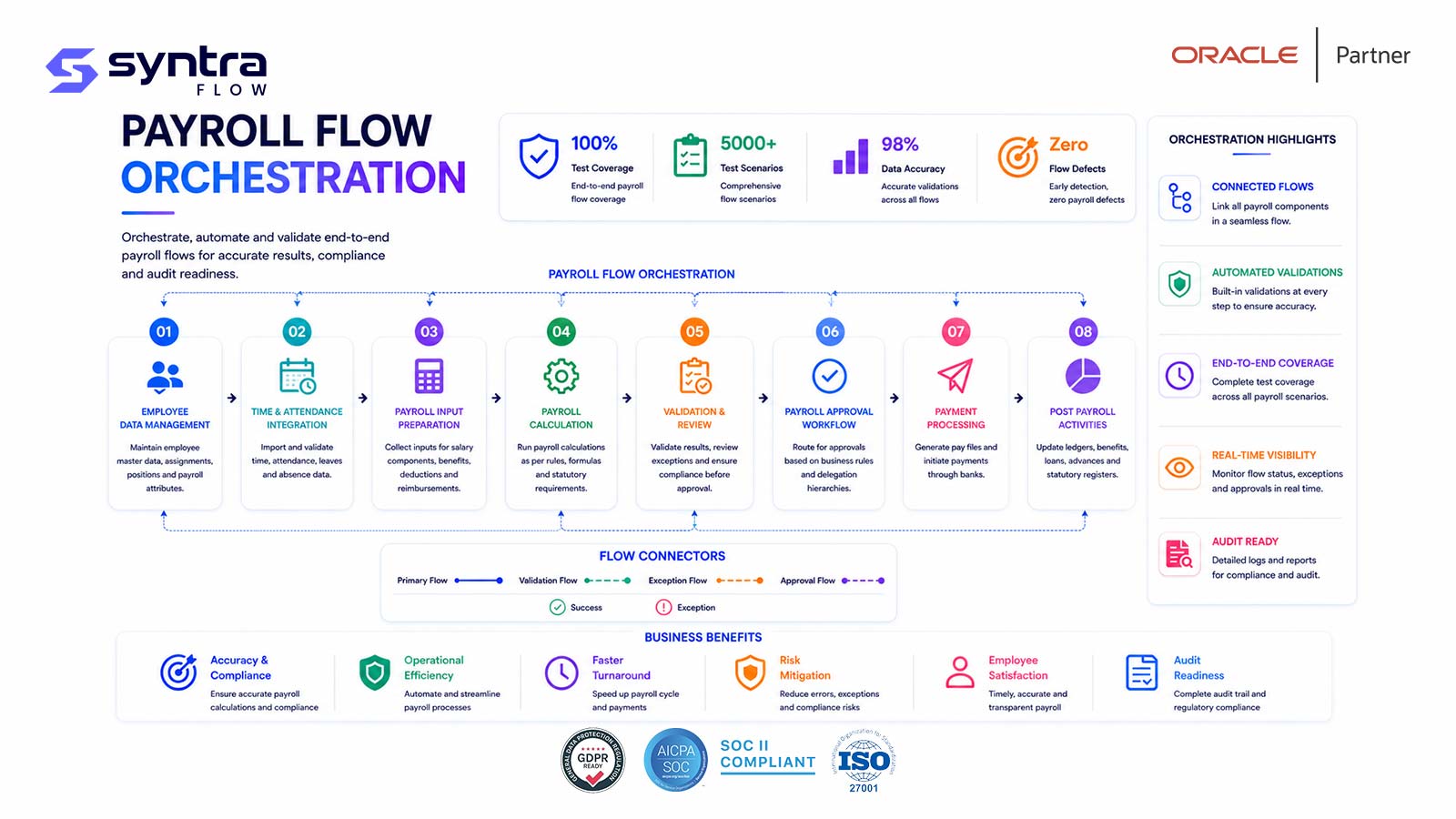
A payroll flow is the orchestration layer that turns individual payroll processes into a single, ordered submission — Calculate Payroll → PrePayments → Archive → Payment Process → Payslips → EFT / Payroll Interface. Each task has dependencies, statuses, and rollback behaviour of its own, and a defect at the orchestration level can strand an otherwise-correct calculation before it ever reaches a payslip or a bank file.
This page is a practical guide to testing that orchestration — task sequencing, task list configuration, flow patterns, and flow-level error handling and rollback — for Oracle Fusion Cloud Payroll. It sits under the Oracle HCM Testing Tool hub.
What Is a Payroll Flow in Oracle Fusion Cloud Payroll?
A payroll flow is a configured, orderable sequence of tasks that Oracle executes as a single submission — most commonly the standard cycle of Calculate Payroll, Calculate Prepayments, Archive Periodic Payroll Results, a payment process task, Generate Payslips, and the EFT or Payroll Interface tasks that move money and data out of Oracle. Flows are built from flow patterns and task lists, each task carrying its own status, parameters, owner, and dependency rules on the tasks before it.
Flow orchestration is distinct from what any single task calculates. Calculate Payroll produces run results from elements, balances, and rules; the flow decides when that task runs relative to PrePayments and Archive, what happens if it errors partway through a payroll relationship group, and whether downstream tasks like Payslips or EFT are permitted to start. A flow can be perfectly sequenced around a calculation that is wrong, and a correct calculation can still be blocked, duplicated, or paid twice by a flow defect — the two failure modes are independent and both need dedicated tests.
Payroll flow testing sits inside the broader Oracle Hire-to-Retire (H2R) lifecycle — the chain from hire and compensation through time capture, payroll processing, and payment that spans the HCM testing cluster. Payroll flows consume time and absence results from Oracle Time and Labor and feed the payment, payslip, and interface outputs that close the cycle.
Scope note. This page owns the flow orchestration layer — the task sequence, flow patterns, task list configuration, and flow-level error handling and rollback across Calculate Payroll, PrePayments, Archive, Payment Process, Payslips, and EFT/Payroll Interface. The underlying calculation mechanics — elements, balances, costing, tax, deductions, and retroactive pay recalculation — are covered on Oracle Payroll Testing. If a scenario is about whether a number is right, it belongs there; if it's about whether a task ran, in order, with the right rollback behaviour, it belongs here.
Why Payroll Flow Testing Matters
Payroll flows run on a fixed calendar, and every task in the sequence sits between an employee and their pay. A flow that stalls between Calculate Payroll and Archive doesn't just delay a report — it blocks Payslips and the payment process task from starting at all, because Oracle enforces those dependencies deliberately. A flow that mis-sequences PrePayments ahead of a final Calculate Payroll rerun can generate a payment file against stale results.
The people depending on flow behaviour are payroll operations teams running the cycle under a hard cutoff, treasury teams relying on the EFT file being accurate and on time, and control/audit teams who need every task's status and rollback history to be traceable. A flow orchestration defect is rarely subtle in its consequence — a missed or duplicated payment run is one of the most visible failures an ERP program can produce.
6
core tasks in a standard flow
30
flow scenarios on this page
4x
yearly quarterly-update triggers
1
missed cutoff is one too many
Oracle Process Overview: The Payroll Flow Task Sequence
A standard periodic payroll flow moves through six functional stages. Each stage is a task (or task group) in the flow's task list, with its own status, parameters, and dependency on the task before it.
Standard payroll flow sequence
- Calculate Payroll: processes eligible payroll relationships and produces run results; errors on individual records do not necessarily halt the flow.
- PrePayments: allocates net pay across each employee's payment methods (EFT, cheque, cash) per their distribution rules.
- Archive Periodic Payroll Results: locks and stores results for reporting, payslips, and payment; most downstream tasks require this task to complete first.
- Payment Process: generates the payment file/register and, where configured, initiates disbursement or positive-pay output.
- Payslips: generates and publishes payslips for processed, non-excluded employees.
- EFT / Payroll Interface: produces the bank payment file and extracts payroll results to the general ledger or a third-party system.
Common Payroll Flow Testing Challenges
Flow orchestration defects are structurally different from calculation defects — they surface as a stuck task, a wrong-order execution, or a rollback that leaves partial data behind, rather than a wrong number on a payslip. That makes them easy to under-test.
| Risk | Impact | Mitigation via testing |
|---|---|---|
| Task dependency not enforced | Payslips or payment generated against un-archived results | Assert downstream tasks block until Archive completes |
| Partial rollback | Residual prepayment or archive data after a task is rolled back | Verify rollback clears all task-generated data, not just status |
| Rerun without correction | Same error reproduced or duplicate payment created | Retry tests require the underlying condition to be fixed first |
| Duplicate EFT submission | Employees paid twice from a re-run payment task | Negative test on resubmitting a completed payment task |
| Flow pattern misconfiguration | Off-cycle or QuickPay flow skips a required task | Validate each flow pattern's task list independently |
| Silent task list change after update | Quarterly update alters task order or default parameters | Release-aware regression on the flow task list |
| Payroll Interface extract gap | GL or third-party feed missing or incomplete records | Reconcile extract row counts and totals against archived results |
| Errored relationships block whole flow | One bad record stalls processing for the whole population | Confirm error isolation and continue-on-error behaviour |
| Task list security gap | Unauthorised user resolves or reruns a task | Role-based task action tests per task owner |
| Volume/performance drift | Flow exceeds the processing window at peak headcount | Run flow tests at production-representative volume |
What SyntraFlow Automates in Payroll Flow Testing
SyntraFlow submits and monitors the flow the way an operator does, then asserts task-level outcomes rather than just "the flow finished."
Pre-built flow scenarios
Starter coverage for the standard task sequence, off-cycle and QuickPay patterns, and rollback/retry cases.
Task-level assertions
Checks each task's status, output, and dependency gating — not only the flow's overall completion status.
Self-healing execution
Playwright-based runs that re-anchor when Oracle changes the flow submission or task list pages.
Flow monitoring
Polls flow and task status through completion and captures the outcome at each stage as evidence.
Rollback & retry coverage
Drives rollback, retry, and mark-resolved paths and confirms downstream tasks re-open correctly.
Release-impact selection
Runs the flow subset a given quarterly release actually affects.
[SyntraFlow — Payroll Flow Monitor view: illustrative task list with per-task status, owner, and elapsed time]
Illustrative Test Execution Dashboard
Representative figures for a single flow regression cycle — illustrative only, not a customer benchmark.
30
flow scenarios executed
97%
pass rate on latest run
2
task-order defects found
~70%
time saved vs manual cycle
AI Testing Features for Payroll Flows
AI assistance targets the parts of flow testing that are hardest to keep current by hand: task list drift after an update, and coverage of the many flow-pattern permutations.
AI impact analysis — quarterly flow regression cycle
Illustrative comparison for a mid-size flow regression pack; actual figures depend on flow count, task list complexity, and pattern coverage.
| Dimension | Manual testing | AI-driven testing |
|---|---|---|
| Task list change detection | Discovered when a flow behaves unexpectedly | Compared against prior task list on each release |
| Flow-pattern coverage | Limited to a handful of scripted patterns | Generated variants across standard, off-cycle, QuickPay, retro |
| UI page changes (Redwood) | Scripts break, require rework | Self-healing selectors re-anchor automatically |
| Rollback/retry coverage | Often skipped due to setup effort | Repeatable, engineered failure/rollback data |
| Evidence for audit | Manually captured, inconsistent | Automatic per-task status and screenshot capture |
A note on capability. Pre-built flow scenarios, task-level assertions, self-healing execution, and flow monitoring are current platform capabilities, available via SyntraFlow's AI testing features. Coverage scoped to your specific flow patterns, task lists, and payroll relationship groups is configurable during onboarding. Any tenant-specific extension is confirmed at assessment rather than assumed here.
Typical Oracle Payroll Flow Test Scenarios
30 representative flow orchestration scenarios — task sequencing, dependency enforcement, rollback and retry, flow patterns, and integration output. Test IDs use the HC-PFL prefix. Calculation-accuracy scenarios (elements, balances, tax, retro pay) are covered on Oracle Payroll Testing, not here.
| ID | Scenario | Preconditions | Expected result | Pri | Auto |
|---|---|---|---|---|---|
| HC-PFL-001 | Submit standard payroll flow for a period | Flow pattern configured, period open | All tasks execute in defined sequence | H | Y |
| HC-PFL-002 | Flow task list matches configured sequence | Task list definition reviewed | Task order and dependencies match config | H | Y |
| HC-PFL-003 | Calculate Payroll task completes successfully | Eligible relationships with valid input | Task status Completed, run results created | H | Y |
| HC-PFL-004 | Calculate Payroll isolates errored relationships | One relationship has invalid element entry | Error flagged; flow continues for others | H | Y |
| HC-PFL-005 | PrePayments allocates by payment method | Employee has EFT + cheque methods | Net pay split per distribution rule | H | Y |
| HC-PFL-006 | PrePayments respects percentage/amount split | Split configured as % and fixed amount | Allocation matches configured rule exactly | M | Y |
| HC-PFL-007 | Archive locks results before downstream tasks | PrePayments completed | Archive completes; results marked archived | H | Y |
| HC-PFL-008 | Downstream task blocked without Archive | Archive task not yet run | Payslip/Payment task cannot start | H | Y |
| HC-PFL-009 | Generate Payslips for all processed employees | Archive completed, full population | Payslip generated for every eligible employee | H | Y |
| HC-PFL-010 | Payslip task excludes terminated employees | Employee terminated mid-period, excluded flag set | No payslip generated per configuration | M | Y |
| HC-PFL-011 | Payslip availability matches self-service config | Online payslip access enabled | Payslip visible in employee self-service on publish | M | Y |
| HC-PFL-012 | EFT task generates correctly formatted payment file | PrePayments completed with EFT methods | File format matches bank specification | H | Y |
| HC-PFL-013 | EFT file applies correct bank and value date | Multiple bank/branch combinations present | Each record carries correct routing and date | H | Y |
| HC-PFL-014 | Payment Process produces accurate payment register | Payment task completed | Register totals reconcile to PrePayments | H | Y |
| HC-PFL-015 | Void Payments reverses a prepayment correctly | Completed payment requires void | Prepayment reversed; employee re-eligible for payment | M | Y |
| HC-PFL-016 | Payroll Interface extracts data to GL/third party | Archive completed, interface configured | Extract row counts/totals match archived results | H | Y |
| HC-PFL-017 | Payroll Interface extract failure reported cleanly | Extract target unavailable | Task errors with clear reason; flow state intact | M | Y |
| HC-PFL-018 | Rollback of a single task restores prior state | Task completed, rollback requested | Task-generated data fully removed | H | Y |
| HC-PFL-019 | Rollback cascades to dependent downstream tasks | Calculate Payroll rolled back after PrePayments ran | Dependent tasks also rolled back or reset | H | Y |
| HC-PFL-020 | Retry a failed task after correcting the error | Task in error, underlying data fixed | Flow resumes at the correct task | H | Y |
| HC-PFL-021 | Mark task-in-error resolved manually | Error does not require data change | Flow continues after manual resolution | M | P |
| HC-PFL-022 | Skip an optional task in the flow pattern | Task marked optional in task list | Flow proceeds; downstream dependencies unaffected | M | Y |
| HC-PFL-023 | Off-cycle / QuickPay flow pattern execution | QuickPay flow submitted for one relationship | Runs independently of the regular cycle flow | H | Y |
| HC-PFL-024 | Retroactive pay flow pattern feeds next cycle | Retro event processed via retro flow | Adjustment included correctly in next regular flow | M | Y |
| HC-PFL-025 | Flow submitted via REST matches UI submission | Same flow parameters via API and UI | Identical task sequence and results | M | Y |
| HC-PFL-026 | Scheduled/recurring flow triggers on schedule | Flow scheduled for a recurring date | Flow submits automatically at scheduled time | M | Y |
| HC-PFL-027 | Flow notifications alert task owners | Task completes or errors | Owner notified per configured role | M | P |
| HC-PFL-028 | Flow monitor reflects real-time task progress | Flow in progress | Status view matches actual task state at each point | M | Y |
| HC-PFL-029 | Task list security restricts actions by role | Non-owner attempts to rerun a task | Action denied; owner-only actions enforced | H | P |
| HC-PFL-030 | Multiple payroll relationship groups in one flow | Flow scoped to two or more groups | Each group processed correctly within the same flow | M | Y |
Pri = priority (H/M/L). Auto = automation candidate (Y suitable · P partly, needs role/data setup). Steps summarised; full step detail ships in the downloadable test pack.
Regression Testing Payroll Flows
Payroll flows are among the most regression-sensitive processes in Oracle HCM because they run on a fixed, unforgiving calendar and touch configuration that changes often — task lists, flow patterns, payment methods, and interface mappings. A change in any of these can alter task sequencing or dependency behaviour without altering a single calculation.
The Oracle Regression Testing Tool re-runs the flow orchestration pack after configuration changes, security-role updates, or patches — confirming task sequencing, dependency gating, and rollback behaviour still hold, not just that individual tasks still calculate correctly.
Quarterly Oracle Release Testing for Payroll Flows
Oracle's quarterly updates can change flow behaviour without any configuration change on your part — a new default task parameter, an altered dependency rule, or a redesigned flow submission page. Because flow orchestration determines whether payslips and payments are even reachable, an untested update is a direct risk to the next payroll cutoff.
SyntraFlow's Oracle Release Intelligence analyses each update's release notes for changes touching payroll flows and task lists, maps them to your configured flow patterns, and recommends the specific HC-PFL scenarios to re-run before the next live cycle.
Redwood UI Considerations for Payroll Flows
Oracle's Redwood redesign reaches the flow submission, task list, and flow monitor pages, changing element locations and interaction patterns while the underlying orchestration logic is unchanged. Selector-based automation built against the older pages breaks the moment Redwood is enabled, even though task sequencing and dependency behaviour haven't moved.
See Oracle Redwood UI Testing for how SyntraFlow's semantic, self-healing execution keeps flow submission and monitoring tests running through a Redwood rollout rather than requiring a rewrite.
Payroll Flow Testing Best Practices
Test the task sequence itself, not just each task's calculation output.
Assert dependency gating explicitly — a downstream task must not be reachable early.
Cover rollback and retry as first-class scenarios, not edge cases.
Test every flow pattern in use — standard, off-cycle, QuickPay, retro — independently.
Reconcile Payroll Interface extract totals against archived results, not just row counts.
Test task-level role security to protect segregation of duties on rerun/release actions.
Include a negative test for resubmitting a completed payment task.
Run flow tests at production-representative volume, not a handful of test records.
Re-run the flow pack on every quarterly update, scoped by release impact.
Keep calculation-accuracy testing on the payroll testing page — don't duplicate it here.
General Oracle documentation for reference: Oracle Fusion Cloud Payroll: Administering Payroll Flows, Oracle Fusion Cloud Payroll: Implementing Global Payroll, and the Oracle Fusion Cloud HCM: Common Payroll Interface documentation library.
SyntraFlow Advantages for Payroll Flow Testing
Task-aware assertions
Verifies each task's status and dependency gating, not just flow completion.
Flow pattern coverage
Standard, off-cycle, QuickPay, and retro patterns tested as distinct scenarios.
Redwood-resilient
Self-healing selectors keep flow submission tests running through UI redesigns.
Release-scoped regression
Targets the flow scenarios a given quarterly update actually touches.
Related Oracle HCM Pages
Payroll flow orchestration connects to calculation, time capture, and broader HCM testing. Go deeper on adjacent topics:
Oracle HCM Testing Tool ⭐
The HCM testing hub.
Oracle Payroll Testing →
Element, balance, and calculation accuracy.
Oracle Time and Labor Testing →
Upstream time and absence feeds.
Oracle HCM Test Cases →
Broader HCM scenario catalog.
Oracle HCM UAT Checklist →
Sign-off checklist for HCM cycles.
Oracle Regression Testing Tool →
Re-run flow packs after every change.
Frequently Asked Questions
What is Oracle payroll flow testing, and how is it different from payroll calculation testing?
▼
Payroll flow testing covers the orchestration layer — the task sequence of Calculate Payroll, PrePayments, Archive, Payment Process, Payslips, and EFT/Payroll Interface, including flow patterns, task list configuration, and rollback behaviour. It does not cover whether the calculated pay is correct; that's calculation testing — elements, balances, costing, tax, deductions, and retroactive pay — which is covered on Oracle Payroll Testing. A flow can be perfectly sequenced around a wrong number, or block a correct calculation from ever reaching payment — both need testing, but they're distinct risks.
What tasks make up a standard Oracle payroll flow?
▼
A standard periodic flow typically runs Calculate Payroll, Calculate Prepayments, Archive Periodic Payroll Results, a payment process task, Generate Payslips, and the EFT and Payroll Interface tasks that produce the bank file and downstream data extract. The exact task list and order are configurable and should be verified against your own flow pattern, not assumed from a generic list.
Why does the Archive Periodic Payroll Results task matter for testing?
▼
Archive locks and stores results, and most downstream tasks — Payslips, payment processing, and interface extracts — depend on it completing first. If dependency enforcement is broken, a task can run against results that later change, producing a payslip or payment file that doesn't match the archived record. Testing must confirm both that Archive completes correctly and that downstream tasks are actually blocked until it does.
How do you test payroll flow rollback and retry?
▼
Roll back a completed task and verify all task-generated data is removed, not just the status flag. Then retry after correcting the underlying condition and confirm the flow resumes at the correct task rather than reprocessing from the start or skipping ahead. Rollback tests should also check that dependent downstream tasks are reset when an upstream task is rolled back.
What is the difference between a regular payroll flow and an off-cycle or QuickPay flow?
▼
A regular flow processes the full eligible population on the standard payroll calendar. Off-cycle and QuickPay flows use a different flow pattern to process one or a small set of payroll relationships outside that calendar — for a correction, termination payment, or bonus run. Each pattern has its own task list and should be tested independently, since a task that's required in one pattern may be optional or absent in another.
How does Payroll Interface fit into the payroll flow?
▼
The Payroll Interface task runs after Archive and extracts payroll results to the general ledger or a third-party system. Testing should reconcile the extract's row counts and totals against the archived results, and confirm that an extract failure is reported clearly without corrupting the rest of the flow's state.
What should EFT and payment file testing cover in a payroll flow?
▼
Confirm the file format matches the bank specification, that each record carries the correct bank, branch, and value date, and that the payment register reconciles to the PrePayments allocation. A critical negative test is resubmitting an already-completed payment task — it should not be possible to generate a duplicate payment file for the same processed population.
How often should payroll flow tests be re-run?
▼
On every Oracle quarterly update, and after any change to task lists, flow patterns, payment methods, or interface mappings. Because flows run on a fixed calendar, a defect surfaced during testing is far cheaper than one discovered on a live cutoff.
Does Redwood change payroll flow testing?
▼
Redwood redesigns the flow submission, task list, and monitor pages, which breaks selector-based automation even when task sequencing and dependency logic are unchanged. SyntraFlow understands Redwood pages semantically and self-heals, so flow submission and monitoring tests keep running through a UI redesign. See Oracle Redwood UI Testing.
How does SyntraFlow automate payroll flow testing?
▼
SyntraFlow submits flows the way an operator does, monitors each task through completion, and asserts task-level outcomes — status, dependency gating, rollback and retry behaviour — rather than only the flow's overall completion status. It self-heals when Oracle changes the submission or monitor pages, and it can scope regression to the flow scenarios a given release actually affects.
Strengthen Your Oracle Payroll Flow Test Coverage
Identify gaps in your flow orchestration testing, automate rollback and retry scenarios, and prepare for Oracle quarterly updates with SyntraFlow. See it run against flow patterns like yours.