Oracle Time and Labor Testing
Oracle Time and Labor captures how every employee's hours are recorded, calculated, and approved — hours that become the raw input for two downstream controls: absence balances and pay. A time card that misapplies an overtime rule, routes to the wrong approver, or fails to reach payroll on schedule produces an underpaid employee, an inflated labor cost, or a missed pay run.
This page is a practical guide to testing time capture and time-rule mechanics: time cards, approval routing, overtime calculation, shift patterns, and the time calculation rules engine behind them. It sits under the Oracle HCM Testing Tool hub and hands off to two neighboring pages for what happens once time leaves this module.
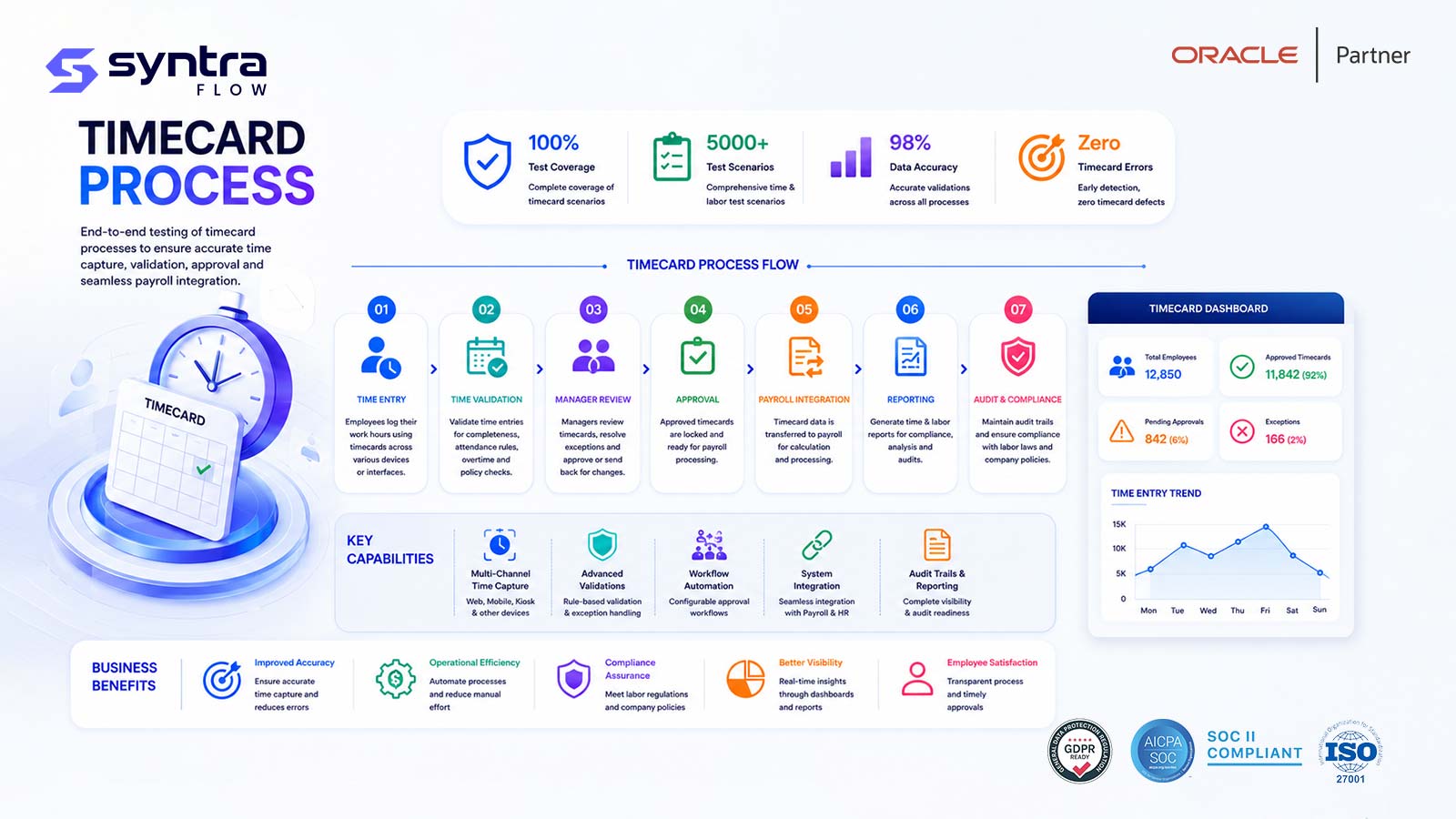
What Is Oracle Time and Labor Testing?
Oracle Time and Labor is the Fusion HCM module where employees, supervisors, and time administrators record and process worked time. A worker enters hours or punches on a time card, time calculation rules evaluate that entry against overtime thresholds, shift definitions, and rounding logic, the card moves through an approval chain, and — once approved — the resulting time entries are made available to payroll processing and, where absence hours appear on a time card, absence tracking.
Testing this module means verifying each stage independently and in sequence: that a time card captures hours correctly regardless of entry method, that the rules engine applies overtime and shift differentials as intended, that approval routing reaches the right person under normal and exception conditions, and that approved time reaches its downstream consumers intact and on schedule. A defect anywhere in that chain is rarely cosmetic — it changes what an employee is paid or how their leave balance moves.
Time and Labor working correctly matters to hourly and elapsed-time employees who need accurate pay, supervisors accountable for labor cost, payroll teams pulling time into a pay run, and compliance teams who must show overtime and shift premiums were calculated per policy and, in many jurisdictions, per law.
Scope note. This page owns time capture and time-rule mechanics — time cards, approval, overtime, shift patterns, and time calculation rules — and the integration points where processed time hands off to other modules. It does not own leave-balance and accrual logic, which lives on Oracle Absence Management Testing, or payroll calculation itself, which lives on Oracle Payroll Testing and Oracle Payroll Flow Testing. Where a scenario crosses that boundary, this page tests the handoff, not the calculation on the other side.
Why Testing Time and Labor Matters
Time and Labor sits directly upstream of payroll, making it one of the few HCM modules where a defect is felt by every employee in a pay period, not just one transaction. An overtime rule that under-calculates hours produces systematic underpayment; one that over-calculates inflates labor cost workforce-wide. Because the impact compounds every pay cycle until caught, even a small configuration error becomes expensive quickly.
The module is also where compliance exposure concentrates. Overtime thresholds, shift differentials, and meal-break rules are frequently tied to labor law and union agreements, and auditors expect evidence that configured rules match policy on paper — not just that a time card was approved. Testing time and labor produces that evidence before a regulator or an employee dispute forces the question.
| Risk | Example | Potential impact | Mitigation via testing |
|---|---|---|---|
| Overtime miscalculation | Daily OT threshold not applied correctly | Underpaid or overpaid employees | Boundary tests at every OT threshold |
| Shift differential omitted | Night-shift premium not paid | Pay dispute; union grievance | Differential cases per shift pattern |
| Approval routing failure | Time card stuck with no approver | Missed payroll cutoff | Routing, delegate and escalation tests |
| Rounding rule drift | Punch rounding changes after an update | Systematic small pay error at scale | Rounding regression on every release |
| Absence/time conflict | Approved absence overlaps worked time | Duplicate or missing paid hours | Cross-module overlap test cases |
| Late delivery to payroll | Approved time not transferred in time | Off-cycle pay run; employee complaints | End-to-end timing tests to payroll cutoff |
| Retroactive adjustment gap | Time corrected after payroll already ran | Retro pay error; reconciliation effort | Retro time-to-payroll scenario coverage |
| Silent rule change | Quarterly update alters a calculation rule | Undetected pay drift | Release-aware regression on time rules |
The Oracle Time and Labor Process Flow
A time card moves through a consistent sequence from entry to delivery, whatever the entry method or worker type. Understanding the sequence is what makes it possible to design tests that isolate a defect to a single stage.
Time and labor sequence
- Entry methods: hourly time cards, elapsed time entry, and punch (clock in/out) entry, each with its own layout and validation.
- Rules evaluated: overtime thresholds (daily and weekly), shift differentials, rounding, minimum increments, and break deductions.
- Routing: single or multi-level approval, with delegation and escalation for absent approvers.
- Downstream consumers: payroll processing and, where a time card carries absence hours, absence tracking.
This process forms part of the complete Oracle Hire-to-Retire (H2R) lifecycle. See how time capture connects to the rest of the employee lifecycle on the Oracle HCM Testing Tool hub.
Common Testing Challenges
Time and Labor is deceptively hard to test well. The rules engine carries dozens of overtime and shift permutations, approval hierarchies vary by business unit, and the module's real correctness only shows up once time lands in payroll — a system most testers treat as someone else's problem.
Rule combinations multiply fast
Overtime, shift, and rounding rules interact, so testing each in isolation misses defects that only appear when two or three combine on the same card.
Approval hierarchies vary by population
Business units, unions, or worker types can carry different routing rules, so a suite validated for one population doesn't guarantee coverage for another.
Downstream effects are hard to see
A time card defect often surfaces first as a pay discrepancy days later — by then the root cause in Time and Labor is harder to trace.
Boundary conditions get skipped
Manual testers test "normal" time cards and skip the exact-threshold cases where overtime and rounding rules actually break.
Cross-module timing is fragile
Absence integration and payroll delivery both depend on time being approved by a cutoff — a delay upstream cascades into a missed transfer.
Quarterly updates touch rules silently
Oracle updates can adjust how the calculation engine evaluates rules, and an untested change reaches a live pay run undetected.
What SyntraFlow Automates
SyntraFlow drives time card entry, submission, and approval across the UI and API, then asserts the calculated result against the expected outcome — not just that the card was saved.
Pre-built time card scenarios
A starter pack of overtime, shift, and approval cases you extend to your own rules.
AI-assisted scenario generation
Generates time-rule variants — threshold boundaries, shift combinations, rounding cases — from your configuration.
Self-healing execution
Re-anchors when Oracle changes the time card or Redwood pages, so assertions keep working release over release.
Dynamic test data
Provisions workers, assignments, and shift patterns that exercise the specific rule each test targets.
Calculated-value assertions
Verifies the actual overtime hours, differential amount, or rounded time — not just that the card processed.
Approval-routing verification
Confirms a time card reaches the correct approver, delegate, or escalation path.
Evidence capture
Timestamped screenshots and calculation logs retained as audit-grade evidence for every run.
Release-impact selection
Runs the subset a given release or rule change actually affects.
Full test-case library
Draws on the broader Oracle HCM Test Cases library to extend coverage without rebuilding cases.
| Benefit | Manual approach | With SyntraFlow |
|---|---|---|
| Overtime boundary coverage | A handful of "typical" cases, boundaries often skipped | Every threshold tested at, below, and above the limit |
| Regression after an update | Days of re-testing, often reduced in scope under deadline | Release-scoped pack re-run in hours |
| Approval routing checks | Tested for the common path only | Delegate and escalation paths included as standard |
| Redwood page changes | Scripts break, manual rework required | Self-healing execution adapts automatically |
| Evidence for audit | Manually assembled, inconsistent | Captured automatically for every run |
180+
Illustrative time & labor scenarios executed per cycle
~97%
Illustrative pass rate on a stable configuration
12
Illustrative defects surfaced before go-live
~65%
Illustrative reduction in quarterly regression time
Illustrative figures, not benchmarks from a specific customer.
[SyntraFlow — Time Card Approval Test Run view]
Illustrative placeholder, not a live screenshot.
AI Testing Features
AI narrows testing to what actually changed and widens coverage into boundary cases manual testers tend to skip. See the full capability set on SyntraFlow AI testing features.
AI impact analysis — illustrative quarterly regression cycle
Illustrative comparison only — actual hours depend on suite size, configuration complexity, and rule count in your tenant.
| Dimension | Manual testing | AI-driven testing |
|---|---|---|
| Boundary case coverage | Limited by tester time and memory | Systematically generated from rule definitions |
| Scope after an update | Full suite re-run, or a risky guess at scope | Scoped to what the release actually touches |
| Page changes (Redwood) | Scripts fail on selector changes | Self-healing re-anchors to the new page structure |
| Consistency across cycles | Varies with tester and time pressure | Same assertions run identically every cycle |
| Evidence for audit | Assembled after the fact, inconsistently | Captured automatically at execution time |
A note on capability. Pre-built time and labor cases, self-healing execution, and evidence capture are current platform capabilities. AI-generated scenario expansion is configurable during onboarding, and tenant-specific rule libraries are scoped at assessment rather than assumed here. SyntraFlow verifies that Time and Labor calculates and routes according to your configured rules.
Oracle Time and Labor Test Scenarios
A representative set of 30 Oracle Fusion Time and Labor scenarios — time card entry, overtime and shift rules, approval routing, time-rule regression, and the handoffs into absence and payroll. Test IDs use the HC-TL prefix.
| ID | Scenario | Preconditions | Expected result | Pri | Auto |
|---|---|---|---|---|---|
| HC-TL-001 | Enter hourly time card for a standard work week | Worker on hourly time layout | Card saves; hours match entry | H | Y |
| HC-TL-002 | Enter elapsed time for a single work day | Worker on elapsed time layout | Elapsed hours recorded correctly | H | Y |
| HC-TL-003 | Enter punch (clock in/out) time card | Worker on punch time layout | In/out punches captured and paired | H | Y |
| HC-TL-004 | Time card with multiple assignments in one day | Worker holds two active assignments | Hours allocated to correct assignment | M | Y |
| HC-TL-005 | Submit time card for approval — happy path | Complete, valid time card | Card routes to assigned approver | H | Y |
| HC-TL-006 | Manager rejects time card with comments | Submitted card, pending approval | Card returned to worker with comment | H | Y |
| HC-TL-007 | Multi-level approval routing (supervisor then project owner) | Two-tier approval rule configured | Card requires both approvals before final status | H | Y |
| HC-TL-008 | Approval delegated while manager is on leave | Delegate rule active for manager | Card routes to delegate approver | M | Y |
| HC-TL-009 | Approval escalates after SLA breach | Card pending beyond configured window | Card escalates to next approver | M | P |
| HC-TL-010 | Withdraw and resubmit a rejected time card | Previously rejected card | Card re-enters approval after correction | M | Y |
| HC-TL-011 | Daily overtime threshold triggers OT rate | Hours worked exceed daily OT threshold | Excess hours paid at OT rate | H | Y |
| HC-TL-012 | Weekly overtime threshold triggers OT rate | Cumulative weekly hours exceed threshold | Excess hours paid at OT rate | H | Y |
| HC-TL-013 | Hours exactly at OT threshold | Total hours = configured threshold | No overtime applied (boundary pass) | H | Y |
| HC-TL-014 | Double-time rule after extended hours | Hours exceed double-time threshold | Excess hours paid at double-time rate | M | Y |
| HC-TL-015 | Overtime calculation for a partial week (new hire) | Worker starts mid-week | OT calculated on actual days worked only | M | Y |
| HC-TL-016 | Shift differential applied for night-shift hours | Worker assigned to night shift pattern | Differential rate applied to qualifying hours | H | Y |
| HC-TL-017 | Rotating shift pattern change mid-cycle | Worker's shift assignment changes mid-period | Correct pattern applied per effective date | M | Y |
| HC-TL-018 | Weekend/holiday shift premium calculation | Hours worked fall on a premium day | Premium rate applied correctly | M | Y |
| HC-TL-019 | Punch time rounded per configured rounding rule | Punch falls between rounding intervals | Time rounds to configured increment | H | Y |
| HC-TL-020 | Minimum time increment enforced | Entry below configured minimum | Entry adjusted or rejected per rule | M | Y |
| HC-TL-021 | Unpaid meal-break deduction applied | Shift length triggers mandatory break rule | Break time deducted from payable hours | H | Y |
| HC-TL-022 | Time calculation rule changed mid-period | Rule effective-dated within an open period | Correct rule version applied per date | H | Y |
| HC-TL-023 | Approved absence hours populate the time card | Approved vacation day in the period | Absence hours shown correctly on card | H | Y |
| HC-TL-024 | Absence and worked time overlap on the same day | Absence and time entry both cover a date | Conflict flagged; no duplicate paid hours | H | Y |
| HC-TL-025 | Unpaid leave reduces payable hours | Unpaid leave recorded in the period | Payable hours reduced accordingly | M | Y |
| HC-TL-026 | Approved time transferred to a payroll batch | Card approved before payroll cutoff | Time record received intact by payroll | H | Y |
| HC-TL-027 | Retroactive time adjustment after payroll has run | Correction made post pay-run | Adjustment flagged for retro processing | H | P |
| HC-TL-028 | Time card edit attempted after payroll lock | Period locked for payroll processing | Edit blocked or routed to retro path | M | Y |
| HC-TL-029 | Approved time delivered to a non-payroll consumer | Time consumer set includes a second application | Time delivered consistently to each consumer | M | Y |
| HC-TL-030 | Time card entry and approval on Redwood UI | Redwood time pages enabled | Entry, submission and approval work as on classic UI | M | Y |
Pri = priority (H/M/L). Auto = automation candidate (Y suitable · P partly, needs additional data or timing setup).
Regression Testing for Time and Labor
Time calculation rules, approval hierarchies, and shift definitions change over time — new overtime policies, restructured business units, revised union agreements. Each change is a candidate for regression, because a rule edited for one worker population can unintentionally affect another sharing the same configuration object.
A useful regression pack re-runs overtime boundary, shift differential, and approval routing cases together, since these three areas most often interact, plus at least one end-to-end case carrying a time card through to payroll delivery to catch handoff defects.
The Oracle Regression Testing Tool maintains this pack as a reusable, versioned suite, so each cycle re-runs the same assertions rather than rebuilding coverage from scratch.
Quarterly Oracle Release Testing
Oracle's quarterly updates can alter time calculation behavior, approval workflow defaults, or the Redwood time entry pages without any configuration change on your part. Because Time and Labor feeds payroll directly, a silent change here is one of the highest-cost surprises a quarterly update can produce.
Rather than re-testing every scenario each quarter, Oracle Release Intelligence maps Oracle's release notes to your overtime rules, shift patterns, and approval configuration, then recommends the subset of the scenario table above the update actually touches — so effort tracks real risk instead of the full catalog.
Redwood UI Considerations
Oracle's Redwood redesign reaches the time card, approval, and manager self-service pages, changing layout and navigation while the underlying calculation rules stay the same. Selector-based automation written against the classic UI typically breaks the first time these pages are redesigned, even though nothing about overtime or shift logic changed.
Testing should confirm functional parity across the transition — that a worker can still enter, submit, and track a time card, and a manager can still approve one — on both classic and Redwood pages while available. Oracle Redwood UI Testing covers the semantic, self-healing approach that keeps time card automation running through these redesigns.
Time and Labor Testing Best Practices
Test overtime and rounding rules at, below, and above every threshold.
Cover every entry method — hourly, elapsed, and punch — since each has independent validation.
Validate approval routing for delegates and escalations, not just the primary approver.
Include an end-to-end case that follows a time card through to payroll delivery.
Test the absence-overlap case — a frequent source of duplicate or missing paid hours.
Include a retroactive adjustment scenario for time corrected after a payroll run.
Re-run the regression pack after any change to overtime, shift, or approval config.
Verify calculation rules on Redwood pages before retiring the classic UI test path.
Capture calculated values, not just page status, so evidence supports pay disputes.
Scope regression to what a quarterly update actually touched.
Oracle documentation references
- Oracle Fusion Cloud HCM: Using Time and Labor
- Oracle Fusion Cloud HCM: Implementing Time and Labor
- Oracle Fusion Cloud HCM: Implementing Global Human Resources
- Oracle Fusion Cloud Payroll documentation library
SyntraFlow Advantages for Time and Labor
Calculation-level assertions
Confirms actual overtime and differential values, not just that a card processed.
Self-healing on Redwood
Time card and approval tests keep running through Oracle's UI redesigns.
Release-scoped regression
Tests the rules a quarterly update actually changed, not the full catalog.
Cross-module coverage
Extends into absence and payroll handoffs to verify the full H2R chain.
Related Oracle HCM Pages
Time and labor connects directly to absence tracking and payroll. Go deeper on adjacent topics:
Oracle HCM Testing Tool ⭐
The HCM testing hub.
Absence Management Testing →
Leave balances, accrual and eligibility.
Oracle Payroll Testing →
Payroll calculation and results.
Payroll Flow Testing →
Flow tasks and payroll processing sequence.
Oracle HCM Test Cases →
The broader HCM scenario library.
Oracle HCM UAT Checklist →
Sign-off checklist for HCM go-lives.
Oracle Regression Testing Tool →
Versioned, reusable regression packs.
Oracle Release Intelligence →
Quarterly update impact analysis.
Oracle Redwood UI Testing →
Semantic, self-healing UI automation.
Frequently Asked Questions
What does Oracle Time and Labor testing cover?
▼
It covers time card entry across hourly, elapsed, and punch methods, the rules that apply overtime, shift differentials and rounding, approval routing, and the handoff of approved time to downstream consumers such as payroll. It does not cover leave-balance accrual or payroll calculation, which are tested on their own pages.
How is this different from Absence Management testing?
▼
Absence Management owns leave types, accrual rules, and balance eligibility. Time and Labor owns how worked hours and, where relevant, approved absence hours are captured on a time card. This page tests the point an absence hour appears on a card; the accrual logic behind that balance is tested on Oracle Absence Management Testing.
How is this different from Payroll testing?
▼
Time and Labor determines the hours and rates going into a pay run — overtime, shift differentials, approved time entries. What happens once payroll calculates gross-to-net pay, taxes, and deductions is covered on Oracle Payroll Testing and Payroll Flow Testing. This page tests that the time data payroll receives is correct.
Why do overtime boundary cases matter so much?
▼
Overtime rules are threshold-based, so the defects that matter most occur exactly at the limit — one minute under versus one minute over. A suite that only checks "typical" hours worked passes even when boundary logic is wrong, which is precisely where pay disputes originate.
How do you test time card approval routing?
▼
By submitting time cards for different worker populations and asserting each reaches the correct approver, including delegate reassignment when a primary approver is unavailable and escalation when a card sits pending beyond a configured window.
What happens when time and absence overlap on the same day?
▼
Oracle needs a defined outcome when an approved absence and a worked-time entry both cover the same date — otherwise an employee can be paid twice for one day, or a worked day can be silently dropped. Testing this overlap explicitly is one of the highest-value cross-module checks here.
How do you test retroactive time adjustments?
▼
Correct a time card after the pay period it belongs to has already been processed by payroll, and confirm the adjustment is flagged and routed for retroactive processing rather than silently ignored or double-counted. This scenario is easy to skip manually since it requires a prior payroll run as a precondition.
Does Redwood change time card testing?
▼
Redwood redesigns the time card, approval, and self-service pages, breaking selector-based automation even when calculation rules are unchanged. SyntraFlow understands Redwood pages semantically and self-heals, so time card and approval tests keep running through UI redesigns. See Oracle Redwood UI Testing.
How often should Time and Labor be regression tested?
▼
On every Oracle quarterly update, and after any change to overtime rules, shift definitions, rounding configuration, or approval hierarchies. Because a defect here affects an entire pay period at once, testing after these events is cheaper than correcting pay after the fact.
Can Time and Labor testing be automated end to end?
▼
Entry, submission, approval routing, and calculation assertions are current automation capabilities. Full verification into a completed payroll run depends on your payroll cycle and is scoped together with Payroll Flow Testing coverage during onboarding.
Strengthen Your Oracle Time and Labor Test Coverage
Identify gaps in your overtime, shift, and approval test coverage, automate boundary cases before they reach a pay run, and prepare for Oracle quarterly updates with SyntraFlow.