Oracle Payroll Testing
Oracle Payroll is the calculation engine that turns elements, formulas, and balances into a paycheck. Every gross-to-net result depends on element setup, formula logic, balance feeds, costing rules, tax and deduction calculation, and — when a change lands after the fact — retroactive recalculation. When any of these pieces drifts after a configuration change or quarterly update, the paycheck is wrong, and nobody notices until an employee, auditor, or regulator does.
This page is a practical, comprehensive guide to testing the payroll calculation engine itself — not the flow that moves a run to payment, but the arithmetic and configuration that decide what the numbers are. It sits under the Oracle HCM Testing Tool hub, and covers 42 distinct calculation, retro, costing, and reconciliation scenarios.
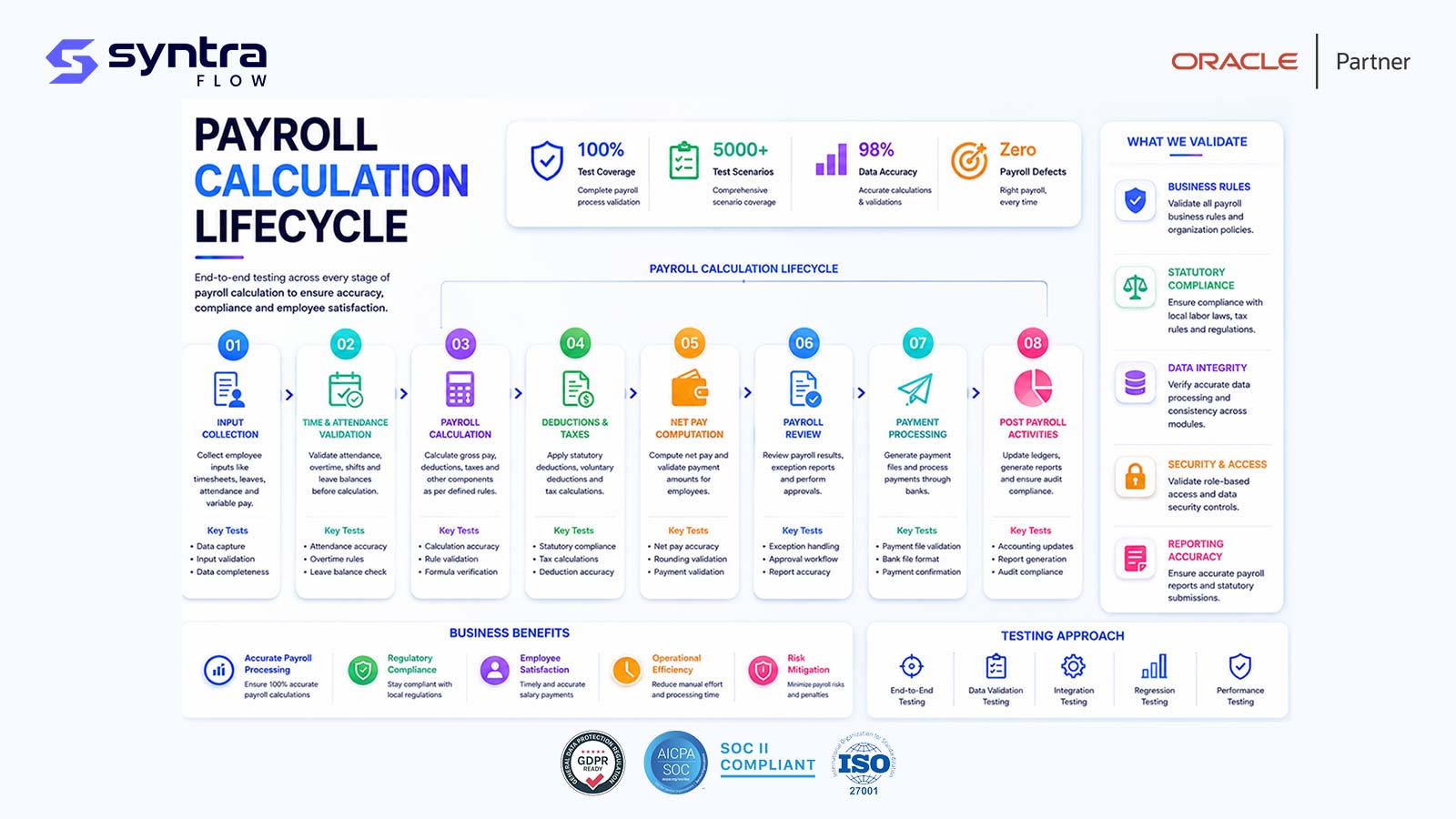
What Is Oracle Payroll Testing?
Oracle Fusion Cloud Payroll calculates pay by running elements — the building blocks representing earnings, deductions, and employer liabilities — through fast formulas that read input values and produce results. Those results feed balances through defined balance feeds, get distributed to cost centers through costing rules, and are adjusted retroactively through retro pay when a change is entered after a period has already processed. Tax and statutory deductions calculate against the same framework, and the resulting gross-to-net figures must ultimately reconcile — run to run, balance to balance, and payroll to the general ledger.
Payroll testing, in this sense, is about verifying the calculation engine produces the correct number every time — for a standard case, an edge case like a mid-period termination, and a configuration change like a new element or updated tax rate. It also means verifying retroactive changes recalculate the right periods, costing routes dollars to the right accounts, and balances reconcile cleanly to what gets paid and posted.
Scope note. This page owns the calculation engine: elements, formulas, balances, balance feeds, costing rules, tax and deduction calculation, retro pay recalculation, and reconciliation. It does not cover the ESS flow tasks that move a run through to payment — Calculate Payroll, PrePayments, Archive, Payment Process, Payslips, EFT, and Payroll Interface — which are covered on Oracle Payroll Flow Testing. This page tests what the numbers are; Payroll Flow Testing tests the process that moves them to payment. The two are complementary.
Why Testing Oracle Payroll Calculation Matters
Payroll is the one Oracle Fusion process where a defect is immediately and personally visible to every employee — and where a mis-calculated tax withholding or deduction is also a compliance exposure, not just a cosmetic error. A mis-calculated gross-to-net result shows up on a paycheck, a payslip, and a general ledger entry, all at once.
The calculation engine is also unusually interconnected. An element's formula depends on input values and other elements' results; a balance depends on which elements feed it and in what direction; costing depends on the assignment and the cost allocation flexfield; and retro pay depends on all of the above being correctly recalculated for an already-processed period. A single configuration change can silently alter results across many employees and periods before anyone notices.
This process forms part of the complete Oracle Hire-to-Retire (H2R) lifecycle. Payroll calculation depends on upstream data from worker assignments, compensation, time capture, and absence entitlements. A defect in any upstream feed shows up as a defect in the paycheck, which is why payroll testing cannot be treated as an isolated module.
The Oracle Payroll Calculation Process
Before payroll runs, configuration must be in place: elements, formulas, balance definitions, costing rules, and tax/deduction setup. The calculation engine then works through these pieces in a consistent sequence for every assignment.
Calculation sequence
- Inputs: element entries, input values, eligibility profiles, and prior-period balances.
- Formula execution: each element's fast formula runs against input values and dependent elements, in priority order.
- Balances: results feed defined balances — gross pay, taxable wages, net pay — through balance feed rules.
- Tax and deductions: statutory and voluntary deductions calculate against taxable balances and tax card configuration.
- Retro: a backdated change triggers recalculation of the affected prior period and a retro entry in the current period.
- Costing: results are distributed to cost centers using the cost allocation flexfield and any element-level override.
- Output: a gross-to-net result that must reconcile across the run, prior balances, and the costing distribution.
[SyntraFlow — Payroll calculation results and balance comparison view (illustrative)]
Common Payroll Calculation Testing Challenges
Payroll defects are hard to catch precisely because the engine is deterministic but deeply interconnected — a small change can ripple through balances, retro, and costing in ways that only show up when a specific edge case is exercised. The risks below are the ones testing teams most often under-cover.
| Risk | Example | Potential impact | Mitigation via testing |
|---|---|---|---|
| Formula logic error | Edited fast formula miscalculates an element result | Wrong pay for every employee on that element | Formula-level unit tests plus assignment-level results |
| Retro under- or over-recalculation | Backdated raise recalculates the wrong periods | Underpayment or overpayment; correction rework | Retro scenarios across multiple prior periods |
| Costing misallocation | Cost allocation flexfield derives the wrong account | GL misstatement; reconciliation breaks | Costing distribution assertions per assignment |
| Balance feed misconfiguration | New element not feeding the correct balance | Understated or overstated YTD figures | Balance feed validation for every new element |
| Tax calculation drift | Statutory rate updated but not reflected in results | Under/over-withholding; compliance exposure | Rate-change regression across affected work locations |
| Deduction priority error | Garnishment calculated before a required pre-tax deduction | Incorrect net pay; legal exposure | Deduction-order test cases with multiple concurrent deductions |
| Negative net pay unhandled | Deductions exceed available pay | Failed or incorrect payment; arrears mismanaged | Negative net pay and arrears scenario coverage |
| Element eligibility gap | Eligibility profile excludes a valid worker group | Missed pay or deduction for eligible workers | Eligibility boundary testing by worker category |
| Reconciliation gap | Gross-to-net total doesn't tie to costing or GL | Unexplained variance at close | Automated reconciliation checks every run |
| Silent quarterly-update change | Oracle update alters a seeded formula or tax table | Undetected calculation drift | Release-aware calculation regression pack |
What SyntraFlow Automates in Payroll Testing
SyntraFlow provisions the assignment and element data each scenario needs, runs the calculation, and asserts the specific balance and costing result — not just that a run completed.
Pre-built calculation cases
A starter pack of gross-to-net, retro, costing, and reconciliation scenarios you extend to your setup.
Assignment-level data provisioning
Builds workers and element entries that reliably produce the condition each test targets.
Balance-level assertions
Checks the actual balance and costing values a run produces, not just that a step completed.
Self-healing execution
Playwright-based runs that re-anchor when Oracle changes payroll pages, so checks keep running.
Retro-aware scenario chains
Sequences a backdated change, a recalculation, and a balance comparison end to end.
Release-impact selection
Runs the calculation subset a given Oracle release actually affects.
[SyntraFlow — Payroll test execution dashboard view (illustrative)]
42
Calculation scenarios executed
98%
Illustrative pass rate
3
Illustrative balance defects found
-60%
Illustrative regression time saved
Illustrative of a typical quarterly regression cycle, not a specific customer benchmark.
| Benefit | Manual approach | With SyntraFlow |
|---|---|---|
| Test data setup | Hand-built workers and element entries per scenario | Provisioned automatically for the target condition |
| Retro verification | Manual comparison of before/after balances in a spreadsheet | Automated balance-diff assertion per retro scenario |
| Costing checks | Spot-checked on a sample of assignments | Checked on every assignment in the test set |
| Regression after an update | Full manual re-test or skipped under time pressure | Release-scoped automated re-run |
| Evidence for audit | Screenshots collected manually, inconsistently | Captured automatically for every run |
AI Testing Features for Payroll
AI assistance targets the hardest parts to scale manually: generating edge-case scenarios and narrowing regression scope to what actually changed.
Illustrative regression effort per quarterly update
Illustrative comparison only; actual effort depends on element count, retro frequency, and scope of the quarterly update.
| Dimension | Manual testing | AI-driven testing |
|---|---|---|
| Scenario coverage | Limited by tester time and imagination | Generated from element and formula configuration |
| Retro edge cases | Often skipped due to setup complexity | Systematically included in the scenario set |
| Regression scope | Broad re-test or risky skipping | Scoped to release-impacted elements and balances |
| Result verification | Visual spot-check of a payslip or report | Balance and costing value assertions |
| UI resilience | Scripts break on page redesign | Self-healing against Redwood page changes |
A note on capability. Pre-built calculation cases, balance-level assertions, self-healing execution, and release-impact selection are current platform capabilities. AI-generated scenario variants for your element and formula library are configured during onboarding and confirmed at assessment, not assumed here. We do not claim autonomous formula authoring or unsupervised tax-table validation as a live capability.
Oracle Payroll Test Scenarios
A comprehensive set of 42 Oracle Fusion Payroll calculation scenarios, spanning gross-to-net calculation, retro pay, costing, elements, balance feeds, tax, deductions, third-party payments, and reconciliation. Test IDs use the HC-PAY prefix. Flow-sequence scenarios for the ESS process that moves a run to payment are covered on Oracle Payroll Flow Testing.
| ID | Scenario | Preconditions | Expected result | Pri | Auto |
|---|---|---|---|---|---|
| HC-PAY-001 | Standard gross-to-net calculation, single assignment | Active worker, standard earnings and deductions | Gross-to-net matches expected calculation | H | Y |
| HC-PAY-002 | Multiple assignments consolidated calculation | One payroll relationship, two active assignments | Balances consolidate correctly at relationship level | H | Y |
| HC-PAY-003 | Mid-period hire proration | Hire date mid-pay-period | Salary and elements prorated to days worked | H | Y |
| HC-PAY-004 | Mid-period termination proration | Termination date mid-pay-period | Final pay prorated; elements end correctly | H | Y |
| HC-PAY-005 | Negative net pay handling | Deductions exceed available gross pay | Handled per configured negative-pay rule | H | Y |
| HC-PAY-006 | Overtime / premium calculation | Hours beyond standard threshold reported | Overtime premium calculated per rule | H | Y |
| HC-PAY-007 | Retroactive salary increase recalculation | Salary change backdated two periods | Prior periods recalculated; retro entry generated | H | Y |
| HC-PAY-008 | Retro pay triggered after termination processed | Backdated change for a terminated worker | Retro calculated and payable post-termination | M | Y |
| HC-PAY-009 | Retro backdated element entry | New element entry dated to a prior period | Prior period recalculated for that element only | H | Y |
| HC-PAY-010 | Retro cost center change recalculation | Cost center reassigned retroactively | Prior costing distribution reversed and restated | M | Y |
| HC-PAY-011 | Retro tax card change recalculation | Tax card updated with a retroactive date | Affected periods recalculate with new tax setup | M | Y |
| HC-PAY-012 | Cost allocation flexfield default derivation | Standard assignment, no override | Costing derives default segments correctly | H | Y |
| HC-PAY-013 | Costing override at element entry level | Element entry has a costing override | Override takes precedence over default | M | Y |
| HC-PAY-014 | Multi-assignment cost split across cost centers | Worker split across two departments | Costing splits proportionally per assignment | M | Y |
| HC-PAY-015 | Suspense account routing on costing failure | Costing cannot derive a valid account | Routed to suspense; exception logged | M | Y |
| HC-PAY-016 | Element eligibility rule enforcement | Eligibility profile restricts a worker group | Only eligible workers receive the element | H | Y |
| HC-PAY-017 | Element input value validation | Input value outside defined range entered | Validation error or hold at entry | M | Y |
| HC-PAY-018 | Formula-driven indirect element result | Indirect element depends on a direct element's result | Indirect result calculates from dependent value | M | Y |
| HC-PAY-019 | Recurring element continues without re-entry | Recurring element entered in a prior period | Processes automatically in the current period | M | Y |
| HC-PAY-020 | Nonrecurring element processes once then stops | One-time bonus element entered | Processes in the target period only | M | Y |
| HC-PAY-021 | Balance feed accumulation to gross earnings | New earnings element feeds gross balance | Gross balance reflects the element's contribution | H | Y |
| HC-PAY-022 | Manual balance adjustment entry | Balance adjustment entered for a correction | Adjustment reflected in balance, audit-logged | M | Y |
| HC-PAY-023 | Balance group dimension aggregation accuracy | Balance grouped by period-to-date dimension | Aggregated total matches individual feeds | M | Y |
| HC-PAY-024 | YTD balance carry-forward across pay periods | Multiple periods processed sequentially | YTD balance carries and accumulates correctly | H | Y |
| HC-PAY-025 | Balance dimension reset at year boundary | Run spans a calendar/tax year boundary | YTD dimensions reset; ITD dimensions persist | M | Y |
| HC-PAY-026 | Federal tax withholding calculation | Standard taxable wages, valid tax card | Withholding matches expected federal calculation | H | Y |
| HC-PAY-027 | State/local tax across multiple work locations | Worker splits time across two tax jurisdictions | Tax apportioned correctly by jurisdiction | H | Y |
| HC-PAY-028 | Tax card update effective mid-year | Withholding elections changed mid-year | New elections apply from effective date forward | M | Y |
| HC-PAY-029 | Tax-exempt status suppresses withholding | Worker claims valid exempt status | No withholding calculated for exempt tax type | M | Y |
| HC-PAY-030 | Year-end taxable wage balance accuracy | Full year of runs processed | Taxable wage balance matches sum of periods | H | Y |
| HC-PAY-031 | Pre-tax deduction reduces taxable wages | Pre-tax benefit deduction active | Taxable wage balance reduced before tax calc | H | Y |
| HC-PAY-032 | Post-tax deduction calculation order | Post-tax deduction active alongside taxes | Deducted after tax calculation, not before | M | Y |
| HC-PAY-033 | Involuntary deduction (garnishment) priority | Garnishment plus other deductions concurrent | Calculated in correct legal priority order | H | Y |
| HC-PAY-034 | Deduction arrears accumulation and recovery | Insufficient pay to cover a deduction | Shortfall recorded as arrears; recovered later | M | Y |
| HC-PAY-035 | Deduction limit cap enforcement | Deduction configured with a period or annual cap | Deduction stops once cap reached | M | Y |
| HC-PAY-036 | Third-party check payment to garnishment agency | Garnishment deduction calculated with a third-party payee | Payment amount and payee correctly derived | M | Y |
| HC-PAY-037 | Benefit carrier third-party remittance | Benefit deduction with third-party payment method | Remittance amount matches deduction total | M | Y |
| HC-PAY-038 | Third-party payment reversal on recall | Payment recalled after a payroll correction | Third-party amount reversed and re-derived | L | P |
| HC-PAY-039 | Gross-to-net reconciliation across the run | Full payroll run completed | Sum of gross, deductions, and net ties out | H | Y |
| HC-PAY-040 | Payroll-to-GL costing reconciliation | Costing distribution generated for the run | Costed total matches payroll run total | H | Y |
| HC-PAY-041 | Balance reconciliation across retro-adjusted runs | Retro pay generated across two periods | Balances reconcile between original and adjusted runs | H | Y |
| HC-PAY-042 | Payroll register vs payslip reconciliation | Register and payslip generated for the same run | Figures match line for line, no variance | M | Y |
Pri = priority (H/M/L). Auto = automation candidate (Y suitable · P partly, needs additional data or role setup). Steps summarised; full step detail ships in the downloadable test pack.
Regression Testing for Payroll Calculation
Payroll calculation logic changes more often than most teams expect — new elements, edited formulas, updated tax tables, and revised costing rules all touch the same engine. Each is a regression trigger, and because balances accumulate over time, an undetected defect can compound across periods before it is caught.
A disciplined regression approach re-runs the scenarios most exposed to the change — not the full 42-scenario set every time, but the subset tied to the elements, balances, or tax rules actually touched. The Oracle Regression Testing Tool maintains this mapping so a change re-points the right tests automatically.
Regression scope should also account for adjacent HCM processes that feed payroll input: a change to time and labor rounding rules or absence management accrual rates can change payroll results even when no payroll configuration itself was touched.
Payroll Calculation & Oracle Quarterly Releases
Oracle's quarterly updates can alter seeded formulas, statutory tax tables, balance definitions, or costing behavior without any explicit action on your part. Because payroll is a compliance-sensitive calculation, a silent change to how a balance accumulates or a tax rate applies must be caught in test, not production.
Rather than re-testing all 42 scenarios after every release, Oracle Release Intelligence narrows the work to what actually changed:
- 1.Analyses the Oracle release notes for changes touching payroll elements, formulas, balances, or tax tables.
- 2.Maps those changes to your configuration — your specific elements, balance feeds, and costing rules.
- 3.Identifies which worker populations and pay groups are affected.
- 4.Recommends the specific calculation and reconciliation test cases to run.
- 5.Prioritises execution by financial and compliance risk.
Because Calculate Payroll is also an ESS flow task, coordinate this with the flow-level release checks on Oracle Payroll Flow Testing.
Redwood UI Considerations for Payroll Testing
Oracle's Redwood redesign touches the pages used to enter element entries, review calculation results, and inspect balances — even though the underlying calculation logic is unchanged. Selector-based automation built against classic pages breaks the moment these screens are redesigned, a common source of false failures that mask real ones. Because payroll testing depends on reading precise balance and costing values from the UI, a broken selector on a balance inquiry page can silently stop verifying the very number the test exists to check.
Oracle Redwood UI Testing covers the broader redesign impact across Fusion; for payroll, prioritize element entry, balance inquiry, and costing result pages after a Redwood rollout.
Oracle Payroll Testing Best Practices
Assert exact balance and costing values, not just that a run completed without error.
Test every new element against its intended balance feeds before it reaches production.
Cover retro pay across multiple prior periods, not just a single-period backdated change.
Verify costing distribution on every assignment type, including splits and overrides.
Include negative net pay and arrears scenarios in every regression cycle.
Reconcile gross-to-net, costing, and the payroll register on every test run, not periodically.
Test deduction priority order whenever multiple concurrent deductions are configured.
Re-run the calculation pack on every quarterly update, scoped by release impact.
Coordinate calculation testing with flow-level testing so numbers and process are covered together.
Use a structured checklist for UAT sign-off, tracked against your test case library.
For a structured breakdown into a full test case library, see Oracle HCM Test Cases; for a UAT sign-off checklist, see the Oracle HCM UAT Checklist.
Why Teams Choose SyntraFlow for Payroll Testing
Payroll calculation is unforgiving of guesswork. These capabilities make automated coverage credible rather than cosmetic.
Balance-accurate assertions
Checks the calculated value, not a proxy like page load or status text.
Retro-aware scenarios
Chains a backdated change through recalculation to a balance comparison.
Release-scoped regression
Runs only the scenarios a given update or configuration change affects.
Self-healing across Redwood
Keeps reading balance and costing values correctly as pages are redesigned.
See the broader platform capability set on SyntraFlow AI testing features.
Related Oracle HCM Pages
Payroll connects to the rest of the Hire-to-Retire lifecycle. Go deeper on adjacent topics:
Oracle HCM Testing Tool ⭐
The Hire-to-Retire testing hub.
Oracle Payroll Flow Testing →
The ESS process that moves a run to payment.
Oracle Time and Labor Testing →
Time capture that feeds payroll input.
Oracle Absence Management Testing →
Accruals and entitlements that feed pay.
Oracle Worker Testing →
Assignment data that drives calculation.
Oracle HCM Test Cases →
The full HCM test case library.
Oracle HCM UAT Checklist →
Sign-off checklist for HCM projects.
Oracle Regression Testing Tool →
Release-scoped regression across Fusion.
Oracle Release Intelligence →
Quarterly update impact analysis.
Oracle documentation references
- Oracle Fusion Cloud Payroll: Administering Payroll for the United States (or your localization)
- Oracle Fusion Cloud Payroll: Implementing Payroll Costing
- Oracle Fusion Cloud Payroll: Using Fast Formula
- Oracle Fusion Cloud HCM: Implementing Global Human Resources
- Oracle Fusion Cloud Payroll: Payroll Batch Loader and Retroactive Pay documentation library
Frequently Asked Questions
What is the difference between Oracle Payroll Testing and Oracle Payroll Flow Testing?
▼
This page covers the calculation engine — elements, formulas, balances, balance feeds, costing, tax and deduction calculation, retro pay recalculation, and reconciliation. Oracle Payroll Flow Testing covers the ESS flow tasks that move a run to payment — Calculate Payroll, PrePayments, Archive, Payment Process, Payslips, EFT, and Payroll Interface. This page tests what the numbers are; the flow page tests the process that moves them to payment.
Why is payroll calculation testing considered high risk?
▼
Payroll is one of the few Oracle Fusion processes where a calculation defect is immediately visible to every employee and can also be a compliance exposure through incorrect withholding or deductions. Because elements, formulas, balances, and costing are tightly interconnected, a small configuration change can silently affect results across many workers and periods.
How should retro pay be tested?
▼
Retro pay testing should cover backdated salary changes, backdated element entries, backdated cost center or tax card changes, and retro triggered after a termination has already processed. Each scenario should verify the correct prior periods recalculate, the retro entry generates in the current period, and balances reconcile between original and adjusted runs.
What should payroll costing tests verify?
▼
Costing tests should confirm the cost allocation flexfield derives correct default segments, element-level overrides take precedence when configured, multi-assignment splits are proportional, and failed derivations route to a suspense account with a logged exception.
How do you test balance feeds for a new element?
▼
Run the element through a calculation and verify each balance it feeds reflects the correct contribution and direction (add or subtract). Also verify dimensions — period-to-date, month-to-date, year-to-date — accumulate correctly across periods and reset appropriately at year boundaries.
How is deduction priority tested when multiple deductions apply?
▼
Configure a test assignment with concurrent pre-tax, post-tax, and involuntary deductions such as a garnishment, then verify the calculation applies them in the correct legal and configured priority order — this matters most when available pay cannot cover every deduction and arrears rules determine what is deferred.
How do you automate Oracle payroll calculation testing?
▼
SyntraFlow provisions the worker, assignment, and element entry data that produces each calculation condition, runs the payroll process, and asserts the specific balance and costing values against expected results. It self-heals when Oracle changes payroll pages and captures evidence for every run.
Does Redwood affect payroll testing?
▼
Redwood redesigns the element entry, balance inquiry, and costing result pages, which can break selector-based automation even though the underlying calculation logic is unchanged. Because these pages are where balance values are read for verification, a broken selector here is a risky form of false-negative coverage.
How often should payroll calculation be regression tested?
▼
On every Oracle quarterly update, and after any change to elements, formulas, balance feeds, costing rules, or tax setup. Because balances accumulate over time, an undetected defect can compound across multiple pay periods, so testing before a change reaches production is far cheaper than correcting it afterward.
What does payroll reconciliation testing check?
▼
Reconciliation testing confirms gross pay, deductions, and net pay tie out across a run, the costing distribution total matches the run total, balances reconcile between original and retro-adjusted runs, and the payroll register matches individual payslips line for line.
Strengthen Your Oracle Payroll Test Coverage
Identify gaps in your payroll calculation test suite, automate high-risk retro and costing scenarios, and prepare for Oracle quarterly updates with SyntraFlow. See it run against calculation cases like yours.