Oracle AI Features Across Fusion Cloud Applications
Oracle AI features are the embedded predictive, generative, recommendation, anomaly-detection, and natural-language capabilities built directly into Fusion Cloud ERP, HCM, SCM, and CX — distinct from the AI agents that act autonomously on a user's behalf. Most Fusion customers encounter both, often without a clear sense of which is which, and that confusion complicates governance, licensing conversations, and test planning.
This page maps the landscape: what embedded AI features are and how they differ from AI agents, the main capability categories Oracle ships across Fusion applications, where to look application-by-application, and what to consider around availability, licensing, security, and testing. It stays at the orientation level — each topic links to a dedicated page for depth.
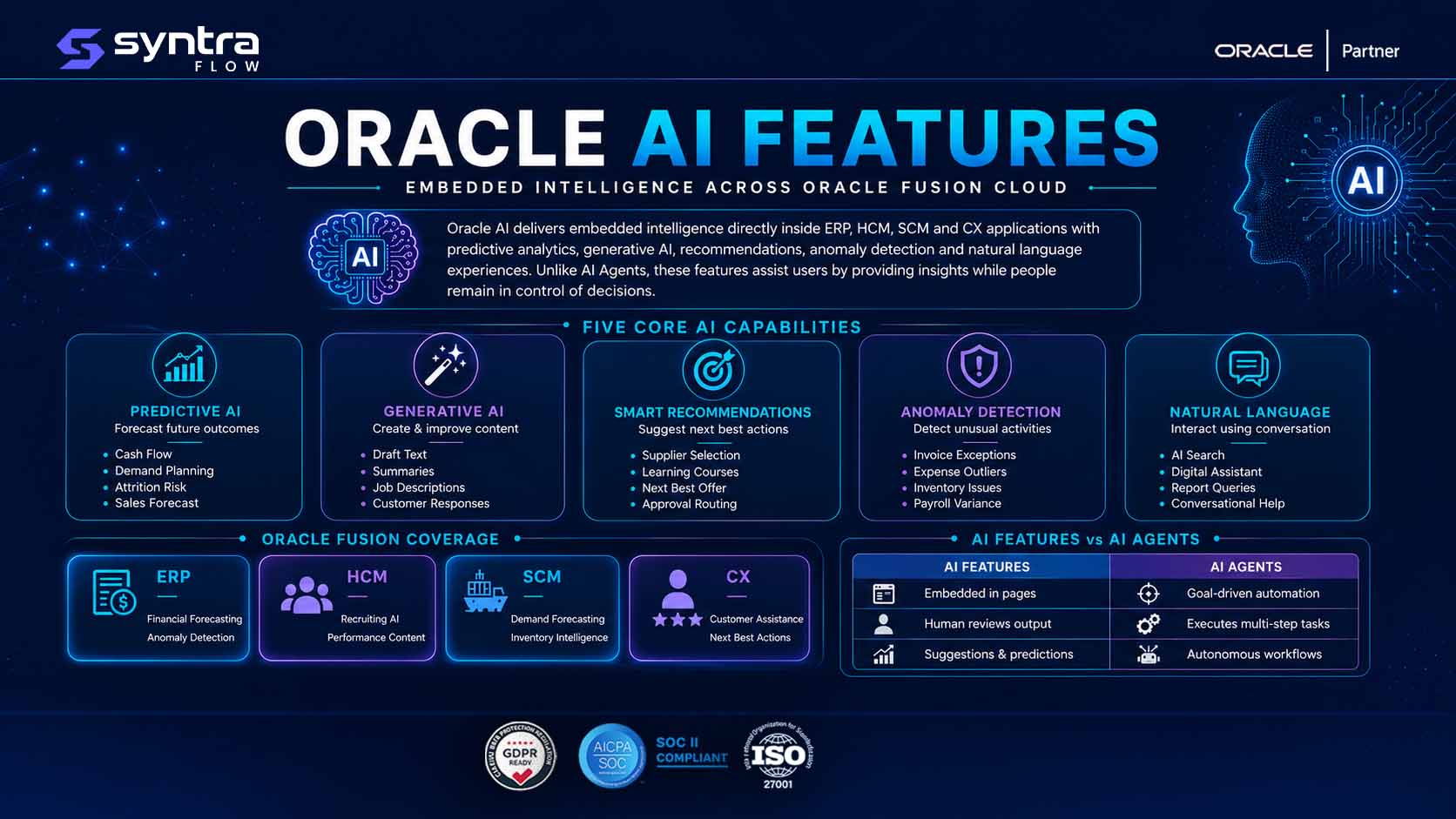
Embedded AI Features Versus AI Agents
The single most common point of confusion in this space is treating "Oracle AI" as one thing. It isn't. Oracle Fusion ships two distinct categories of AI capability, and they behave, govern, and get tested differently.
Embedded AI features are model-driven functions built into a specific page, process, or transaction — a forecast, a suggested value, a flagged outlier, a drafted piece of text, a natural-language search box. They are invoked as part of using the application, produce a discrete output, and a person decides what to do with that output. AI agents are a different pattern: they are assigned a goal or a monitored condition and can carry out a sequence of steps — evaluating data, taking or proposing actions, and following up — with a defined level of autonomy and human oversight. Agents are covered in depth on the Oracle AI Agents page; this page focuses on the embedded feature layer.
| Dimension | Embedded AI features | AI agents |
|---|---|---|
| What it is | A model-driven function inside a page or process (forecast, suggestion, draft, flag) | A goal- or event-driven capability that performs a sequence of steps toward an outcome |
| How it's invoked | Runs as part of a transaction, page load, or explicit user action | Runs on a trigger, schedule, or monitored condition, often with less direct user initiation |
| User role | Reviews and accepts, edits, or discards a single output | Sets scope, approves checkpoints, or reviews a chain of actions and their outcomes |
| Typical output | A number, a ranked list, a flagged record, a drafted text, an answer to a query | A completed or proposed multi-step task, often spanning several records or transactions |
| Governance focus | Output accuracy, explainability of a single suggestion, data used to generate it | Scope of autonomy, approval checkpoints, action logging, and who can configure the agent |
| Configuration surface | Feature-level enablement and parameters within an application module | Agent setup, triggers, and permissions, generally managed through AI Agent Studio |
| Testing focus | Does the feature produce a correct, consistent output for known inputs | Does the agent stay within scope, escalate correctly, and produce the right action chain |
In practice the two overlap: an agent may call an embedded predictive or generative capability as one step in its process. Treating them as separate governance and testing questions still holds — the feature's output quality and the agent's decision-making are different things to validate.
Generative AI Capabilities
Oracle generative AI features use large language models to draft, summarize, or rewrite content directly inside a Fusion page rather than requiring a separate tool. Common patterns across ERP, HCM, SCM, and CX include drafting a job description or performance narrative, summarizing a long case, service record, or document, generating a first-pass response to a customer or candidate, and rewriting text to match a tone or length. These are embedded features in the sense described above: a person reviews, edits, and approves the generated text before it becomes part of a record.
Because generative output is probabilistic rather than deterministic, the same prompt or input can produce different phrasing on different runs even when the underlying facts are unchanged. That has direct implications for how these features get tested — covered later on this page and in more depth on the Oracle AI Testing page.
Predictive AI
Predictive AI features estimate a future value or outcome from historical and current data — a demand forecast, a cash-flow projection, an attrition or flight-risk score, a projected delivery date, or a likelihood-to-close estimate on a sales opportunity. Unlike generative features, predictive outputs are typically numeric or categorical, and the same inputs should reliably produce the same, or a closely bounded, prediction.
Predictive features are the AI category most directly comparable to traditional reporting and analytics, which is also why they are often the easiest entry point for testing: a known historical dataset has a known, or at least boundable, correct answer, which makes it possible to check a prediction against expectation rather than only against plausibility.
Recommendations and Anomaly Detection
Recommendation features suggest a next-best action or option ranked against alternatives — a suggested supplier, a recommended learning course, a next-best offer for a customer, or a suggested approval routing. They typically present a ranked list or a single top suggestion alongside the option to choose differently, so the person using the application always retains the final decision.
Anomaly detection features flag records or transactions that deviate from an expected pattern — an unusual invoice amount, an out-of-pattern expense claim, an irregular inventory movement, or a payroll result that doesn't match prior periods. These features are exception-focused by design: most transactions pass through unflagged, and the value of the feature is measured by how well it surfaces the small number that genuinely warrant review without burying reviewers in false positives. Both categories reduce manual effort, but both depend on the underlying data and configuration being correct — a theme covered further under security and testing below.
Natural-Language Experiences
Natural-language features let users query, navigate, or interact with Fusion applications using conversational input instead of, or alongside, menus and structured fields — a digital assistant that answers a question about a balance or a policy, a search box that accepts a plain-language request, or a conversational interface that helps a user find a report or complete a task. The distinguishing trait of this category is the interaction model: the input is unstructured language rather than a form, and the system has to interpret intent before it can act or respond.
Natural-language features can sit on top of any of the other categories — a conversational query might return a predictive forecast, a generative summary, or a recommended action. That layering is convenient for users and adds a testing dimension of its own: correctness now depends on both intent interpretation and the accuracy of whatever underlying feature answers the request.
AI Features by Application
The same capability categories — predictive, generative, recommendation, anomaly detection, natural-language — show up differently in each Fusion pillar. Each application area has its own dedicated page covering the specifics.
ERP
In Financials and Procurement, AI features tend to concentrate on anomaly detection in transactions, predictive cash and close forecasting, and generative drafting for narratives and communications.
Oracle AI for ERP →HCM
In Human Capital Management, common patterns include generative assistance for job and performance content, predictive attrition and skills insights, and recommendation features for learning and internal mobility.
Oracle AI for HCM →SCM
In Supply Chain Management, predictive demand and lead-time forecasting, supplier and inventory recommendations, and anomaly detection on shipments and orders are the recurring themes.
Oracle AI for SCM →CX
In Customer Experience, generative response drafting, next-best-action recommendations, and natural-language service and sales assistance are the most visible AI features.
Oracle AI for CX →Availability and Release Status
Oracle ships and updates Fusion Cloud applications on a quarterly cadence, and AI features move on that same cadence — new capabilities appear, existing ones change behavior, and some features roll out to specific regions or application editions ahead of others. That means the list of AI features available in a given tenant is not static, and a feature that isn't visible today may appear in an upcoming update, or vice versa for a feature being changed or retired.
Because this page stays at the capability-category level, it does not track individual quarterly release content. For what's changing release by release, see Oracle AI Release Intelligence, which tracks AI-related updates across Oracle's quarterly release cycle.
Licensing and Enablement Considerations
Not every Oracle AI feature is available to every customer by default. Some are included with the base application, some require an additional license or subscription tier, and some require an administrator to explicitly enable them before end users can see them — separate questions that are easy to conflate. A feature can be licensed but not yet enabled, or enabled in a test environment but not yet in production, or available in one module but not another.
A note on accuracy. Licensing terms, packaging, and enablement requirements vary by capability, by Oracle Fusion product line, and change over time. This page intentionally does not state specific license names, tiers, or prices. Customers should confirm current licensing and enablement requirements for any specific AI feature directly with Oracle or their account team before planning a rollout.
Security and Data Requirements
Embedded AI features consume application data — transaction history, employee records, customer interactions — to generate their outputs, which raises the same questions any data-driven feature raises: what data the feature can access, who can see its output, and how that maps to existing role-based security. Generative features add a further consideration around what source content a model may draw on or reproduce, and predictive and recommendation features raise questions about how a scored or ranked outcome should be governed when it influences a business decision.
These are broad, cross-application considerations rather than something specific to one AI feature category, so they get their own dedicated treatment on the Oracle AI Security page.
Validation and Testing Requirements
AI features complicate testing in a way traditional, deterministic Fusion functionality does not. A predictive score can shift as the underlying data or model refreshes; a generative output can vary in wording between runs even when the facts are the same; a recommendation ranking can change as new records enter the system. That means test approaches built around exact-match output comparison do not translate cleanly — teams generally need to validate that outputs stay within an expected range, that generated text meets defined content and tone criteria, and that flagged anomalies and recommendations remain sensible as data changes, in addition to standard functional and regression checks after each quarterly update.
This page does not go deep into test approach; that is covered on the Oracle AI Testing page. It's also worth distinguishing the AI features discussed here from SyntraFlow's own AI-driven testing engine — the self-healing scripts and AI-assisted test generation SyntraFlow uses to test Oracle Fusion applications. That is SyntraFlow's product capability, not an Oracle AI feature, and the two should not be conflated.
Understanding where AI features sit inside a broader business process also matters for testing scope. SyntraFlow can be configured to connect release-aware regression testing with process-level visibility — for example, using Process Mining to surface where an AI-influenced step (a recommendation, a flagged anomaly, a predictive score) actually sits inside a live process variant, which helps prioritize which AI-touched paths are worth testing first. This is a capability organizations can assess and configure for their environment, not a claim that every Oracle AI feature is automatically covered.
Frequently Asked Questions
What are Oracle AI features?
▼
Oracle AI features are the embedded predictive, generative, recommendation, anomaly-detection, and natural-language capabilities built into Fusion Cloud ERP, HCM, SCM, and CX applications. They run as part of a page or transaction and produce a single output — a forecast, a suggestion, a flagged record, a drafted text — for a person to review and act on.
What is the difference between an Oracle AI feature and an Oracle AI agent?
▼
An embedded AI feature produces a single output inside a page or transaction that a person reviews and acts on. An AI agent is assigned a goal or monitored condition and can carry out a multi-step process with a defined level of autonomy. See the comparison table above, and the Oracle AI Agents page for detail on agents specifically.
What types of Oracle generative AI features exist?
▼
Generative AI features across Fusion applications typically draft, summarize, or rewrite text — job descriptions, performance narratives, case summaries, customer responses — directly inside the relevant page. Output is reviewed and edited by a user before it becomes part of a record, and wording can vary between runs even for the same underlying facts.
Which Fusion applications have the most AI features?
▼
AI features appear across ERP, HCM, SCM, and CX, with different capability categories emphasized in each — anomaly detection and forecasting are prominent in ERP, generative and recommendation features in HCM, predictive demand and supplier features in SCM, and generative and next-best-action features in CX. See the application-specific pages linked above for detail.
Do I need a separate license to use Oracle AI features?
▼
It depends on the specific capability. Some AI features are included with the base application, others require an additional license or subscription, and most require explicit administrator enablement regardless of licensing. Licensing and enablement terms vary and change over time, so confirm current requirements for any specific feature directly with Oracle.
How do I know which Oracle AI features are available in my environment?
▼
Availability depends on your Oracle Fusion product line, region, release version, and licensing, and changes with each quarterly update. Check current release documentation for your environment and track ongoing changes on the Oracle AI Release Intelligence page.
How is testing Oracle AI features different from testing regular Fusion functionality?
▼
AI outputs are often probabilistic rather than deterministic, so exact-match testing does not work well for generative or predictive features. Testing generally needs to check that outputs stay within an expected range or meet defined criteria, rather than matching one fixed expected value. See the Oracle AI Testing page for a full treatment.
Is SyntraFlow the same as an Oracle AI feature?
▼
No. SyntraFlow is a testing platform that uses its own AI-driven capabilities — such as self-healing scripts and AI-assisted test generation — to test Oracle Fusion applications, including their AI features. It is not an Oracle product or an Oracle AI feature, and the two should not be conflated.
Planning How to Govern and Test Oracle AI Features?
If you're mapping which Oracle AI features are live in your Fusion environment and how to validate them alongside your regular regression testing, SyntraFlow can help you assess the testing approach that fits your setup.